

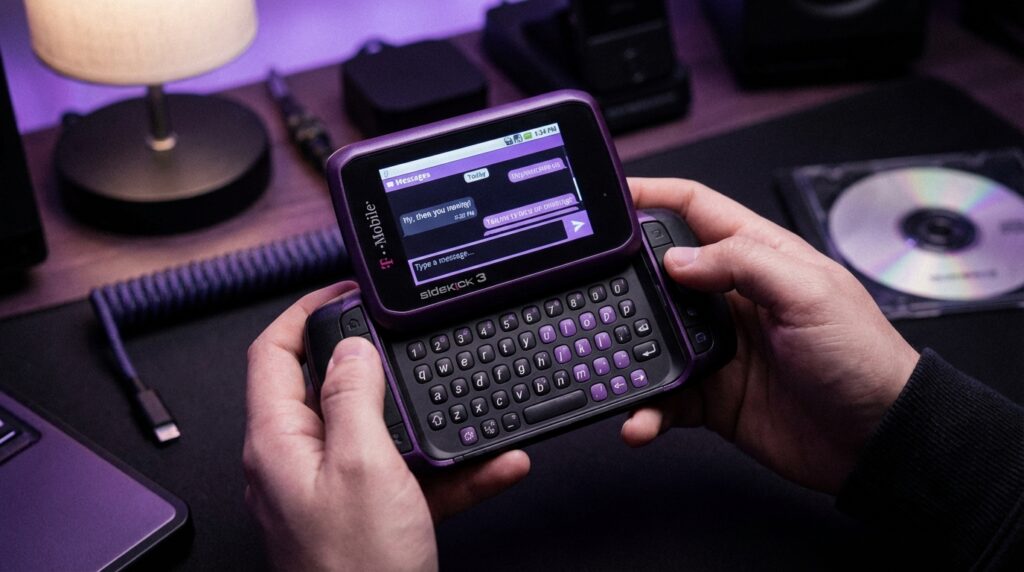
“That soft ‘thwip’ when the Sidekick screen snapped open felt like loading a weapon, except your ammo was text messages.”
You remember that sound, right? Your thumb flicks the corner of the device, the screen swings out with that sideways arc, and suddenly this chunky little brick transforms into a tiny horizontal computer. In that split second, your whole focus shifts from the world around you to the people living in that screen. That flip motion was more than a hinge. It was a doorway between hanging out in the cafeteria and hanging out on AIM and SMS at the same time.
Today you can fire off a hundred messages on an iPhone without thinking. Blue bubbles, read receipts, voice notes, group chats. It is all fast, invisible, practically weightless. But the Sidekick asked you to commit. You had to make a physical move to say: “I am now in texting mode.” The sound, the feel, even the tiny clack of those plastic keys became part of the ritual. Modern phones try to hide the interface. The Sidekick put it right in your hands and practically yelled: “This thing is for talking to people.”
If you spend your days comparing messaging apps, obsessing over notification badges, or looking at screen time charts, it is easy to forget that the “always-on chat life” had a starting point on mobile. Before iMessage and WhatsApp, there was this awkward, lovable, sideways computer in your pocket that was built around one idea: text is king. That is why people still talk about the Sidekick like it was a friend they used to hang out with. Not just a phone, more like a social console.
The story of why we loved the Sidekick is really about how a device with average phone features, a low-resolution screen, and a clunky OS managed to feel like pure social energy in your pocket. It did not win on camera specs or materials. What it did was make every text feel like part of a bigger stream of conversation, years before “always online” messaging became standard. And if you look at the way we use phones now, you can still see the Sidekick’s fingerprints on your lock screen, your keyboard, your notifications bar.
The first time the Sidekick took over your pocket
“Retro Specs: ‘The screen was only 240 x 160 pixels, but in 2003 it felt like you were carrying a webpage in your hand.'”
The original Sidekick (also known as the Danger Hiptop) did not feel like any other phone at the time. Most phones then were narrow vertical sticks with T9 keypads and tiny monochrome or low color screens. They were light, almost forgettable, designed mostly for calling and “just in case” texts.
The Sidekick was none of that. It had weight. When you picked it up, it felt dense, like a compact camera crossed with a pager. The rubberized plastic shell dug into your palm in a friendly way. You did not worry about it slipping out of your hand. Some people carried it without a case because it already felt like it came in its own armor.
Closed, it looked like a strange little slab with a trackball (on the early models) or tiny directional pad off to the side. The screen sat flush on the front, a rectangle that did not betray its party trick. But getting one into your hand for the first time was like being handed a puzzle. Someone would say, “Here, flip it,” and once you got the right thumb motion, the top would whip around sideways and lock with a satisfying click that felt part mechanical, part magic.
Under that screen: a full QWERTY keyboard. Real keys. Raised, domed, with just enough resistance so your thumbs “knew” when they had landed on a character. The legends might have been small, the layout a little cramped, but the physical feedback made you brave. You could look away from the screen for a moment and still keep typing. Compare that to glass keyboards today, where a typo is always one slippery tap away.
“User Reviews from 2005: ‘You cannot understand sending 500 texts a day until you have done it on a Sidekick. It is like AIM in your hand all day.'”
The Sidekick did not have the sharpest display, the loudest speaker, or the nicest materials. What it had was intent. Every design decision nudged you toward messaging and chat.
Why the Sidekick was built as a texting machine first
To understand the Sidekick, you have to look at what other phones were trying to be at the time.
Nokia and Motorola were racing on battery life, ringtone customization, and sturdy hardware. BlackBerry was going after executives with secure email. Early Windows Mobile phones chased “mini computer” vibes, but with styluses and complex menus that made people feel like IT staff.
The Sidekick’s creator, Danger, started from a different direction. The priority was not spreadsheets or enterprise email. The priority was chat.
It had:
– Persistent data connection that kept your AIM and Yahoo Messenger sessions alive.
– A contact list that felt like a buddy list, not a corporate address book.
– Notifications that treated IM and SMS like first-class citizens.
– A UI that made text conversations feel like the main feature, not a side app.
On most phones back then, SMS was a bolt-on feature. You pressed a soft key, waited for the messaging app to load, picked a recipient from a slow scroll list, and then used T9 on a numeric keypad to type “where r u”. It worked, but it always felt like an extra step.
On the Sidekick, communication sat at the center of the interface. You unlocked it and the first thing you saw was your messages and updates. It felt like a living feed of people wanting to talk to you, instead of an empty phone waiting to ring.
Maybe it was just nostalgia talking, but there was a certain comfort in seeing that long scroll of bubble-free, plain text conversations stacking up. You could scroll back through days of small talk, jokes, arguments, and late night confessions, all living in this little sideways brick.
The feel of real keys: why Sidekick texting felt so fast
You know that moment when your thumbs “memorize” a keyboard? You stop thinking about where the letters are and everything just flows. The Sidekick was one of the first mobile devices that really gave teenagers that feeling at scale.
Each key had a tiny domed shape. Your thumb landed in the center naturally. The travel distance was short but firm, with a soft “tack” sound when you pressed in, quieter than a laptop but more distinct than most phones. Over time, your thumbs would learn exactly how hard to press and how far.
On a glass screen, you are relying on visuals and a small haptic buzz. Your brain has to double check each word. On the Sidekick, you could angle the phone under a desk and type without staring at the keys. The ridges and spacing did some of the work for you.
There was also something about the two-handed posture. Screen open, device sideways, thumbs hovering at both ends like a tiny game controller. Your elbows tucked in, eyes level with the display. No weird wrist angles, no pinky balancing the bottom edge. That made marathon conversations feel less tiring. You were holding it like a controller for social life.
“User Reviews from 2005: ‘I type faster on this thing than my computer keyboard. My mom thinks I am hacking. I am just texting three people at once.'”
The other hidden piece was prediction and shortcuts. The Sidekick was not T9, but it did have shortcuts for names, quick access to people, and a layout that made replying and jumping between chats fast. You did not need to drill through menus. You hit one or two keys and you were back in the conversation.
Always online before “always online” was a default
The Sidekick’s secret weapon was not just that hardware keyboard. It was the way it treated data connection. This thing lived for the network.
Most phones of that era treated data like an optional upgrade. You launched a browser, waited for a connection, watched a tiny modem icon blink. IM clients were clunky, disconnected when you closed them, and felt like a novelty.
The Sidekick worked differently:
– Your messages lived on remote servers managed by Danger.
– Your IM sessions stayed active in the background.
– If you lost signal, the device queued messages and pushed them once you were back online.
– Backups happened behind the scenes. Lose your device, log into a new one, and your data appeared.
The result felt almost magical at the time. You could close the Sidekick, toss it in your bag, walk around, and when someone sent you an AIM message, the device would light up and buzz. It felt like having a chat window open on a PC that you were carrying in your pocket.
Compare that to texting on older phones, where messages sometimes disappeared or arrived out of order. There was a sense of reliability with the Sidekick. Your chats had a “home.”
From Sidekick servers to cloud sync
If you look at that architecture with modern eyes, you see the early version of what we now call cloud sync and push messaging. Today, you expect iCloud or Google to handle your backups. You expect WhatsApp to sync your messages. But back then, a phone that synced your contacts and messages to a remote server and could restore them felt almost futuristic.
This came with tradeoffs. When Sidekick servers had outages, users felt it right away. But in a strange way, that just reinforced how connected and chat-centric the device really was. Your Sidekick was not a lonely piece of plastic. It was more like a terminal for your social graph.
Sidekick vs modern smartphones: Then vs Now
To really see why people cared so much about the Sidekick, it helps to compare it with the kind of phone many of us carry now. So let us play with a little hypothetical match-up.
| Feature | T-Mobile Sidekick 2 (circa 2004) | iPhone 17 (hypothetical modern flagship) |
|---|---|---|
| Screen | 240 x 160, ~2.6 inch LCD, low DPI, visible pixels, washed colors | Super high-res OLED, 120 Hz, deep blacks, crisp text at any size |
| Keyboard | Physical QWERTY, domed keys, tactile feedback, two-handed typing | Full-screen virtual keyboard, haptics, swipe typing, predictive text |
| Weight & Feel | Chunky plastic, ~180 g, thick body, rubberized shell | Slim glass and metal, similar or lighter weight, rounded edges |
| Messaging | SMS, AIM, Yahoo, always-connected chat, server-side backup | SMS, iMessage, multiple chat apps, cloud backup, RCS, cross-device sync |
| Camera | Low-res VGA camera, noisy images, poor low light | Multi-lens system, 4K video, night mode, computational photography |
| Battery Life | Decent for text and basic web, full day with light use | All-day with heavy use, fast charging, battery health tracking |
| Apps | Curated basic apps: browser, email, IM, simple games | Full app stores, social platforms, productivity tools, games, media |
| Main Identity | Texting and IM machine first, phone second | General-purpose pocket computer, phone and text are core apps |
On paper, a Sidekick looks painfully weak next to any modern flagship. Tiny screen, low resolution, slow CPU, no app ecosystem to speak of. Yet ask people who carried one, and they will tell you it felt more “social,” more “alive.”
You were not drowning in options. You did not have 30 different apps with overlapping notification badges. You had a device that said: “Your people are here, in these chats, right now.” That focus is what modern phones often lack.
Why the flip mattered so much
You cannot talk about the Sidekick without talking about that flip.
It was not just a hinge. It was a user interface.
Closed: glance mode. You saw caller ID, time, maybe a notification icon.
Open: conversation mode. Full screen horizontal view, keyboard exposed, your attention locked in.
Modern phones have tried to mimic that mental shift with software. Focus modes. Do Not Disturb. Chat heads. But the Sidekick gave you a clean physical boundary. The moment you flicked that screen open, your brain switched context. It is messaging time.
There was also a bit of performance in that movement. People saw you do it. At a lunch table, you flipped it open and everyone knew: you were answering something “important” or funny or both. The device gave your actions a little flair. You did not just check your phone. You activated it.
Maybe that is why people still remember the sound and feel of that flip. It gave you agency. Today, everything is a swipe on glass. Back then, your phone literally changed shape to match what you were doing.
Sidekick as a social status symbol
There was a period where the Sidekick took on a life beyond specs and features. It became part of music videos, TV shows, and teenage dreams. You saw it in the hands of artists, actors, and early internet personalities. For a certain crowd, having a Sidekick was like wearing a particular brand of sneakers. It told people what kind of communicator you were.
Not everyone had one. The data plans were not cheap at the time, and the device itself sat at a price point just high enough to create a sense of separation. So when you saw someone flick open a Sidekick, you made some quick assumptions:
– This person lives in their messages.
– This person cares about being reachable and connected.
– This person is probably juggling multiple conversations at once.
The device’s design leaned into that image. Bright colors on some models, playful icons, a UI that felt more instant messenger than enterprise. In an era where BlackBerry was the serious work device, the Sidekick felt like its younger cousin who skipped the meeting invite and just started the group chat.
Early features that foreshadowed modern messaging
If you strip away the nostalgia and just look at the Sidekick’s features, you start seeing how ahead of its time it felt in the context of communication.
Unified communication hub
On many early phones, SMS, email, and IM clients felt scattered. Each lived in its own app with its own quirks. On the Sidekick, they all felt like part of one communication layer. With a few button presses, you could bounce between IM, SMS, and email, keeping the rhythm of your interactions.
That sense that “talking to people is one unified activity” now feels familiar. Modern phones blend SMS and internet messaging. Some apps combine DMs, comments, and story replies. The Sidekick had a rough, early version of that vibe.
Persistent presence
Presence indicators on AIM and other chat systems told your friends whether you were online, away, or idle. The Sidekick turned you into someone who was “always there.” Even if the screen was off and the device was in your pocket, your friends saw you as online.
This prefigured what we now feel with “last seen” timestamps, typing indicators, and online dots on apps. The Sidekick was a physical anchor for your presence in those networks.
Push before push was normal
Before Apple and Google came up with push notification infrastructure, the Sidekick had its own flavor of pushed messages. Data came to you without you having to refresh or manually connect. That feeling of your device just buzzing with new content turned texting into something more addictive.
Today, we tweak notification settings because every app wants our attention. Back then, that buzz almost always meant something personal. A message from someone who knew your Sidekick number or screen name. That kept the signal-to-noise ratio high.
Why typing on glass never fully replaced physical keys in our heads
If on-screen keyboards are so capable now, why do so many people still talk lovingly about the Sidekick keyboard, BlackBerry keys, or old QWERTY sliders?
Part of it is the sensory feedback. Your fingers could tell when a key press succeeded. That is hard to replicate with flat glass and subtle vibration. But there is another piece: commitment.
When you flipped open a Sidekick and started typing, you were in “message mode.” You were less likely to be half-watching a video, half-texting. The physical layout made multitasking harder, which ironically made conversations deeper. Your posture, your grip, your focus all said: “I am here in this chat.”
Modern devices let you text while walking, watching, scrolling, and doing three other things. It is powerful, but it also dilutes the experience. Messages become just one of many overlapping streams.
Maybe that is why some people still miss those keys. Not because they were magical objects by themselves, but because they shaped the type of attention we gave to the people on the other side.
The limits that made the Sidekick feel more social
The Sidekick was full of constraints:
– Small, low-res display.
– Fairly basic camera.
– Simple browser with slow load times and limited site compatibility.
– Very few third-party apps.
By modern standards, that sounds painful. But those constraints shaped how you used it.
You did not spend hours doomscrolling. The web experience was too slow and cramped. You did not constantly tweak home screens or install endless apps. There was not much to customize.
So you leaned into what the device did best: texting, IM, sharing tiny pictures, swapping notes. Slow data nudged you into quicker, shorter exchanges. Limited media nudged you into words and simple emoticons instead of high-quality video.
There is a parallel here with early social media platforms that focused on one or two interactions. The Sidekick took that same focused approach with communication.
From Sidekick to modern chat culture
If you map the line from the Sidekick to where we are now, you see several trends it helped push into the mainstream:
– Phones as social devices more than voice devices.
– Persistent identity and presence across SMS and IM.
– Hardware built around messaging comfort.
– Devices that sync your social life to remote servers.
– Notifications as a core part of the experience.
Modern smartphones do all of that and more, wrapped in far more refined hardware and software. But they spread your attention across a huge number of apps and platforms.
The Sidekick feels almost pure by comparison.
It was not trying to be everything. It was not a camera first, not a gaming console first, not a media streamer first. It was unapologetically a messaging appliance with some extra tools attached.
“Retro Specs: ‘Call quality was fine. But nobody cared. If my Sidekick battery died in the middle of AIM, that was a crisis. Missing a phone call was whatever.'”
You can see echoes of that mindset in how teens use modern phones. DMs and group chats carry more emotional weight than traditional phone calls. Being added to the right chat can matter more than being in someone’s contact list. That line starts, in part, with devices like the Sidekick that took text-based communication seriously before everyone else caught up.
The feel of carrying a tiny social terminal
Hold a Sidekick today, and you feel the difference in design philosophy immediately.
The device is thick. It fills your palm. The screen is small by modern standards. The bezels are huge. The plastic feels almost toy-like compared to modern metal and glass slabs, but not in a cheap way. More like a Game Boy Advance, built for being tossed in a backpack.
Flip it open and the screen rotates with that same smooth, guided arc. There is no flex or wobble. The keyboard springs into view, its tiny keys waiting. The UI appears simple, with big text and bold icons that feel almost cartoonish now.
You can hear the faint clicks as you press the keys. The trackball (on some models) rolls under your thumb with a little resistance. Each scroll notch feels distinct. Compare that to the frictionless swipe on a touchscreen. On the Sidekick, every interaction has texture.
This texture made interactions memorable. You remember snapping it open in class to see a new message from that one person. You remember late-night sessions with the screen brightness turned down, thumbs flying, lying on your back staring at that low-res screen like it contained the whole world.
What the Sidekick teaches us about focused design
For anyone building communication products today, the Sidekick is an interesting case study.
The device itself was not technically impressive by current standards. The OS had quirks. The hardware had clear limits. But because the design centered messaging and chat, the product punched way above its technical weight.
Some lessons from that:
– Make the main action feel special. The flip motion and physical keyboard made texting feel like a central, honored action, not just another app.
– Let constraints shape culture. The lack of heavy media features pushed users toward words and quick exchanges, which fit the hardware and network reality of the time.
– Treat presence seriously. By keeping users “online” and tightly integrating IM, the Sidekick created a sense of continuous, low-level connection that users craved.
– Use physical affordances. The sideways layout, thumb typing, and tactile keys gave the device a user posture that matched long-form chat.
Maybe it was just nostalgia talking, but there is something satisfying about a device that wears its purpose on its sleeve. The Sidekick did not try to hide its focus behind glass. You saw the keyboard, you felt the flip, and you knew exactly what it was for.
And for a while, that was enough to make it feel like the ultimate texting machine.
