

“The sharp snap of a Nokia 3310 battery cover sliding back into place, that hollow plastic clack that told you: fixed. No Genius Bar. No ticket. Just your fingernails and a stubborn little brick of a phone.”
You remember that sound, right? The weight of that chunky blue or gray block in your hand, the rubbery keypad that had seen too many rounds of Snake, the tiny monochrome screen that somehow never felt fragile. If it froze, you pulled the battery. If the battery died, you swapped it. If the housing cracked, some stall at the mall had a new shell in neon orange.
Fast forward to the rectangle in your pocket right now. Glass on the front, glass on the back, cameras peeking out like a sci‑fi movie prop. It takes 4K video, runs your banking apps, and talks to your light bulbs. But try to open it, and suddenly you hit pentalobe screws, glue, and “unauthorized repair” warnings.
That gap, between snapping off a battery cover in two seconds and needing heat pads, spudgers, and a YouTube tutorial for a screen swap, is where the “Right to Repair” movement lives. Fixing your own phone used to be normal. Now it feels like a small act of rebellion.
From Swappable Bricks to Glued Glass
Phones did not start out as sealed mystery slabs. Early mobile phones were big, heavy, and clumsy in your pocket, but they were honest about what they were: electronics in a plastic shell. You could feel the seams. You could pry things apart.
The typical early-2000s phone had a plastic back that flexed a bit if you pressed on it. You could feel the slight give around the battery cover. The battery itself had weight, like a thick chocolate bar, with gold contacts that scratched over time. The screen was small and slightly recessed, so when you ran your thumb across the front you felt the edges of the plastic frame.
“Retro Specs: Nokia 3310 (2000)
Screen: 84 x 48 pixels, monochrome
Battery: 900 mAh removable
Back cover: Fingernail-accessible, no tools
Cost of replacement battery: 10-15 dollars at most small phone kiosks”
Back then, repair and maintenance were baked into the product. Carriers knew people would drop phones. Manufacturers knew batteries sagged after a year. So batteries popped out. Keypads could be replaced. You could even swap the entire front housing if you got bored of the color.
The soundscape of repair was different too. The click of plastic tabs, the rattle of a new battery in its cardboard sleeve, the soft crinkle of a cheap aftermarket case. No heat guns. No solvent for adhesive. Just friction and plastic.
Then smartphones came along.
First, we traded buttons for glass. Touchscreens meant fewer moving parts but a larger, more fragile surface. You got that cold, smooth slab feel, with almost no texture breaks. The device felt more like a single object, not a collection of parts.
Then came thinner designs, unibody frames, and a war on visible screws. To make phones slim, water-resistant, and beautiful, manufacturers leaned on adhesives. Screens, batteries, and back covers were glued instead of clipped.
Suddenly, repairing your phone shifted from “grab a guitar pick and a Torx driver” to “is this going to crack in my hand if I lift too hard?”
Why Phones Got Harder To Fix
Manufacturers will tell you this story in three big themes: design, safety, and security.
Design: Thin, sealed, and pretty
Today’s flagship phone screens stretch almost edge to edge. Bezels shrank. Camera bumps grew. Phones feel denser and more like polished stones in your hand. That look and feel comes at a cost.
Full glass backs are glued on to protect against water ingress. Internal components are layered tightly, batteries shaped to use every millimeter of space, flex cables routed like spaghetti under shields.
From a repair perspective, you get a puzzle box. From a design perspective, you get an object that looks seamless. The irony is that the more “seamless” a phone looks, the more seams you have to break to fix it.
Safety: Batteries that do not like being poked
Older phones used smaller, less energy-dense batteries and often had more plastic between you and the cells. You could yank a Nokia battery with almost no risk.
Modern lithium-ion packs are thinner, wider, and glued down with very strong adhesive. If you bend them too far or puncture them, they can vent or catch fire. That is why many internal batteries come with pull tabs that stretch and release the adhesive slowly when pulled at the right angle.
Problem: to reach those tabs, you often need to remove a glued screen or back first. So your “simple battery swap” starts with a risky operation.
Security & Software Locks
Then there is the software side. Phones today handle payments, biometric data, and encrypted chats. Manufacturers pair parts like fingerprint readers and Face ID modules to the main logic board for security. If a replacement part is not “approved” or matched, some functions can break or show warnings.
You see this with:
– Face ID or Touch ID disabled after a sensor swap
– Camera apps complaining about “unknown” parts
– Battery health stats missing after third-party battery replacement
Suddenly, repair is not only physical. It is also digital. You might swap a screen perfectly but run into a pop-up that says your device cannot recognize the part.
So What Exactly Is the “Right to Repair” Movement?
The “Right to Repair” movement is basically a big global argument over a simple question:
If you paid for the phone, how much control should you have over fixing it?
Different groups answer that in different ways:
– Consumers: Want access to parts, tools, and manuals so they can fix devices themselves or pick any repair shop they trust.
– Independent repair shops: Want the same diagnostic tools, parts, and calibration software that authorized service centers use.
– Manufacturers: Want to keep control over quality, safety, and brand reputation, and keep some control over the repair chain.
At the heart of it, Right to Repair pushes for these core things for phones:
1. Access to genuine or compatible spare parts at reasonable prices.
2. Access to repair manuals and schematics.
3. Access to software tools for calibration and error clearing.
4. No software locks that punish third-party repairs without a real safety reason.
“User Review from 2005:
‘Dropped my Sony Ericsson in a puddle. Took it apart, dried it on the radiator, swapped the keypad from my old one, and it worked. Felt like fixing a Lego set.'”
Back then, that kind of DIY story was normal. Now, similar situations turn into videos of people baking phones in rice and begging for data recovery.
How Laws Are Starting To Shift
Governments started getting involved once people realized how much e-waste was piling up and how short device lifecycles had become.
Some key moves around the world:
– The EU has pushed rules that push longer support timelines for software updates and better access to spare parts.
– Some US states have passed Right to Repair laws covering electronics, including phones.
– Other regions are slowly picking up similar themes, especially around agricultural gear and consumer electronics.
The phone angle is especially spicy because phones combine three hot issues:
1. Consumer rights
2. Security and privacy
3. E-waste and environmental impact
When repair is hard or expensive, people replace phones earlier. That means more devices sitting in drawers or heading to recycling centers. The rare metals and energy that went into that shiny slab get locked away or lost.
Then vs Now: What Changed On Your Desk And In Your Pocket
Let’s put some numbers and features side by side. This is not about which device is “better” in every sense, but about how repair and ownership feel different.
| Feature | Nokia 3310 (2000) | iPhone 17 (Hypothetical modern flagship) |
|---|---|---|
| Weight | ~133 g, chunky and top-heavy | ~190 g, flat, dense slab |
| Screen | 84 x 48 px, monochrome, deep bezel | Super high-res OLED, edge-to-edge, high refresh rate |
| Battery | Removable, user-swappable in seconds | Internal, glued, needs tools and heat to replace |
| Back cover | Clip-on plastic, no screws | Glass or metal, glued or screwed with special drivers |
| Average screen repair time (skilled DIY) | 10-15 minutes | 30-90 minutes with special tools |
| Official repair manual availability | Third-party guides, minimal official docs | Selective release under pressure from laws and public push |
| Part pairing / software locks | None. Replace and go. | Common for cameras, biometric sensors, sometimes batteries |
| Expected lifespan with simple repairs | 5+ years with new batteries and housings | Potentially similar, but repairs tougher and more regulated |
The tech clearly improved. Cameras, screens, processors, radios, everything took huge leaps. But the repair story feels like a trade: power and polish in exchange for more friction when something breaks.
Fixing Your Own Phone Today: What It Actually Looks Like
Right to Repair is a slogan, but at your desk it looks more like this:
You, a phone with a cracked screen, a small kit of tools, and a YouTube video paused at 0:37.
The Gear
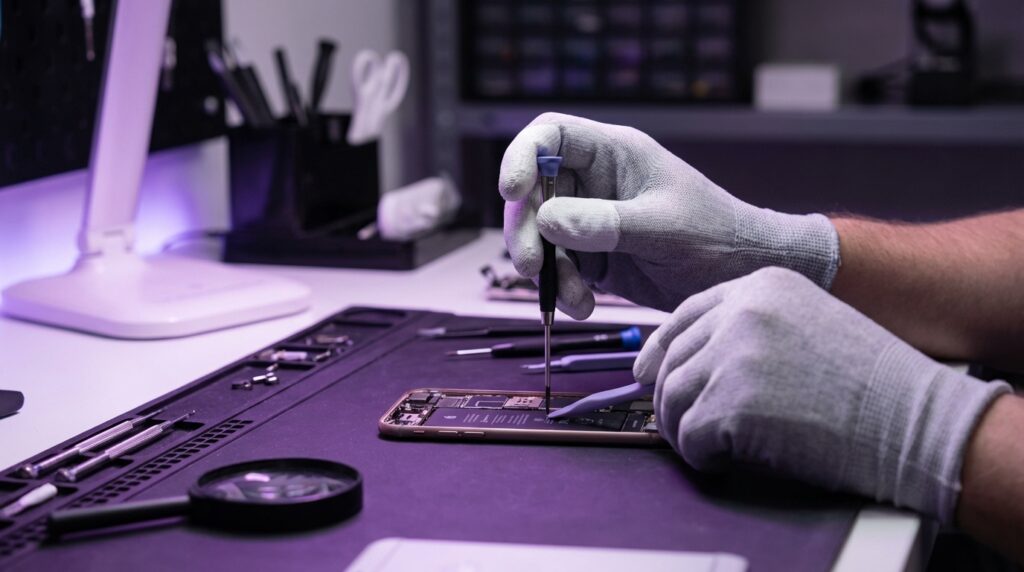
A realistic DIY kit for modern phone repair usually includes:
– Precision screwdrivers (pentalobe, Phillips, Torx, sometimes tri-point)
– Plastic spudgers and guitar-pick style opening picks
– Suction cup or suction handle
– Tweezers
– Heat source (heat gun, hair dryer, or dedicated hot plate / mat)
– Isopropyl alcohol for loosening adhesive
– Replacement part (screen, battery, back glass)
Older phones: You needed fingernails and maybe one small screwdriver.
Newer phones: You feel like you are setting up a small electronics bench.
The Process
Take a battery swap on a current glass-sandwich smartphone.
1. Power off and remove SIM tray.
2. Heat back glass to soften adhesive.
3. Pry very carefully with picks, trying not to crack the glass.
4. Disconnect the battery connector under shields held by tiny screws.
5. Pull adhesive tabs under the battery, hoping they peel clean without snapping.
6. If they snap, you have to carefully lever the battery out without puncturing it.
7. Install new battery, new adhesive, and reassemble in reverse order.
Now contrast that with a Nokia era battery change:
1. Slide off back cover.
2. Pop out battery.
3. Insert new battery.
4. Slide cover back on.
“User Review from 2004:
‘Got a second battery for my Motorola. Keep it in my pocket when I travel. When one dies, swap in 5 seconds. No charger stress.'”
The emotional angle is different too. With older phones, repair felt casual. With newer ones, even a careful fix can feel tense. You worry about cracking a cable or tripping a software lock.
Why Manufacturers Push Back
Manufacturers rarely come out and say “we do not want you to fix your phone.” Instead, they talk about a mix of concerns:
1. Safety
They point to punctured batteries, failed third-party chargers, and badly fitted parts that cause shorts. There are real incidents behind these stories. Lithium-ion packs are not friendly when abused.
Their argument: if anyone can swap parts with anything, there is more risk of fire or injury. From their side, restricting parts and tools looks like risk control.
2. Security
Biometric sensors and secure elements handle very sensitive data. Wrongly paired parts could open paths for tampering. Manufacturers like to keep tight control over these.
This is why Face ID sensors are paired, and swapping one requires special calibration tools and server-side approval from the manufacturer.
3. Brand and experience
If a third-party repair shop uses low-quality screens or batteries, and the user has a bad time, the blame often falls on the phone brand, not the shop. Companies want consistent brightness, color accuracy, touch response, and battery safety.
So they prefer “authorized” repair networks, where they supply parts, tools, and training.
Right to Repair advocates respond that these concerns are real, but solvable without blocking independent repair or DIY. For example, by selling parts with clear labels, publishing safety guidelines, and warning users when non-genuine parts are used instead of disabling features.
How Right to Repair Is Changing Phone Design
The pressure is working in some places. You can see it in new phones that quietly add repair-friendly features.
Some noticeable patterns:
– Adhesive pull tabs that actually work and are clearly visible
– Batteries shaped for easier removal with less risk
– More modular designs where speakers, charge ports, and buttons have their own modules
– Official online repair stores for parts and tools in some regions
We are not fully back to the era of snap-off backs and hot-swappable batteries, but there is a slow swing back toward serviceability. At least for some brands.
“Retro Specs: Mid-2000s ‘repair-friendly’ phone
Battery: Removable in 5 seconds
Keypad: Separate rubber sheet, replaceable
Screen: Held with a few screws and clips
Housing: Sold in full kits with tools at mall kiosks
Manuals: Unofficial PDFs and forums handled the rest”
Compare that to a modern “repair-aware” flagship:
– Still glued, but with cleaner access paths
– More labels on internal parts
– Official guides in some languages
– Self-service repair programs in limited markets
Maybe it is just nostalgia talking, but those old plastic shells did invite tinkering. The new designs are trying to find a middle ground: premium feel on the outside, slightly less hostile on the inside.
Why Fixing Your Own Phone Matters Beyond Saving Money
Yes, DIY repair saves money. Yes, it keeps your device alive longer. But there is something else going on here.
Ownership vs. Access
When you fix your own phone, you are exercising ownership in a deeper way. You are saying: this is not just a service I rent, this is hardware I control.
If the only option is expensive official repair, people often choose upgrade over fix. Not because the old phone is truly done, but because the friction is high. Fixing your own device lowers that friction.
Skills and confidence
The first time you open a phone, your hands might literally shake. The second time, it feels like a puzzle you already solved. Over time, that confidence leaks into other areas: laptops, controllers, smart speakers.
A lot of people first learned to solder by fixing a broken headphone jack or reattaching a loose charger port. Phone repair can be a gateway into understanding electronics rather than fearing them.
E-waste and the quiet drawer of dead phones
If you are honest, you probably have at least one “retired” phone sitting in a drawer. Maybe two. Screens cracked, batteries bloated, or just “too slow.”
Many of those could work fine for:
– A dedicated music player
– A kid’s first offline gaming device
– A smart remote for your TV or smart home gear
– A backup hotspot
Repair turns “drawer junk” into second lives. That slows down the constant churn of buying and dumping.
The Practical Side: What You Can Realistically Fix
Not every phone, and not every problem, is a good candidate for DIY. Even as someone who loves opening gadgets, I pick my battles.
Common repairs that hobbyists often tackle:
– Screen replacements
– Battery swaps
– Back glass replacement (trickier, but possible)
– Camera module swaps
– Charging port module replacements
The feel of each repair differs. A battery swap feels like surgery with tape and glue. A camera module swap is usually more like LEGO: screws and connectors, no glue.
If you are holding a modern flagship with curves, glass, and waterproofing, your repair threshold might be lower. A midrange device with plastic back and friendlier design is usually a better starter patient.
How Right to Repair Could Shape Future Phones
If laws and consumer pressure keep pushing, here is what might slowly creep back into mainstream phones:
Longer software support
Right to Repair is not just about hardware. If the hardware still works but stops getting security updates, the device becomes risky to use. Longer update promises keep repaired phones useful.
Modular elements where it counts
We might not get full modular phones with swappable everything, but things like:
– Camera modules that pop out with a few screws
– Charge ports as separate boards
– Earpiece speakers and microphones that are not glued under ten layers
These small changes make common failures less of a nightmare.
Transparent repair paths
Imagine this flow:
– You go to an official site
– Enter your phone model
– See a clear list of supported repairs, tools, difficulty ratings
– Parts ship with QR codes linking to step-by-step guides
Some brands are already testing versions of this. With enough pressure, it could become normal.
Where Nostalgia Helps And Where It Misleads
Those old phones we remember fondly had their own issues. Low-res screens, clunky browsers, cameras that looked like watercolor paintings. They were more repairable, but also simpler.
You could not crack Face ID on a Nokia 3310 because it did not exist. You could not worry about watermarking non-genuine cameras because the camera was nearly an afterthought.
So when we compare “then vs now,” it helps to stay grounded:
– Specs today are incredible.
– Repair complexity is higher.
– Some of that complexity is justified, some is not.
The Right to Repair conversation is not “go back to 2003.” It is: with all this power and polish, can we design phones that do not treat repair as an enemy?
Because you still remember what it felt like to own a device you were not scared to open. The creak of plastic. The sight of a naked circuit board. The weird pride after fixing something yourself.
And maybe, as more people ask for that feeling again, future phones will bring a bit of that spirit back, even if the screens are sharper and the glass is glued a little too well.
