

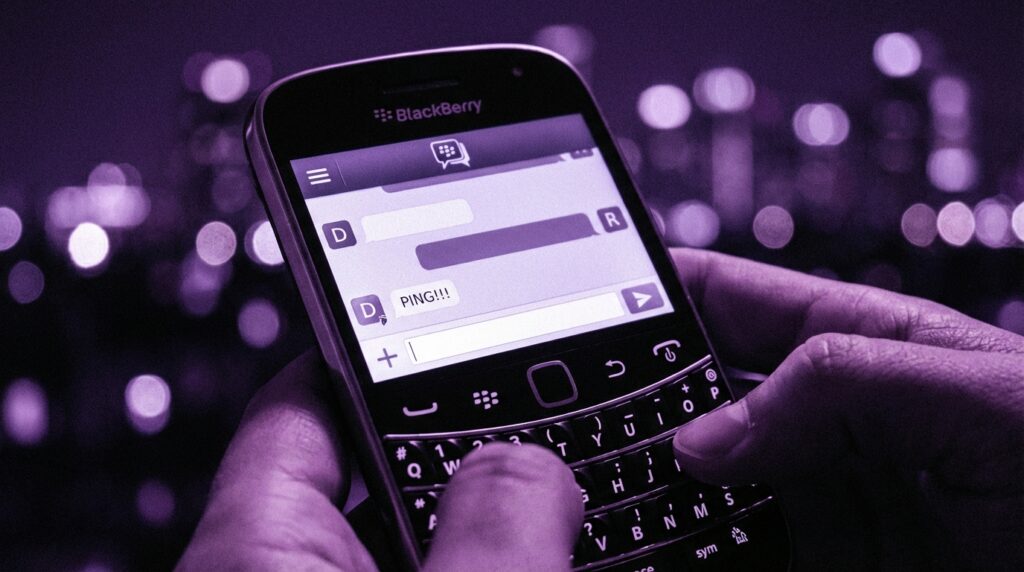
“The tiny red LED on my BlackBerry started blinking, and before the phone even buzzed, I knew it was a BBM. That soft keyboard click, that little ‘D’ turning to ‘R’… that was the sound of 2000s social life loading.”
You remember the feeling, right? That rush when you felt your phone vibrate in your pocket and you knew it was not just any message. It was a BBM. Not a random SMS, not an email from a mailing list. It was someone who had your PIN. Someone from your circle.
Fast forward to now. Your phone is drowning in WhatsApp groups, Telegram channels, iMessage threads, Discord servers, Slack work chats, and random DMs spread across half a dozen apps. You can react with a fire emoji, send a 4K video, drop your location, pay someone, and jump on a video call in the same interface. On paper, it is miles ahead of what BBM did.
Maybe it is just nostalgia talking, but BBM felt different.
BlackBerry Messenger was not just “another messaging app.” It sat right in the middle of three worlds: enterprise email, early mobile internet, and the first taste of always-on chat. It taught a generation how it feels when your phone becomes social, sticky, and a little bit addictive.
Not just because of what it could do, but how it made you behave.
You watched that “D” and “R” status like stock prices. You memorized your PIN the way people later memorized WiFi passwords. You guarded your BBM contacts like they were VIP entries in a very small, very exclusive club.
The same ideas that power modern “seen” receipts, last seen statuses, typing indicators, encryption badges, and private groups all trace back to patterns that BBM helped normalize. That tiny app on a chunky, plasticky device helped shape the messaging habits that drive iMessage bubbles, WhatsApp blue ticks, and Instagram “Active now” indicators.
The feel of a BlackBerry, the pull of a BBM ping
Before we talk about features, remember the hardware BBM lived on.
Those phones were not light. A BlackBerry Bold felt like a small metal brick in your pocket. Around 130 to 140 grams, with that dense center of gravity. You could feel it tap against your leg when you walked. It felt serious. Not like a toy.
The screen was small and rectangular, sometimes 320 x 240 pixels, later 480 x 360. On paper, that sounds rough compared to the slabs of OLED we stare at now, but at the time, that sharp little screen with its app icons, emails, and BBM chats felt like a tiny control panel.
The keyboard was the real star. Those small, clicky keys with the sculpted smile layout. You could type a full paragraph with one thumb while holding the phone under a desk in class or under the table in a meeting. Every key press had a satisfying, muted “tick” sound and a light tactile bump.
BBM wrapped itself around that experience. The app felt like it was built into the phone’s bones, not bolted on. There was no sense of “launching” a chat app. It was just part of what the BlackBerry did, right there with email and calls.
“Retro Specs: 2008 BlackBerry Curve with BBM
• Screen: 2.5 inches, 320 x 240 pixels
• Keyboard: Full QWERTY, raised plastic keys
• Network: 2G/EDGE or 3G
• Storage: Measured in megabytes, not gigabytes
• Battery: Removable, often lasting a full day of heavy BBM use.”
BBM took that hardware and turned it into something social. The blinking LED was a signal. Red for messages, sometimes different colors if you tweaked the settings. You could leave your phone on silent and still know that something was waiting for you.
Today, we get that signal overload in a thousand colors and banners, but back then, that one red blink meant very few things: email, SMS, or BBM. And most of the time, it was BBM.
The PIN: messaging with a secret handshake
The weird thing about BBM is how personal it felt even though it used a completely impersonal identifier.
You did not “add someone’s number” on BBM. You got their PIN.
It was this long mix of letters and numbers, something like 24DA7C9F. You could show it as a barcode on your screen. Your friend would scan it with their camera, and suddenly they were in your BBM list.
No phone number needed. No username. It felt oddly anonymous and intimate at the same time.
To give someone your BBM PIN meant you trusted them enough to let them into your daily notification stream. Not your entire address book. Not your Facebook friends list. Just that one code.
“User Review from 2009:
‘I do not give my BBM PIN to everyone. Only close friends and my girlfriend have it. If you are on my BBM, you are part of my day, all the time.'”
The PIN model did something interesting for privacy and control.
If someone annoyed you, you could delete them. If they kept bothering you, you could block them at the PIN level. Your phone number stayed yours. There was a layer between your identity and your contact list.
Today, apps like Telegram and Signal let you hide phone numbers and use usernames, but back then, this felt fresh. It also created a barrier to entry. People had to ask for your PIN. That request created a social moment in real life.
“Hey, do you have BBM?”
“Yeah, what’s your PIN?”
“One sec, let me find it.”
On modern apps, you can auto-sync contacts from your phone. That is convenient, but the “add as contact” step is almost automatic. BBM made that step intentional.
The magic of D and R: the read receipt that changed how we text
One single feature is probably what people still remember most about BBM: the “D” and “R” statuses.
You type a message.
You hit send.
First, you see a checkmark and “D” under the message: Delivered.
Then, a little later, it changes to “R”: Read.
That “R” became both comforting and stressful.
Comforting, because you knew the other person actually saw your message. Stressful, because now you knew when they saw it, and you also knew when they ignored it.
“User Review from 2010:
‘The worst feeling is when it says ‘R’ and there is no reply. My girlfriend knows I saw the message, so I cannot say I was ‘away from my phone’ anymore. No more excuses.'”
Sound familiar? That is basically the ancestor of WhatsApp’s blue ticks, Instagram’s “Seen,” Telegram’s double checks, and iMessage “Read” receipts.
BBM took the quiet, passive nature of SMS and turned it into a live channel. You were not just sending messages. You were watching them move through the pipeline: sent, delivered, read.
That small change shaped user behavior:
– People started timing responses.
– Social etiquette formed around how fast “you should” reply.
– Leaving someone on “R” was like walking away mid-conversation.
It also changed how we thought about presence. Before, “online” meant sitting at a computer. With BBM, presence was implied. If your phone was in your pocket and connected, BBM worked. You were reachable.
Modern messaging apps have built on this with “last seen at,” online dots, typing indicators, and real-time presence. But the spirit of it, the subtle pressure of “I know you saw this,” started to crystallize in the BBM era.
Groups, broadcasts, and early social circles on BBM
BBM was not just one-to-one chats. It also gave people a kind of proto-social network that lived inside a messaging app.
You had:
– Group chats where you could add multiple contacts.
– Broadcast messages where you could send the same update to a bunch of people at once.
– Status messages where you could set your mood, what you were doing, or a song lyric.
That “status” line often carried more emotion than any message itself. People dropped cryptic messages, breakup hints, coded jokes, or inside references to friend groups.
You might remember:
“Busy. Do not ping unless urgent.”
“Battery almost dead. BBM slow.”
“At work. Reply later.”
Or the classic: song lyrics that said what you were feeling but did not want to say directly.
If you squint a bit, you can see how this maps to modern features:
– WhatsApp statuses and profile messages
– Instagram bios and stories
– Discord status messages
– Snapchat streaks and emojis
The concept was simple: your messaging identity extended beyond your messages. People could open your name and get a small snapshot of your mood or priorities that day.
BBM groups were where friend circles and office gossip lived. You did not have huge, noisy groups with hundreds of participants. Most BBM groups stayed relatively small: tight clusters of classmates, coworkers, or family.
These groups worked well on the hardware BlackBerry had. Lightweight, mostly text-based discussions. Sometimes a low-res picture. No auto-playing videos. No voice notes at first.
That limitation shaped the behavior. People wrote more. Real sentences. You scrolled through lines of text, not a flood of stickers and GIFs. The app was built for a keyboard, after all.
BBM vs the messaging giants: then vs now
To understand how much BBM did on such limited hardware, it helps to line things up with where messaging stands now.
Below is a table comparing a classic BlackBerry with BBM to a modern flagship like an iPhone 17 running iMessage and WhatsApp.
| Feature | Then: BlackBerry + BBM | Now: iPhone 17 + Modern Messengers |
|---|---|---|
| Screen | 2.5 to 2.8 inch LCD, ~320 x 240 or 480 x 360, small but sharp for text | 6+ inch OLED, ~2800 x 1300, high refresh rate, bright colors |
| Keyboard/Input | Physical QWERTY with clicky plastic keys | Full-screen capacitive touchscreen keyboard, haptics |
| Network | 2G/EDGE or 3G, often with compressed data plans | 5G, WiFi 6/7, near-instant media transfer |
| Primary Chat Features | Real-time text, “D” and “R” receipts, group chats, basic media | Text, reactions, stickers, GIFs, voice/video calls, stories, communities |
| Identity | Device-specific PIN, not tied directly to phone number | Phone number, Apple ID, usernames, QR codes |
| Security Model | BlackBerry network routing, reputation for strong security for email | End-to-end encryption standard in apps like Signal, WhatsApp, iMessage |
| Platform Reach | Initially BlackBerry-only | Cross-platform (iOS, Android, desktop, web) |
| Media Handling | Compressed images, small file size, limited video | High-resolution media, large attachments, live shared content |
| Presence Indicators | Delivered/Read (D/R), sometimes status messages | Typing indicators, last seen, online, read receipts, active statuses |
| Monetization | Mostly bundled into carrier plans or BlackBerry services | Freemium models, ads, business APIs, subscriptions |
On paper, the modern experience wins across almost every line: speed, visual quality, features, and flexibility.
Yet, talk to anyone who lived on BBM and you will hear something like: “Those were the best messaging days.” Not because the tech was better, but because the experience felt focused.
BBM had one clear job: text-first communication that felt instant, private, and personal on those tiny screens.
Why BBM felt faster than it really was
If you look at the raw numbers, BlackBerry devices were not monsters. They ran on modest processors with limited RAM, and networks were slower than anything we would tolerate now.
Still, BBM felt fast.
Part of that came from how BlackBerry handled data. The company used its own infrastructure, with its own servers, and compressed almost everything. That meant messages were small, routing was efficient for text, and carriers often gave BlackBerry data plans that were friendly to heavy messaging.
Another part came from perception. BBM’s instant feedback loop made the experience feel live:
– You hit send, your message shows a tick.
– It quickly switches to “D.”
– Once the other side’s device picks it up, you see “R.”
Your brain reads that as “real-time,” even if there are small delays under the hood.
Compare that with SMS, where you hit send and just think, “I hope it got there.” No delivery information, no read confirmation.
Today, messaging apps send larger payloads. High-res photos, typing indicators, reactions. All that adds to overhead, but networks are fast enough to handle it. Still, that sense of “bare metal” speed on a tuned system is hard to replicate when the app is one of many living on a generalized platform.
BBM felt like a dedicated line.
The social rules BBM created
Every communication platform develops its own etiquette. BBM was no different.
Because it was always-on and always-there, people had to figure out new social norms:
– Is it okay to ignore a message after it showed “R”?
– How quickly should you reply to a boyfriend or girlfriend on BBM versus a regular friend?
– Do you share your PIN with coworkers or keep it just for personal contacts?
– Is it rude to remove someone from your BBM list without telling them?
The “D” and “R” statuses added a new layer to all of this. People started reading implications into timing.
“She read my message 2 minutes ago and did not reply. Something is wrong.”
“He has time to update his status but not reply to me?”
If that sounds similar to today’s WhatsApp argument patterns, that is not an accident. BBM seeded that habit of using metadata around the message (status, time, read state) to infer emotion or priority.
Another interesting quirk: BBM encouraged longer, more structured messages compared to the one-liners common in many modern chats. That physical keyboard and the text-first design almost invited you to type paragraphs.
On-screen keyboards changed that, making short bursts and emojis easier. Voice notes pushed it even further. But in the early BBM days, the chat felt like a thread of mini emails, just delivered faster.
“User Review from 2008:
‘I type full sentences on BBM. It feels like email, just instant. On SMS I write short and lazy. On BBM I explain myself more.'”
There is a straight line from that behavior to the rise of “long-form messaging” in modern apps, where people send screen-length rants, thoughtful breakdowns, or detailed how-tos over chat instead of email.
BBM and the office: where work and personal life started to blur
BlackBerry has a reputation as the “work phone.” It sat on the belts and in the pockets of executives, managers, and anyone whose job involved constant email.
At first, BBM was more of an internal BlackBerry-to-BlackBerry communication tool. Quietly, it started pushing those work relationships into a new space.
Instead of sending a short email, colleagues pinged each other on BBM.
“On my way to the meeting.”
“Call me.”
“Client replied, check your email.”
The shift seems small, but it changed how people thought about availability. If you carried a BlackBerry, you were reachable. For email, for calls, and for BBM.
When BBM started to break into the consumer market, something odd happened. People started carrying two devices: one for work, one for personal life. Sometimes both BlackBerrys, sometimes one BlackBerry and one other phone.
That double-device era showed how sticky BBM had become. Some users refused to leave BBM behind, even if their main phone for apps, music, and browsing was something else.
Modern apps like WhatsApp Business, Slack, Teams, and workplace messaging tools inherit a lot from that blend of personal-chat energy and work messaging structure that BBM helped shape.
From BBM to everything: the legacy in modern chat apps
Look at your phone today and open any major messaging app. You will see BBM’s fingerprints in multiple places:
– **Read receipts**: Blue ticks, “Seen,” read timestamps.
– **Delivery indicators**: checkmarks and sending states.
– **Status messages**: profile messages, bios, short updates.
– **Presence**: online dots, “last seen,” “typing…” indicators.
– **Invite-only circles**: private groups, invite links, controlled access.
– **Device-independent IDs**: usernames, QR codes, IDs that are not only phone numbers.
BBM did not invent all of those, but it popularized a specific mix in the mobile context.
The app taught users that messaging could be:
– Always-on without costing SMS fees.
– More personal than email, but more structured than early web chat.
– Bound to a device identity (PIN) rather than only a phone number.
For a lot of users, BBM was the moment where their phone turned from a tool into a social hub. That shift set expectations for what smartphones needed to do next.
You can see the echoes:
– WhatsApp went hard on simple, fast, secure messaging tied to your number.
– iMessage built deep into the OS, like BBM inside BlackBerry.
– Telegram played with usernames, channels, and stickers but kept that core instant feel.
– Signal focused on privacy and encryption but still kept familiar patterns like read receipts and groups.
They all sit on more advanced hardware, but the core model feels very familiar to anyone who lived through BBM’s peak.
Why BBM faded while its ideas survived
If BBM had such strong influence, why are we not all still on it today?
Several reasons line up:
– BlackBerry devices lost ground to iPhone and Android touchscreens.
– BBM stayed locked to BlackBerry hardware for too long, then arrived late on other platforms.
– Competing apps came in with lower friction: just use your phone number and you are in.
– App ecosystems grew around iOS and Android, and BBM became one app among many, not a core service.
When BlackBerry tried to pull BBM out as a cross-platform service, the world had already moved. WhatsApp, iMessage, and later Telegram and others had captured user bases. BBM no longer had the device advantage.
Messaging apps thrive on network effect. People use what their contacts use. The minute enough of your circle left BBM, your own reason to log in started to fade.
The interesting twist: BBM’s specific brand might have faded, but its model stayed alive. That is why it still feels relevant. Many of the “standard features” we now expect in any messenger feel almost incomplete without a BBM-style mental map of how they behave.
BBM and the emotional side of messaging
There is a reason BBM sits in a special memory slot for many users. The timing was unique.
It arrived when people were just starting to carry phones everywhere, but before social media feeds ate up all the attention. There was no constant scroll of photos to check. No push alerts from a dozen social platforms.
Your BlackBerry buzzed, you checked BBM or email. That was it.
That focus gave BBM chats a kind of weight. You leaned in a bit more. You remembered where you were the first time you had a long late-night BBM conversation with someone you liked. Or the first time a work emergency popped up on BBM while you were out with friends.
The little sounds and lights enhanced that emotional map:
– The soft alert tone when a new message came in.
– The red LED that would not stop until you looked.
– The feel of the plastic trackball or trackpad as you scrolled through a thread.
BBM turned that hardware into something that felt social, not just functional.
We see a similar pattern today when people talk about early days of WhatsApp, MSN Messenger, or ICQ. But BBM sits in a special pocket because it carried that specific mix of professional and personal messaging on the same device, in the same app.
What BBM foreshadowed about always-available communication
If you think about your current messaging habits, a lot of what feels normal started in a rough shape during BBM’s lifetime.
Things like:
– Expecting people to reply quickly.
– Feeling slightly anxious when messages stay unread or un-replied.
– Balancing work and personal messages on the same device.
– Worrying about privacy, who can see your status, and who can ping you at any time.
BBM gave people their first taste of that constant connection. It did not have mental health labels, quiet modes, or elaborate “Focus” settings. If your BBM was on and you had coverage, you could be reached.
Modern systems are starting to offer tools to control this: mute conversations, custom notification profiles, “Do Not Disturb” modes, and status controls. You can silence a group for hours, days, or forever.
Looking back, you can see what BBM taught developers and product designers:
– Real-time is powerful, but it needs control knobs.
– Status and presence info can create anxiety, not just convenience.
– Identity layers (PIN, username, number) affect how safe or exposed people feel.
– Hardware and software integration can make a messaging app feel more personal than competitors with more raw features.
BBM did not solve all of this, but it set up the exercise. The world has been iterating on those tradeoffs ever since.
From ringtones to read receipts: where BBM sits in mobile history
When you zoom out and look at mobile tech as this ongoing archive of ideas, BBM holds a clear place.
Older phones focused on calls, ringtones, and maybe SMS. They were communication devices, but not social devices in the modern sense. BBM helped shape that shift.
Before BBM, “real-time” interaction lived more on computers with instant messaging platforms. Phones were still something you used more deliberately: call, send a text, put it away.
With BBM, the phone became part of your social fabric in a steady way. The ping, the blinking LED, the constant presence of that icon on the home screen. It lived with you.
Modern messaging platforms push that much further. Voice, video, screensharing, ephemeral content, encryption badges. But the core loop is similar:
– Quick message.
– Clear status about what happened to that message.
– Easy reply.
You can feel that DNA when you tap your screen, watch for a typing indicator, or wait for a “Seen” label to show up. Somewhere in the background is that little “D” turning into “R” on a small, bright screen with a physical keyboard under your thumbs.
“Retro Specs: BBM at its peak
• Core: Instant messaging tied to BlackBerry PINs
• Key signals: ‘D’ for Delivered, ‘R’ for Read
• Status: Custom message line, often lyrics or moods
• Groups: Small, focused chats for friends or teams
• Reach: From boardrooms to classrooms worldwide”
