

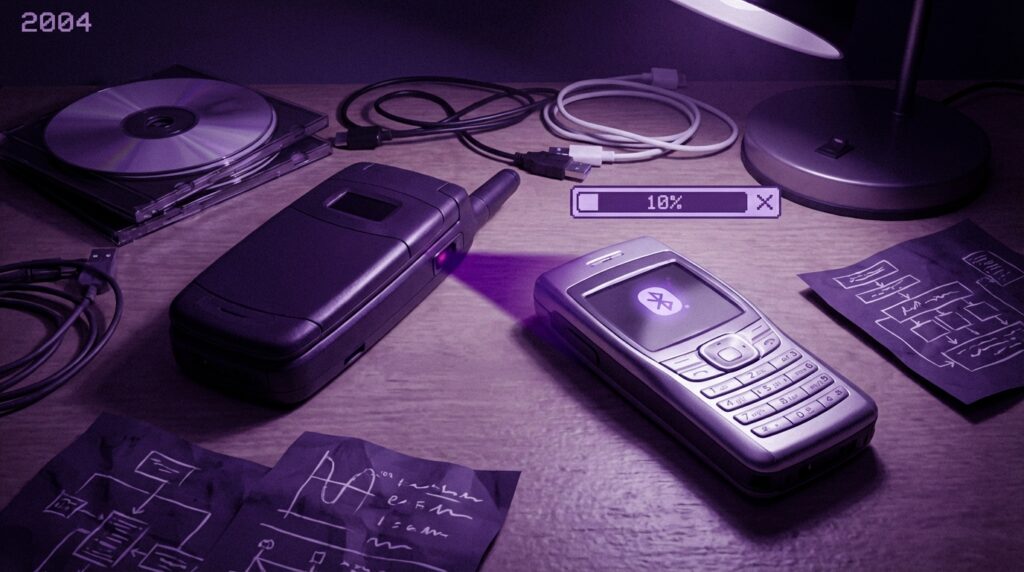
“The soft chirp of an infrared beam connecting two Nokias, both phones perfectly lined up, both owners holding their breath.”
You remember that sound, right? Two people in a school hallway, arms almost touching, trying not to move a single millimeter while a tiny red window on one phone “talked” to the red window on the other. That little light was how you got the new ringtone, the snake game level, or that blurry VGA photo that absolutely had to be on your phone.
Fast forward to right now. You tap “Share” on your phone, choose Bluetooth, AirDrop, WhatsApp, or whatever, and the file just goes. No lining up sensors, no countdown, no “transfer failed” at 92 percent. The funny part is that the struggle from 2004 is exactly why modern wireless sharing feels so invisible. Once you wrestled with infrared, Bluetooth felt like magic. And once you wrestled with early Bluetooth, today’s sharing tools feel obvious.
You can trace a straight line from those clunky infrared beams in 2004 to how you move photos between your phone, laptop, tablet, smart TV, and even your car today. The friction back then forced engineers, carriers, and users to think hard about how phones “talk” to each other. Maybe it was just nostalgia talking, but that slow crawl prepared us for the quick tap-and-send world we live in now.
The awkward ritual of infrared sharing
Before we get into Bluetooth vs infrared as specs, think about the ritual of using infrared on a phone in 2004.
Plastic phone in your hand, usually under 120 grams, with that slightly rough battery cover that creaked if you pressed too hard. A tiny CSTN or early TFT display, maybe 128 x 128 pixels if you were lucky, often with that faint blue or green tint. You navigate through those icon menus with a D-pad or soft keys, hunting for “Infrared” buried under “Connectivity.”
Then came the moment of truth. You and your friend would stand there like two statues, holding your phones so the infrared ports were perfectly aligned. Not “kind of close.” Perfect. The sensors needed line of sight. Something simple like a thumb in the way meant failure. Line the ports up, choose “Send via Infrared,” and wait for both devices to agree.
It felt slow even then. One MIDI ringtone was not a big file, maybe a few kilobytes, but the progress bar still seemed to crawl. You watched every little segment of that bar fill, hoping no one bumped your elbow. If someone brushed past you in the hallway and the phones drifted apart, you got a blunt message: “Connection lost.”
“Retro Spec: Nokia 6610, infrared port hidden near the top, 128 x 128 pixel display, 4096 colors, 84 grams. Light in your pocket, heavy in patience needed for file sharing.”
Infrared was not new in 2004. Remote controls had used it for years. Laptops had those little black windows for IrDA ports in the late 90s. Some PDAs had it too. The technology was simple: point two devices at each other, let the beams line up, send tiny bursts of data through pulses of light that humans cannot see.
But on phones, it felt personal and slightly awkward. You did not just send a file. You had to physically cooperate, hold your phone near someone else’s, almost like a handshake that could time out. The tech forced you to stay in the moment.
How infrared actually worked on those 2004 phones
Infrared on phones usually followed the IrDA standard. Most consumer phones in that era sat at the bottom end of the spec.
Here is what you were dealing with:
– Typical speeds around 9.6 kbps to 115.2 kbps for phones
– Ideal range about 10 to 20 centimeters
– Strict line of sight; even a pencil in the way could break the beam
At 115.2 kbps, moving a 100 KB image could take around 7 or 8 seconds in ideal conditions. That does not sound terrible, but conditions were rarely perfect. Bad angles, moving hands, or sunlight could cause problems. Some phones dropped speed automatically when the signal got sketchy, so that “7 seconds” could become “we are still here 30 seconds later.”
Infrared also worked in half duplex on many devices. That meant one device could talk at a time. It was like walkie-talkies, not a phone call. So data flowed in one direction, then the other, with little pauses. For small files, that was fine. For anything larger, it felt clunky.
And it was not “always on.” You had to toggle it manually on many phones to save battery and prevent random connections with nearby laptops. You would go:
Menu > Connectivity > Infrared > On
Then a little symbol would appear on the screen, waiting for a beam to land.
“User Review from 2005: ‘Infrared works ok but you have to keep the phones VERY close and not move. It is annoying for big images, but for ringtones it’s fine.'”
Infrared on phones felt like a hack grafted onto a device built for calls and texts first, everything else later. It was “good enough” for that one ringtone or that one phonebook contact. It was not built for big photo libraries or videos.
Enter Bluetooth: the invisible connection
Now switch scenes. Same plastic phones, similar weight, similar chunky chargers. But instead of squinting at two little red windows, you turn on Bluetooth.
You might remember the Nokia 6230, Sony Ericsson K700i, or the classic Motorola V3 Razr. Many of them shipped with Bluetooth 1.1 or 1.2. These versions were not fast by modern standards, but for 2004, being able to send a picture across the room without lining up phones felt wild.
You paired once, then the phones remembered each other. No need to point. The range was usually around 10 meters, using 2.4 GHz radio waves, not light. Bluetooth existed in the background, not tied to a tiny window on the top of your phone.
The process sounded like this:
1. Turn on Bluetooth
2. Make your phone visible
3. Search for devices
4. Choose your friend’s phone
5. Accept a pairing code
6. Send file, wait, done
This still took effort, but you did not need to keep your hands frozen in one position. You could drop your phone on the desk and let it do its thing while you talked about something else.
Bluetooth 1.1/1.2 usually offered speeds around 721 kbps for effective data transfer. Still slow compared to later versions, but much faster than typical phone infrared. A 100 KB image that took 10 to 20 seconds over shaky infrared could move in a few seconds when Bluetooth behaved.
“Retro Spec: Sony Ericsson K700i, Bluetooth 1.1, VGA camera (640 x 480), 32 MB internal memory, 107 grams. Enough to send a few photos before you got bored of waiting.”
Bluetooth had another trick: it did not need line of sight. It could go through pockets, bags, or table surfaces. You could toss your phone on a couch and still receive a file. Radio waves gave you freedom that infrared never did.
Infrared vs Bluetooth: the 2004 user experience
To really feel the difference, picture yourself trying the same thing in both modes. Your friend has a new polyphonic ringtone and a grainy photo from a party. You want both.
You try infrared first. Both of you:
– Turn on infrared
– Line up the ports
– Choose “Send via Infrared”
– Stand still, stare at the tiny progress bar
You finish the ringtone in a few seconds. Then comes the image. The bar moves, stops, jumps, then the phones beep: “Connection failed.” You sigh, realign, and start over. This time you cover the phones with your free hands, trying to “block noise” like you are shielding some rare plant.
Now try Bluetooth. You pair once. Your friend’s phone shows up in your device list. You send the ringtone. Your phone vibrates, you click accept. Done. You send the image. The transfer crawls a little, but the connection feels more stable. You can talk, wave your hands, even step back a little.
In 2004, this difference felt massive. Infrared was simple but demanding. Bluetooth felt more advanced but also more confusing during first setup. PIN codes, pairing requests, visibility timers, and battery drain were new headaches.
Then vs now: how far sharing has come
To put the old struggle next to modern comfort, look at this side-by-side comparison. Imagine the legendary Nokia 3310 meeting something like an “iPhone 17” era device.
| Feature | Nokia 3310 (2000 era) | Modern Flagship (iPhone 17 era example) |
|---|---|---|
| Wireless sharing method | None built-in, no Bluetooth, no infrared | High speed Bluetooth, Wi‑Fi Direct, UWB, cloud sharing |
| Typical screen | 84 x 48 pixels, monochrome | Super high resolution OLED, millions of colors |
| File types shared | Ringtones via SMS, simple logos | 4K/8K video, RAW photos, app bundles, large documents |
| Storage | About 1 MB internal, no cards | 256 GB to 1 TB internal flash |
| Speed of local sharing | N/A for direct file transfer | Multiple Mbps to Gbps over Wi‑Fi and modern Bluetooth profiles |
| Setup complexity | None, just SMS | One tap sharing, QR codes, background pairing across devices |
| Range | N/A for file sharing | Several meters (Bluetooth) to house-wide (Wi‑Fi) |
Those early infrared phones sat between these two worlds. Not as simple as the Nokia 3310, not as flexible as modern hardware. They were the awkward teenage years of sharing.
Why infrared survived so long
If Bluetooth was better for sharing, why did infrared stick around on phones for years?
Several reasons:
1. Simpler hardware
The infrared port was cheap. A small LED, a photodiode, some supporting circuitry. No complex radio stack, no antenna tuning. For low cost handsets, that mattered.
2. Clear security model
With infrared, two devices had to be almost touching and pointing at each other. That physical contact acted like a security measure. No one could silently beam a virus across the room to you through infrared.
3. Legacy support
Laptops, printers, and PDAs already used IrDA. Some business users had workflows that involved beaming contacts or small documents. Phone makers kept infrared as a bridge feature.
4. Carrier attitudes
In the early 2000s, many carriers pushed paid services for ringtones and wallpapers. Wireless methods that let users share freely, over distance, could cause tension. Infrared was “small scale” enough that it felt less threatening.
Bluetooth, on the other hand, had more range, more features, and more complexity. It took time for chipsets to become cheap, stable, and battery friendly. Early Bluetooth stacks could feel buggy. Some phones lost connections or drained power faster when Bluetooth stayed on.
Bluetooth’s slow climb from “weird feature” to default
In 2004, Bluetooth did not feel standard yet. It was a selling point on mid-range and high-end phones, not a given. Ads talked about “wireless headsets” almost as much as file sharing.
You saw it in three main areas:
1. Wireless headsets
The classic single-ear headset with the blinking blue LED. Pairing it with your phone felt like science fiction. Call quality was often rough, but it worked.
2. Phone to PC
Sending a photo or contact card to your laptop without cables. It felt easier than drivers and sync software, even if Windows or macOS Bluetooth utilities sometimes acted strange.
3. Phone to phone
The part we care about here. Sharing ringtones, wallpapers, and photos. For many teenagers and students, this was their first direct experience of device pairing.
Bluetooth beat infrared on paper in almost every way:
– Higher speeds
– No line of sight
– Longer range
– Multiple devices in one “piconet”
But real life had rough edges. Different manufacturers implemented stacks differently. Some devices refused to talk to each other. Others asked for PIN codes every time or forgot paired devices. So while Bluetooth was “better,” it still felt like work.
“User Review from 2005: ‘Bluetooth is cool but confusing. My phone sees my friend’s but sometimes it won’t send the picture. Infrared is slower but at least when it works, it works.'”
The strange part is that people tolerated all this. Because the alternative for sharing bigger files was often a data cable, proprietary software, and a computer. Pulling out a USB cable and installing a PC Suite just to move a photo felt heavier than wrestling with wireless.
When files were small but precious
To understand the struggle, you also need to remember file size in 2004. Cameras on phones usually shot:
– VGA (640 x 480)
– Sometimes 352 x 288 or 128 x 96 “photo” modes
A single image could range from 20 KB to 100 KB or more, depending on compression. Ringtones in MIDI form were often under 20 KB. Wallpapers might hover around 10 KB.
So even low speed connections could manage. The frustration did not come from total transfer time alone. It came from unreliability:
– Transfers failing at the last second
– Random disconnects
– Bad alignment with infrared
– Random pairing problems with Bluetooth
Every successful file felt like a little victory. You ended up with a small .mid file or a grainy .jpg stored in a phone with maybe 2 MB of memory total. That made the content feel more “valuable.” Not because the quality was high, but because you had worked for it.
Maybe it was just nostalgia talking, but you treated those ringtones and wallpapers almost like collectibles. Who had the rarest one, the funniest one, or the one ripped from an anime opening on some forum and passed along phone to phone like contraband.
Why alignment mattered: human factors in infrared
Infrared highlighted something that modern users barely think about: physical coordination. The tech forced people to adjust bodies and posture.
You would see:
– Two people sitting at a table, both phones face down, infrared ports touching
– Arms stretched out between desks in a classroom
– Phones propped against each other like a little tent, trying to keep them steady
The beam needed a clean line. Many infrared ports were recessed or tucked into corners of the phone body. Some cases partially blocked them. Users learned the best angles by feel.
This physical setup turned file sharing into a mini social interaction. You could not send something privately from across the room. You had to be right there, eyes on the screens, waiting together.
Bluetooth broke that link. Once pairing was done, you could send things without physical closeness, sometimes even without looking up. In hindsight, infrared sharing looks like the last phase where wireless still felt like a physical meeting of devices, not just addresses in a menu.
Security fears and the birth of “bluejacking”
As Bluetooth spread, people started experimenting. Some sent anonymous messages to nearby phones, often saved as contacts with jokey names. That practice became known as “bluejacking.”
Infrared never had a scene like that. Its design did not lend itself to anonymous contact. You had to cooperate. Bluetooth, with its 10 meter reach, felt different. Suddenly, wireless file sharing was not just a one-to-one ritual. It had social layers, pranks, and new privacy questions.
Early tech magazines and TV shows started warning about “bluebugging” and Bluetooth viruses. Many users reacted by keeping Bluetooth turned off except when needed. Infrared, with its short reach and line-of-sight constraint, escaped that kind of panic.
From a user perspective, this meant:
– Infrared felt clumsy but safe
– Bluetooth felt free but slightly risky
The path from there to modern sharing systems involved a lot of standard work: more secure profiles, better pairing flows, and stronger hardware encryption. But the seeds of those efforts sat right in that 2004 era when people realized “wireless sharing is not just about convenience, it is about control.”
From phone-to-phone to phone-to-air
The next big evolution came when phones started using the internet as the main sharing channel. MMS bridged the gap a bit, letting users send pictures and longer tones over carrier networks. But real change came with mobile data and social platforms.
When you can send a photo to a server and let your friend pull it down later, local sharing becomes one option among many, not the only lifeline. Bluetooth and infrared both started to feel niche outside special uses like:
– Offline sharing in classrooms
– Moving files where data costs were high
– Connecting to headsets or car kits
Yet, the design lessons from local sharing did not vanish. They echoed in modern services:
– Simple pairing flows inspired tap-and-share and QR code based handshakes
– Progress bars and file size awareness informed cloud upload design
– Concerns about sending files to the wrong person led to clear prompts and previews
The physical alignment of infrared turned into the virtual alignment of contacts, usernames, and device IDs. You no longer hold two phones together, but you still “bring them close” in menus or share sheets.
How the hardware felt in your hand
Go back for a second to the feel of those 2004 devices. That stuff matters more than it sounds when we talk about file sharing.
You had:
– Removable batteries with a bit of flex when pressed
– Keypads that made a soft plastic click, T9 under your thumb
– Slightly hollow shells with metallic paint pretending to be brushed aluminum
Infrared ports usually sat near the top edge, covered by dark translucent plastic. You might have never really looked at it. It just existed as a mysterious window that “did something.”
When you shared files, the whole device posture changed. You gripped the phone closer to the top, tried not to hit buttons by accident, and felt the weight shift in your hand as you lined up ports. With Bluetooth, your posture did not change at all. It moved sharing from something physical to something mental: just navigating menus and watching icons.
“Retro Spec: Siemens CX65, 132 x 176 display, 65K colors, infrared on the side, optional Bluetooth with an adapter. Infrared was there out of the box, Bluetooth felt like an upgrade.”
Even that detail says a lot. Some phones offered Bluetooth through add-on modules, while infrared came built in. Features that felt secondary to you were often direct results of cost and placement decisions inside cramped phone shells.
The strange charm of waiting
By modern standards, waiting 30 seconds for a ringtone file sounds painful. But in 2004, phone time had a different rhythm.
You were already used to:
– Waiting for WAP pages to load over GPRS
– Watching progress bars while Java games installed
– Waiting for MMS messages to retrieve
Infrared and Bluetooth fit into that rhythm. You expected friction. You expected to fiddle with settings. When things worked smoothly, it felt almost luxurious.
Maybe it was just nostalgia talking, but there was a certain satisfaction in watching a file inch its way across a progress bar, knowing it came directly from your friend’s hand to your pocket, no wires, no computers, no carrier in the middle.
Today, file sharing is so fast and abstract that it almost feels weightless. Back then, each shared ringtone had a story:
– “That one failed twice before it worked.”
– “We had to stand by the window to get the angle right.”
– “His phone refused Bluetooth from everyone except that one model.”
The tech struggled, and users adapted.
Infrared vs Bluetooth by the numbers
To pull it together, here is how the two stacked up in the mid-2000s:
| Category | Infrared (IrDA on phones) | Bluetooth (v1.1 / v1.2 era) |
|---|---|---|
| Medium | Infrared light, requires line of sight | 2.4 GHz radio waves, no line of sight needed |
| Range | 10 to 20 cm typically | Up to 10 meters for Class 2 devices |
| Speed | Up to 115.2 kbps common on phones | Around 721 kbps max data rate |
| Setup | Turn on IR, align ports, accept transfer | Turn on BT, pair devices, then send |
| Reliability | Sensitive to movement, alignment | Sensitive to interference but more tolerant of motion |
| Security feel | Very local, physical contact required | Range brings convenience and more concern |
| Typical uses | Contacts, small ringtones, logos | Photos, ringtones, headsets, PC sync |
| Battery impact | On only during transfers | Could drain faster if left on and discoverable |
Infrared won on simplicity and hardware cost. Bluetooth won on almost everything else, once the ecosystem caught up.
From struggle to baseline expectation
The real legacy of “Infrared vs Bluetooth in 2004” is not just which one performed better. It is how they shaped your expectations.
Infrared taught you that:
– Devices could talk without cables
– Alignment and physical presence mattered
– Short range sharing still felt useful
Bluetooth taught you that:
– Wireless could happen in the background
– You could connect multiple devices at once
– Pairing and identity mattered
Together, they trained a whole generation to accept the idea that files were not stuck on one device. Even if the path from one phone to another felt slow, fragile, or confusing, the concept itself became normal.
So when newer tech arrived, from Wi‑Fi Direct to cloud sync to tap-to-share using NFC or UWB, people did not need convincing that it was possible. They just expected it to be less annoying than holding two Nokias together under a fluorescent light, hoping the infrared beam would not break at 98 percent.
