

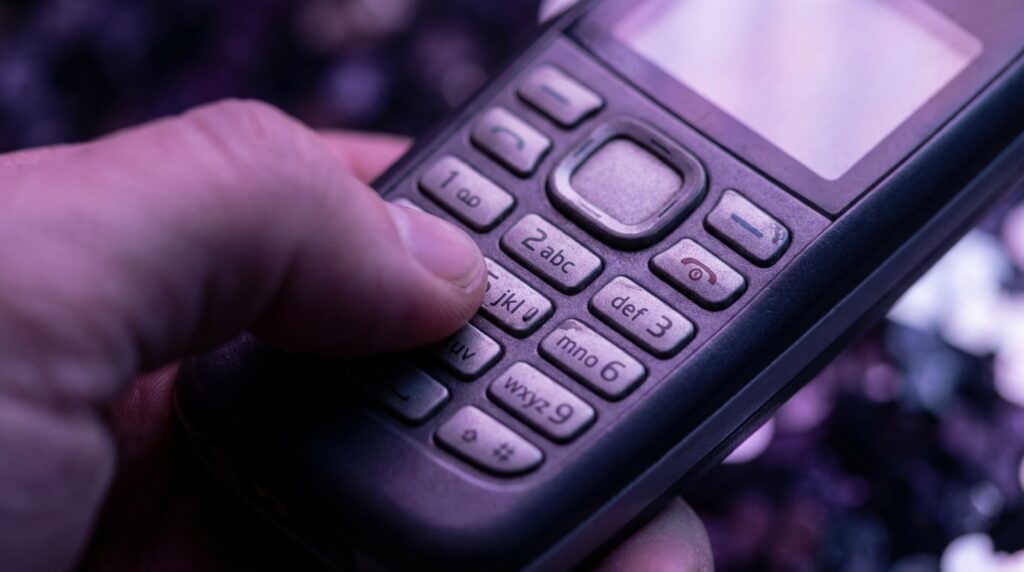
“The soft click-click-click of a T9 keypad on a dimly lit Nokia screen, your thumb flying over ‘2’ three times for ‘C’ without even glancing down.”
You remember that feeling, right? Sitting on a bus or crammed in the back of a classroom, phone hidden under the desk, eyes locked on the teacher or the road ahead, but your thumbs were somewhere else entirely. You were typing out full sentences on a twelve-key keypad, predicting each word from muscle memory and a slightly stubborn algorithm that thought “good” should always be “home” first. Today you stare at a glass slab with a full QWERTY layout, autocorrect, swipe typing, and voice input. Back then, all you had was T9, a 128 x 128 pixel screen, and a plastic keypad that felt like it would last forever.
That gap between then and now is not just about nostalgia for polyphonic ringtones and operator logos. It tells us something very real about how we learned to communicate with machines when screens were tiny and patience was bigger. T9 texting trained your brain to predict patterns, to compress language, to type without looking. Compare that to modern phones where the keyboard eats half the display, autocorrect rewrites your sentences, and predictive text tries to finish your thoughts before you have them. T9 was slower on paper, but somehow it made you sharper. Maybe it was just nostalgia talking, but the focus it demanded still feels unique.
So let’s talk about that “lost art” of typing without looking. Not as a romantic story about the “good old days,” but as a piece of mobile history that quietly shaped everything from how we hold our phones to how predictive keyboards work on your latest flagship. Because T9 was not just a feature. It was an entire interface philosophy squeezed into twelve numbered keys and a tiny processor that had to guess what word you meant from a handful of taps.
How T9 Turned Twelve Keys Into a Full Keyboard
Retro Specs: Nokia 3100 (circa 2003)
Display: 128 x 128 pixels, 4096 colors
Keypad: Plastic, 12-key numeric with T9
Storage: 725 KB internal
Weight: About 85 g, light but solid in the hand
Pick up an old Nokia, Sony Ericsson, or Motorola candybar phone and you notice it instantly. The weight is centered, not top-heavy like many modern phones. The keypad is where the action is: raised plastic keys, clear separation between numbers, a 4-way d-pad, and two soft keys under the display. Your thumb rested naturally on the 5 key. That physical center point mattered.
T9, short for “Text on 9 keys,” sat on top of this simple layout. Instead of pressing “2” three times for “C”, you pressed each number once and let the software predict the word. So for “home,” you would type 4-6-6-3. For “good,” same keys: 4-6-6-3. T9 had to guess which one you wanted from its built-in dictionary and from your previous choices.
What made T9 feel almost magical at the time was how quickly it snapped words into place on those low resolution screens. Each tap gave you a little plastic click. The phone chirped softly as characters appeared, blocky and slightly jagged. Your brain started linking beat patterns to words. You could “hear” 4-3-5-5-6-8 as “hello” in your fingers.
The big trick: every key covered multiple letters.
– 2: ABC
– 3: DEF
– 4: GHI
– 5: JKL
– 6: MNO
– 7: PQRS
– 8: TUV
– 9: WXYZ
T9 used this mapping plus a compressed dictionary to guess what you meant. It was basically a probability engine for language, squeezed into a few hundred kilobytes. That meant you could type full words with fewer keystrokes than multi-tap, which was huge when you were paying per SMS and every second on that tiny keypad counted.
The Feel of Typing Without Looking
You probably did not think about it at the time, but T9 trained your hands. That twelve-key layout became a physical map in your mind. The “5” key usually had a little nub or ridge on it, just like modern keyboards have on “F” and “J”. Once you found that, the rest fell into place.
The plastic keys had travel. You pressed down, felt resistance, then a soft bottom-out. No glass, no haptic motor, just actual micro switches triggering under your thumb. That mechanical feedback gave your brain enough confidence to look away from the phone. After a while you could text in your pocket, under a table, under a hoodie sleeve, or behind a book.
T9 added a mental rhythm on top of that physical map. You did not spell letters; you spelled patterns:
– “Hey” felt like 4-3-9 with a tiny pause
– “Where are you” mapped to a familiar string of taps that your thumb could do while your eyes watched something else
You crammed meaning into as few characters as possible. Abbreviations like “c u l8r” did not just come from laziness. They came from a tiny screen where every extra word felt cramped and a keypad that made numbers easy to reach. T9 let you blend numbers and letters without thinking twice.
Maybe it was just nostalgia talking, but there was something satisfying about finishing a whole message with the phone flipped shut, only glancing down at the screen for a final check. Compare that to now, where glass keyboards demand your eyes and autocorrect still manages to turn simple sentences into awkward autocorrect fails.
What Was Actually Happening Under The Hood
T9 looked simple, but the software had a lot going on for the time. It was not looking at a massive dictionary in the cloud. There was no data center, no big language model. Everything happened locally, on hardware with less memory than a modern smartwatch uses for its boot logo.
Here is what made T9 tick:
Keypress Sequence To Word Mapping
Every word could be represented as a number sequence. “Text” became 8-3-9-8. “Word” became 9-6-7-3. The T9 engine stored dictionary words grouped by these sequences. When you typed 9-6-7-3, it would cycle through:
– “Word”
– “Work”
– “Worm”
You used the “next” key (often the star or pound key) to jump through candidates. Over time, some systems even learned which options you picked more often. So if you wrote “work” more than “word”, it would bump “work” to the top of the suggestion list for 9-6-7-3. That was early personal language modeling, hidden behind a black and white or low color interface.
Compressed Dictionaries
Phones had tiny storage. T9 dictionaries were heavily compressed. They stored words in clever chunks, trimming duplicates and using shared prefixes to save space. English dictionaries still had thousands of entries, but they lived in a footprint small enough to sit comfortably in firmware.
That is why some slang never showed up. You had to add it yourself.
User Dictionaries
This is where T9 really felt personal. When you typed a word that T9 did not recognize, you could switch to multi-tap, spell it out letter by letter, and then save it. From that moment, the T9 engine treated it like a real word. Your friend’s nickname, your school, the town no one could spell right, your favorite band with weird capitalization. All locked into that little brick in your pocket.
User Review from 2005
“My phone keeps turning ‘lol’ into ‘kpp’. Took me two days to figure out I had to teach it. Now it knows all my slang and my mom has no idea what half my texts mean. 10/10 T9 is my secret code machine.”
That small bit of customization made those phones feel more personal than some modern devices. Your dictionary was really yours. When you swapped phones, you lost it and had to train from scratch. Painful, but also strangely intimate. Your T9 dictionary was a mirror of your vocabulary at that exact moment in your life.
T9 vs Modern Keyboards: A Then vs Now Snapshot
We can talk feelings for hours, but it helps to see how far things moved on. Let us stack a classic T9 device against a modern flagship with a glass keyboard.
| Feature | Then: Nokia 3310 (T9) | Now: iPhone 17 (Virtual Keyboard) |
|---|---|---|
| Input method | 12-key physical T9 keypad | Full QWERTY on glass, haptic feedback |
| Typing without looking | Very doable with practice, strong muscle memory | Harder, limited by flat glass and no physical key edges |
| Word prediction | Dictionary-based on device, basic frequency learning | Context-aware prediction powered by large language models |
| Error handling | User cycles through word options; manual correction | Autocorrect, swipe typing, predictive suggestions |
| Screen size | About 1.5 inches, T9 does not cover much space | Almost entire front is screen, keyboard covers big chunk |
| Tactile feedback | Physical buttons with clear travel and click | Haptic vibration simulating keypress |
| Learning curve | Slower at first, then very fast | Quick for basic use, but eyes stay glued to screen |
| Power usage | Minimal, no heavy processing or background models | Higher, especially with advanced prediction and cloud sync |
| Language flexibility | Limited by preloaded dictionaries | Multiple languages, emoji, GIFs, voice input |
| Privacy of text prediction | Fully local, no data upload | Varies by platform; models trained locally and in the cloud |
The funny part: T9 and modern keyboards share the same basic dream. Fewer keystrokes, more accurate words, less cognitive load. The means changed: from tiny fixed dictionaries and physical keys to massive neural nets and touchscreens. The core problem stayed the same.
Speed vs Attention: What We Lost And What We Gained
T9 slowed you down enough to think about every message, but not so much that it felt painful. You had limited characters per SMS, usually 160, so you wrote tighter, cut filler, and used shorthand. The hardware and billing model combined to shape how people wrote to each other.
Modern messaging is instant, endless, and often free. You can send five half-baked messages in the time it took to craft one T9 text. Autocorrect tries to clean things up, but you know the drill: typos slip through, context gets lost, and the keyboard keeps guessing “ducking” when that is not what you meant at all.
With T9, your attention sat in a different place. Your eyes could point at the world while your thumbs worked in the background. That sounds simple, but it affects behavior. People could walk and text without bumping into every object in front of them. Your gaze was not locked to a bright rectangle, because the tactile keypad did half the work.
Maybe it was just nostalgia talking, but that balance between physical feedback and mental prediction felt healthier. You were still “on your phone,” yet your posture, your eyes, and your surroundings still mattered.
The Social Side Of T9: Slang, Style, And Secret Skills
T9 did not just manage words. It shaped how people wrote.
Compressed Language
When every message cost money, people wrote lean. T9 made full words easier, but the constraints stayed. That is where you saw:
– “u” instead of “you”
– “l8r” instead of “later”
– “gr8” instead of “great”
Even when T9 could predict the full word, the culture of texting leaned toward speed and brevity. Those habits carried forward into early online chat, instant messaging, and social media. The seeds were planted on greenish backlit displays with fixed-size fonts.
The Hidden Skill Flex
There was always that one friend who could text with the phone behind their back. They would hold eye contact during a conversation while their thumbs quietly composed a full story under the table. That was not just practice; it was muscle memory trained on a totally predictable grid of physical keys and the T9 pattern engine.
You could almost see the keyboard layout burned into their mind. No one brags about blind touch typing on glass screens in quite the same way, because without key edges, your fingers drift. With T9, the physical borders and the numeric pattern locked you in place.
User Review from 2005
“Parents think I’m paying attention at dinner, but my 6230i is under the table and I’m writing full novels on T9. I barely look down anymore. My thumbs know where every letter is faster than my brain does.”
Mistakes That Became Jokes
The limitations of T9 even created running jokes. Wrong dictionary entries and clumsy guesses became a style of humor. You might send “let’s home” instead of “let’s hang” or “meet at food” when you meant “meet at 5:00.” People started reading around the errors, guessing intent from context. It was a mini training ground for reading between the lines in digital communication.
From T9 To Predictive Keyboards And Voice Input
If you look at how modern keyboards work, you can still see T9’s ghost in the machine.
Predictive Text As A Spiritual Successor
Modern keyboards show you three suggested words above the keys. On many phones, after you type the first few characters, it tries to predict your entire sentence. That idea did not come out of nowhere. T9 already played a smaller version of this game, picking from a tiny pool of words for each numeric pattern.
The difference now:
– Instead of a fixed mapping like 4-6-6-3, the system looks at full character sequences and your entire recent typing history.
– Instead of a couple thousand compressed dictionary entries, it draws from large language models trained on massive text datasets.
– Instead of one person’s phone learning slowly over months, new devices start “smart” right out of the box.
T9 walked so that predictive keyboards could sprint.
Swype And Gesture Typing As “Modern Multi-Tap”
Gesture typing, where you slide your finger over the letters and let the software guess the word, feels strangely similar to old T9 from a logic angle. Your finger draws a crude shape across the keyboard, and the phone figures out which word from its dictionary best fits that path.
The input is continuous rather than discrete taps, but the principle matches T9’s guesswork. A rough signal comes in, a list of candidates goes out, and operator “you” picks the right one or watches the model learn over time.
Voice Input: The Opposite Of T9
If T9 was about doing more with less hardware, voice input goes in the opposite direction: more microphones, more processing, more models, bigger everything. Instead of pushing language through twelve keys, you push it straight from your mouth into a speech recognition engine.
That is powerful, but it changes your relationship with the device. T9 let you chat quietly in a classroom without sound. Voice requires space, silence, and fewer people around. It is convenient in cars or at home, less so on a noisy subway.
The irony: T9 was quiet, slow, and private. Voice is fast, loud, and often public.
T9’s Influence On Device Design
T9 did not just sit inside phones; it changed how they were built.
The Candybar Form Factor
Phones were designed around the keypad. The screen lived on top, keypad below, separated by soft keys and navigation. Holding the device balanced the weight between screen and buttons.
Typing one-handed felt natural because the thumb only had to travel a small distance across a tight grid. Manufacturers obsessed over key spacing, dome switches, and the feel of each click. A millimeter too flat and you lost that blind typing magic.
From Physical Keys To Sliding Keyboards
As screens grew, some brands tried to keep the T9 or QWERTY feel alive:
– Slider phones with numeric keypads under big main screens
– Sidekick and Nokia Communicator devices with full hardware QWERTY
– Early smartphones that blended T9 dialing with basic apps
T9 had proven that people were willing to type longer and longer messages on phones. That opened the door to chat apps, mobile email, and mobile web browsing. But once screens claimed more space, something had to give. Physical keys lost the fight.
The Transition To Touch
When capacitive touchscreens fully took over, T9 faded. A virtual T9 keypad on a large touch screen never quite caught on with the masses because:
– People already knew QWERTY from computers
– Screen real estate was big enough to show full keyboards
– Touch did not give the same precise tactile feedback as plastic keys
That said, some modern phones and custom keyboards still keep T9 as an option. There are Android keyboards that emulate classic T9 layouts for users who prefer one-handed, eyes-off typing. It is niche, sure, but it shows that the pattern still holds value for some.
The Cognitive Skill of T9: Why It Felt Like An “Art”
Calling T9 texting a “lost art” might sound dramatic, but there was a real mental skill behind it.
Spatial Memory
Your brain built a 3D map of the keypad:
– Where each number lived
– Which letters hid under each number
– How much thumb travel each jump took
That is similar to how touch typists memorize the layout of physical keyboards. The key difference: the T9 layout was tiny, and it lived in your hand, not on a desk. It turned thumbs into mini touch typists.
Pattern Recognition
Over time, numeric sequences started to feel like words themselves. 4-3-5-5-6-8 was not just “hello”, it was a particular rhythm under your thumb. Slight variations gave new words with almost the same pattern.
That pattern sense is not so different from what predictive models try to do today, just in reverse. You learned patterns from repeated use; now the model learns them from millions of users at scale.
Attention Splitting
T9 encouraged a particular kind of divided attention. Your visual attention could sit fully in the environment, while your motor skills handled the typing. Your brain juggled:
– Watching where you were going or who you were looking at
– Listening to a conversation
– Composing a message
– Letting your thumbs execute a known pattern on plastic keys
Modern glass keyboards pull more of that attention back into the device, because precise touch targeting requires your eyes. Haptic motors help, but they do not replace the clean boundaries between raised keys.
Retro Specs: Sony Ericsson K750i (circa 2005)
Display: 176 x 220 pixels, 262K colors
Keypad: Small but firm T9 grid, metal-like finish
Camera: 2 MP with autofocus, lens cover
Weight: Around 99 g, dense and pocketable
The feel of that keypad, with its slightly stiff clicks and metal-style caps, encouraged that “eyes up, thumbs down” style of texting. Once you got used to it, returning to a full desktop keyboard felt weirdly loose.
The Legacy Of T9 In A Smart Home, Smart Everything World
So how does a predictive keypad from early 2000s phones connect to your modern setup of smart speakers, wearables, and cloud-synced everything?
Predictive Interfaces Everywhere
T9 normalized the idea that small devices could guess what you meant with incomplete input. That concept is everywhere now:
– Smart TVs try to auto-complete search terms
– Watches guess quick replies from short touch input
– Voice assistants finish queries from partial commands
The constraint changed from “twelve keys” to “tiny watch screen” or “limited remote buttons,” but the thinking connects straight back to T9’s method: get more meaning out of fewer interactions.
Minimal Input, Maximum Output
When you tell a smart speaker “play that song from yesterday,” there is a chain of models working to interpret your vague input. T9 worked with more rigid rules, but it had the same ambition. That was the mindset shift: you did not need a full PC keyboard to talk to a computer. You just needed a smart enough interpreter in between.
T9 proved that even very limited hardware could feel “smart” if the software compensated well enough. Modern devices scaled that idea up with far more computing power.
The Nostalgic Comeback In Niche Devices
You still see echoes of T9 in:
– Feature phones in developing markets that still ship with T9-style typing
– Minimalist “dumb phones” that some people buy today to escape the distraction of smartphones
– Retro-inspired phones that mix modern radios with old-school keypads
For people who want connection without constant apps and notifications, T9 can feel strangely fresh again. The constraint becomes a feature. You can text, call, and that is about it. No doom scrolling, no constant keyboard flares from group chats and social feeds. Just the soft glow of a tiny display and the click of plastic keys under your thumb.
