

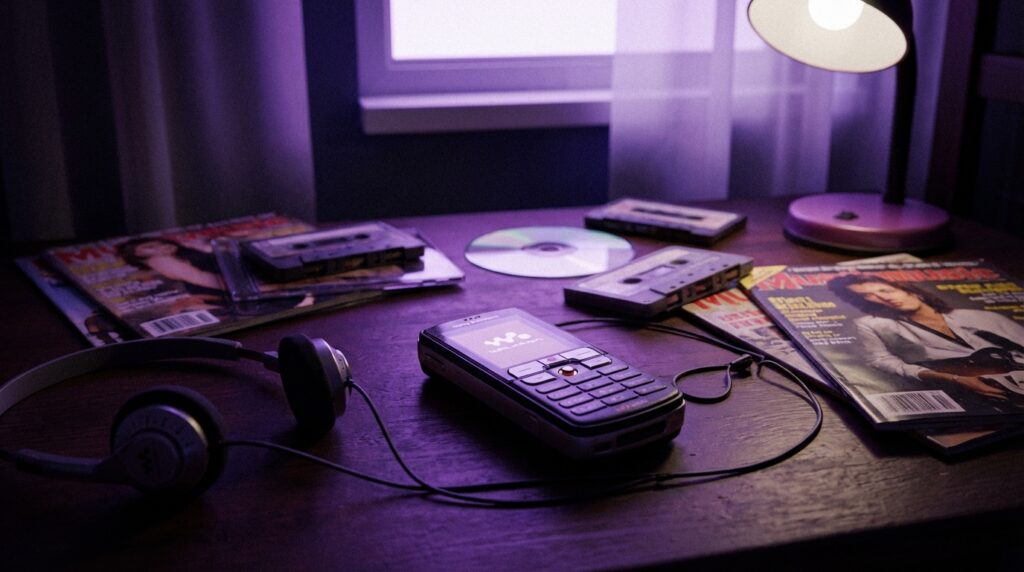
“The soft orange glow of that tiny ‘W’ button, the click of the side volume rocker, and the hiss before the bass kicked in on your favorite MP3.”
You remember that sound, right? That half-second of silence before the track started on your Sony Ericsson Walkman phone. No instant streaming, no lossless audio buzzwords, just a chunky orange-themed media player on a 2-inch screen and a 512 MB Memory Stick that felt like it could hold your entire life.
Todays phones have 1 TB storage, noise cancellation, and streaming apps stacked in folders. Back then, you were swapping songs on a W800 over a USB 1.1 cable and feeling like you were carrying a portable recording studio in your pocket. The Walkman phone era sat right between CD players and Spotify, right between “burning MP3 CDs” and “add to playlist.” It was that sweet spot where your phone was still a gadget, not a small slab of your entire existence.
The moment Sony Ericsson decided your phone should be an MP3 player
The Walkman phones did not show up out of nowhere. Before them, you had standalone Sony Walkman cassette players, then Discman CD players, then MiniDisc for the brave. At the same time, early “music phones” from other brands felt like an afterthought: mono speakers on the back, crude media apps, and no real focus on what music lovers actually wanted.
Sony Ericsson looked at that gap and noticed something simple: people were already carrying two devices. A phone for calls and texts. A music player for the commute. The idea was not “lets invent something new” but more “what if the phone could seriously replace the MP3 player without feeling like a downgrade.”
So they took a candybar phone, painted bits of it orange, dropped the Walkman badge on it, bundled proper headphones, and made the music app the star of the show instead of tucking it into a tools folder. The W800, W550, W810, W910, W595, W850, W880, all of them had one thing in common: the phone was built around music, not the other way around.
You could feel that focus in the way they were built. Matte plastics with just the right grip. Slightly raised keys that clicked like a T9 dream. Play, pause, forward, and back buttons dedicated to audio, not hidden in a menu three levels deep. You carried a device that said “I am here for your tracks” every time you pressed that orange Walkman logo.
The first breakthrough: W800 and its orange revolution
“Retro Specs: Sony Ericsson W800i
Display: 176 x 220 pixels, 1.8 inch
Camera: 2 MP with autofocus
Storage: 34 MB internal + Memory Stick PRO Duo
Release year: 2005”
The W800i is where this story really takes off. It was not the very first phone with music features, but it was the first one where a huge number of people went, “I do not need a separate MP3 player anymore.”
The body felt solid, around 99 grams, thick enough that you never worried about bending it in your pocket. The white and orange shell had this mix of toy-like charm and serious function. The keypad had distinct ridges so you could text blind under the school desk without looking down.
The screen was tiny by current standards: 176 x 220 pixels, around 1.8 inches. You could see the pixels if you looked close, especially on album art, but the colors were vivid enough for the time. The Walkman interface used those oranges and blacks that almost looked like a miniature hi-fi system UI.
And the sound. For a lot of users, the bundled headphones were better than what they used on their computers. The sound carried enough punch in the low end to give you that “wow” moment when you first played a track converted from your ripped CDs. You had an EQ, Mega Bass, and volume levels that could actually compete with street noise.
This was the period where you were ripping your CDs into MP3s at 128 kbps or 192 kbps in Winamp or Windows Media Player, then dragging them into a Sony Ericsson folder over a clunky USB cable. Copy speeds were slow, but that process felt like a ritual. Curating a small, perfect library instead of dumping thousands of tracks.
Walkman mode: when your phone pretended to be only a music player
One of the slick touches on models like the W800 and W810 was “Walkman mode.” You could turn on the phone straight into music mode without loading the phone network. To your parents it looked like you just had your music player on, not your phone. For flights and battery conservation, this was gold.
You hit the Walkman key, the orange logo animates in, and suddenly your T9 messaging machine becomes a portable jukebox. Controls on the side let you change volume or skip tracks with the phone still in your pocket. No multitasking in the modern sense, but it did not matter because while you were listening, the device knew its purpose.
Memory sticks, bitrates, and the 100-song decision
Storage was the bottleneck. Most Walkman phones shipped with either a 512 MB or 1 GB Memory Stick PRO Duo. You might have seen that tiny purple card and thought: this thing holds more music than my CD binder.
It also forced you to think more about your music. If you ripped songs at 128 kbps, you could cram around 120 to 200 tracks into 512 MB, depending on track length. If you went for 192 kbps or 256 kbps for better sound, you had to make choices. No “sync all” button, no “liked songs” list with thousands of entries. You were building a focused library.
You probably remember sitting at your computer, dragging folders named “Bus Mix” or “Gym” or “Sleep” onto that removable drive. The Walkman software on the phone sorted them by artist, album, or playlist, but everything started with that physical act of copying data. It made every track feel more intentional.
“User review from 2005: ‘Just got my W800i. The sound on this thing is better than my standalone MP3 player. Mega Bass is crazy. Only wish the memory card was bigger.'”
Battery life held up surprisingly well. You could get around 15 to 30 hours of music playback depending on volume and method of use. That meant a couple of days of commuting before you had to hunt for the charger, which used that little multi-pin Sony Ericsson connector for both audio and power.
The tactile side of music: buttons, sliders, and sliders-that-flip
Part of why Walkman phones stick in memory is the physicality. Everyday modern phones are almost all screen. Touch controls, gestures, volume buttons, and maybe a silent switch.
Sony Ericsson Walkman models lived and died by their hardware controls. You had:
– A dedicated Walkman button, usually in orange.
– Side-mounted volume keys with a clear click feel.
– Physical play/pause, next, and previous keys on the front or the side.
– Often, a dedicated camera button too, since music was not their only trick.
The plastic felt slightly textured, sometimes soft-touch, sometimes glossy. The chrome around the D-pad would catch the light when you tilted it. It weighed enough that when it played music in your pocket, you could feel it shift a bit as you walked, but not enough to feel bulky.
On slider models like the W850 or W910, sliding the phone open answered calls or revealed a numeric keypad. Closed, they could still act as music players with front-facing controls and sometimes light effects that pulsed with the music.
“Retro Specs: Sony Ericsson W910i
Display: 240 x 320 pixels, 2.4 inch
Weight: 86 grams
Special feature: Shake control for track skipping
Release year: 2007”
The W910 introduced shake control. Hold a button and flick your wrist to skip to the next track. It sounds gimmicky now, but at the time, it felt like the phone was aware of you in a new way. You did not have accelerometer-based tricks everywhere yet, so this stood out.
From candybar to slider: Walkman models evolve
The Walkman range was not just a single line. It was a family with different shapes and priorities.
W550 / W600: the swivel show-offs
The W550 (and its variant W600 in some regions) was a swivel phone, with the screen twisting sideways to reveal the keypad. It had stereo speakers on the front, which made it feel closer to a mini-boombox when you set it on a table.
The plastic on the W550 felt chunkier, and the orange was even more in-your-face. This phone broadcasted its identity visually. It said, “I am the music kid” before you even launched a track. Gamers loved it too, since Java games played better with that horizontal style and loud speakers.
W810i: the all-rounder
The W810i might be one of the most remembered Walkman models. Black body, orange accents, 2 MP autofocus camera, quad-band, and a more polished Walkman interface. It fixed little things users complained about on the W800, like software quirks and button feel.
It felt like a serious phone first and a serious music player second, but not in a watered-down way. The headphone output was strong, the camera was solid for its time, and network support made it a good pick for travelers.
W850i and W880i: style takes over
The W850i was a slider with a glowing round D-pad that almost looked like a small vinyl record. The W880i went in the other direction: a super thin candybar with tiny round keys and a metal body. The W880i did not win everyone over with its keypad, but in pocket it felt like a sliver of tech, closer to a luxury gadget.
The music UI matured, album art became a bigger deal, and people began to care not only how their phones sounded but how their music library looked on that small screen.
Then vs now: A Walkman phone against a modern flagship
Lets line up one of the classic Walkman phones against a modern high-end smartphone to see how the story changed. For this, we will use the Sony Ericsson W810i and a hypothetical “iPhone 17” as an example.
| Feature | Sony Ericsson W810i (2006) | iPhone 17 (Modern) |
|---|---|---|
| Display | 2.0 inch, 176 x 220 pixels, LCD | 6+ inch OLED, ~3000 x 1400 pixels |
| Storage for music | 20 MB internal + Memory Stick (commonly 512 MB or 1 GB) | Up to 1 TB internal, cloud libraries |
| Music source | Local MP3/AAC on memory card | Streaming services + local files |
| Audio output | 3.5 mm (via adapter on proprietary port), wired headphones | Bluetooth wireless earbuds/headphones, USB-C or no jack |
| Battery life (music) | Up to ~20+ hours playback | Typically 40+ hours streaming with modern power management |
| User controls | Physical Walkman key, D-pad, side volume rocker, hardware music keys | Touchscreen controls, a couple of side buttons, voice control |
| Connectivity | 2G/EDGE, USB 1.1, Bluetooth 2.0 | 5G, Wi-Fi 6/7, fast USB-C, high-bitrate Bluetooth codecs |
| Music experience focus | Curated file-based collection, tactile control, bundled headphones tuned for the phone | Infinite catalogs, playlists, recommendation engines, multi-device sync |
From a pure spec sheet view, the older phone loses on almost every metric. But that is not the whole story. Where the Walkman phone era still holds interest is the way it locked music into a physical ritual. Copying files. Setting EQ. Choosing the 100 songs that made the cut.
With modern phones, you have power and convenience. With Walkman phones, you had limits that shaped your habits.
Why the Walkman badge actually mattered
The Walkman logo was not just branding stuck on a regular phone. Sony had a legacy to protect from the cassette Walkman days. The expectations were simple: it should sound good, be reliable, and be easy to carry.
So the audio chain on Walkman phones was tuned with more care than many rival devices at the time. You had:
– Decent DACs for the period.
– Software equalizers that actually made audible changes instead of fake sliders.
– Mega Bass tuning that pushed low frequencies without drowning everything else completely.
“User review from around 2006: ‘Compared my W810i to my iPod mini with the same song. The W810i is not as loud, but the bass is warmer. I use the phone more now because I dont want two devices in my pocket.'”
That last line captured the mood of the mid-2000s. The idea of “convergence” gadgets was still forming in most peoples heads. For many, the Walkman phone was their first serious step toward a single device doing more than one thing well.
Ringtones, MP3s, and custom identity
Owning a Walkman phone was not only about album listening. It shaped how you treated ringtones and notification sounds. The MP3 capability meant your ringtone could be a real song, not a polyphonic approximation.
You remember recording a 30-second clip from your favorite track, trimming it to start at the chorus, and setting it as your ringtone. Then you had SMS tones that were small, punchy sounds ripped from games, anime, movies, or meme audio shared over Bluetooth in class.
The Walkman phone turned the device into a portable identity badge. People recognized your taste in music before you said a word. When someone nearby had the same “Numa Numa” or Linkin Park clip as a ringtone, that sparked a conversation.
Sharing was mostly local. IR ports on older models, Bluetooth file transfers on newer ones. You sent songs and snippets directly to friends, no cloud account, no streaming links, just a raw music file hoisted over a short-range connection.
Software quirks: Java apps, simple UIs, and the Walkman menus
The Walkman interface stayed relatively consistent across models: orange accents, icon-based menus, and that familiar Walkman player layout.
You had tabs for:
– Now playing
– Artists
– Albums
– Tracks
– Playlists
No complex swiping gestures, no nested settings menus buried three levels down. You pressed up, down, left, right, OK. It felt predictable. The transitions were simple, and the phone did not try to be flashy with animations that slowed everything down.
Java-based apps were present, but they rarely touched the core Walkman experience. Music playback stayed stable most of the time, even when you jumped into messages or checked your call log.
There was no true background multitasking like current OSs, but you could often minimize the player, send a few texts, and jump back with the Walkman key. It felt like the phone paused itself politely to let you do one thing, then gently nudged you back to your tracks.
Walkman vs other music phones: Nokia XpressMusic and friends
Sony Ericsson was not alone. Nokia pushed XpressMusic phones, Samsung had Ultra Music models, and a few others tried similar branding.
Nokia XpressMusic devices, like the 5300 or 5800, had good sound and strong feature sets. They leaned into replaceable 3.5 mm jacks, visual equalizers, and sometimes better battery numbers. Fans often argued about which sounded better: Walkman or XpressMusic.
Walkman phones had that Sony sound tuning and the weight of the Walkman name. Nokia brought their own flavor, closer to a general multimedia pitch. Different brands, different approach. If you liked a tighter focus on music identity, the orange W badge pulled you in.
How Walkman phones foreshadowed streaming behavior
On the surface, Walkman phones were about local files. But some usage habits from that time feel very familiar to current streaming behavior.
– Playlists: Users built tiny, focused playlists for specific mood or activity: “Bus,” “Night,” “Study,” “Crush mix.”
– Skipping tracks: With easy next/previous buttons, you grew used to skipping songs within seconds if the vibe was off. This was the seed of short attention spans that streaming amplified.
– Audio as constant background: The phone in your pocket was always capable of audio, not just at home or at the desk. That constant presence set the stage for music being an always-on backdrop.
The difference is that Walkman phones did not feed you endless recommended tracks. You did the curation. You ripped, tagged, sorted, and copied. Today, the curation is offloaded to algorithms.
Maybe it was just nostalgia talking, but there was a special charm in sitting at your desk for an hour, crafting the perfect 512 MB “week mix” and knowing that for the next seven days, those tracks were your entire world when you stepped out the door.
Design details that made Walkman phones feel unique
Think about the small touches:
– The orange ring around the camera lens.
– The Walkman logo printed on the back cover, slightly raised.
– The LED that blinked while music played or when notifications came in.
– The tactile feel of the rubberized side keys when you pressed them through denim pockets.
These details gave each model personality. They did not feel generic. If you placed a W810, a K750, and a Nokia 6233 on the table, the Walkman phone stood out without even turning it on.
The camera shutter sound, the startup jingle, the clickty-click sound when you navigated menus, all of this built a mental link between device and music. You looked at that orange “W” and your brain filled in basslines and drum loops.
From Walkman to Xperia: the slow fade
As smartphones rose, Sony Ericsson started blending the Walkman concept into its newer products. The market wanted bigger screens, true internet browsers, and app stores. The iPhone and early Android devices rewired expectations around what a phone should be.
Sony Ericsson experimented with devices like the W960 and eventually the Xperia line. They carried Walkman apps or branding for a bit, but the identity started to spread thinner. Instead of a single-purpose mix of phone and music player, you now had a general-purpose smartphone that “also does music very well.”
Streaming apps took over. Local files became secondary for many users. Headphone jacks started to fade, replaced by Bluetooth audio and dongles. The feeling of a dedicated music phone, with physical play/pause keys, faded from the mainstream.
Still, you can see Walkman DNA in modern features:
– Sound profiles and EQ settings in Android skins.
– Branded music apps with visualizers and hi-res icons.
– Hardware audio enhancements, like better DACs on certain flagship devices.
Those touches trace directly back to a time when putting a logo like “Walkman” on a device meant more than just a licensing deal. It meant a concrete promise about how your tracks would sound through that tiny 3.5 mm jack, on a device that fit perfectly in your palm.
