

“The faint buzz of a Nokia 3310 on a wooden desk, the tiny monochrome screen lighting up with a pixelated envelope icon.”
You remember that feeling, right? Phone buzzes, you grab it, flip it open or slide it out of your pocket, and everything about that moment is physical. Buttons click. Plastic flexes a bit in your hand. The battery door creaks when you squeeze it. That little brick did not care about wireless charging or magnetic alignment. You shoved a chunky charger in the bottom and hoped the pin was not bent.
Fast forward to the iPhone in your hand right now. Smooth glass. Rounded aluminum or titanium. No buttons on the front. No obvious way to attach anything at all. Yet somehow your wallet snaps on, your charger sticks to the back like it is glued there, your car mount grabs it without clamps. It feels almost invisible. That jump from “shove a plug into a port” to “it just snaps and works” is where MagSafe quietly changes how you live with your phone.
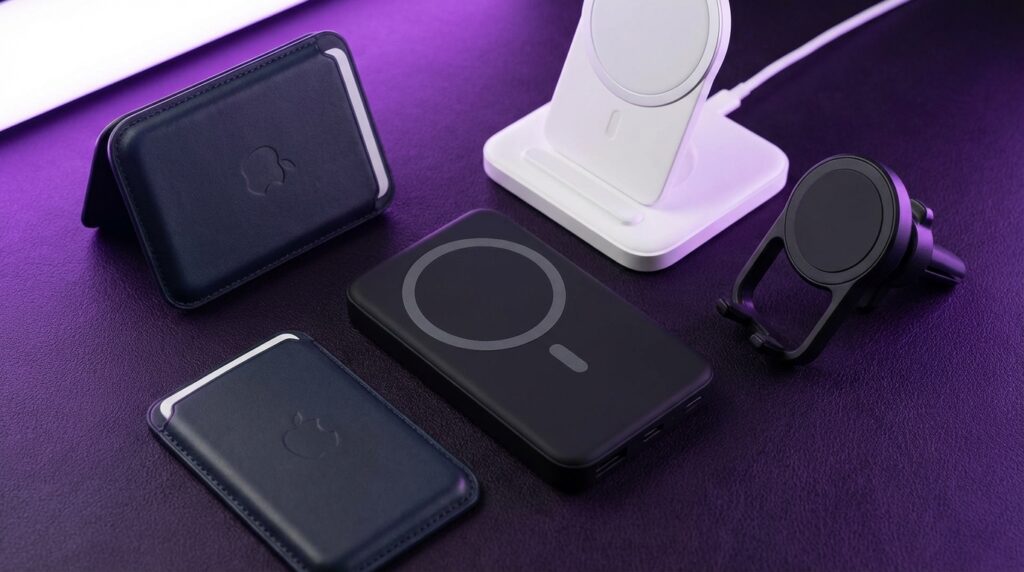
MagSafe accessories are not just little gimmicks that cling to the back of your iPhone. They change where you keep your phone, how you charge it, when you reach for your physical wallet, how you use your camera, and even how you set up a desk or nightstand. That sounds big, but it is built out of very simple parts: a ring of magnets, a charging coil, and a design playbook that accessory makers now build around.
Back in the early 2000s, the feature phone world ran on friction. Cases snapped over thick shells. Car chargers twisted into cigarette lighter sockets. Your phone dangled from a lanyard or belt clip like a tiny plastic badge. Every accessory grabbed on with clips, rubber, or screws. Now accessories float around your iPhone like modular pieces. You pull one off, snap another on, and your phone changes personality in a second.
Maybe it is just nostalgia talking, but when I first felt a MagSafe charger click into place, my brain jumped right back to that feeling of seating a Nokia battery under a plastic cover. That tiny mechanical “yes, it is seated correctly” moment. Only now the click is magnetic, not mechanical, and the payoff is a docked phone that feels like it belongs there.
Before we talk about what to buy, it helps to see MagSafe as a kind of new “socket” on the back of your phone. The same way that old charging pins, 3.5 mm jacks, and 30‑pin connectors shaped whole worlds of accessories, this magnetic ring is reshaping stands, power banks, wallets, and even how you hold the device.
“Retro Specs: 84 x 48 pixels, 1.5 inch monochrome screen, removable 900 mAh battery, T9 keypad that could outlive a small planet.”
Those numbers look tiny next to a modern iPhone, but they show how far we have come and why something like MagSafe can exist at all. Thinner bodies, large coils, much more precise magnets, and wireless charging chips make that magnetic snap feel casual. Under the hood it is not casual at all.
From Bricks to Magnets: How We Got to MagSafe
MagSafe on the iPhone sits on a long timeline. You can almost trace a straight line from the chunky accessories of the early 2000s to the almost invisible add‑ons we have now.
The Old Phone Accessory World
If you had a Nokia 3310, a Sony Ericsson T610, or a Motorola Razr, your gear probably looked like this:
“User Review from 2004: ‘Got this belt clip for my 3310. Phone fell off once when I got out of my car, but still works. 10/10.'”
Everything was mechanical: clips, screws, latches. You plugged an external antenna booster into a port. You snapped a camera add‑on over the top of your phone because your phone probably did not ship with a great one built in. Your charger had its own shape and your friend’s Samsung charger did not help you at all.
That world had a lot of friction. You could not swap gear between brands. Your case, charger, and car mount often died with the phone.
Then vs Now: Phones That Invited Accessories
The iPhone slowly shifted that pattern with docks, then Lightning, then wireless charging. MagSafe is just the next stage. To see the jump, it helps to put a classic like the Nokia 3310 side by side with a modern iPhone that supports MagSafe.
| Spec / Experience | Nokia 3310 (2000) | Modern iPhone with MagSafe |
|---|---|---|
| Screen | 1.5″ monochrome, 84 x 48 pixels | 6+ inch OLED, high resolution, millions of colors |
| Charging | Physical pin charger, no wireless | Lightning or USB‑C, Qi wireless, MagSafe up to 15 W |
| Battery Access | Removable plastic back, pop‑out battery | Sealed body, internal battery |
| Accessories | Belt clips, snap‑on faceplates, wired car chargers | Magnetic wallets, stands, power banks, car mounts |
| Weight & Feel | About 133 g, thick plastic shell, heavy keys | Roughly 170‑220 g, glass and metal, no front buttons |
| Attachment Method | Clips, screws, friction fit | MagSafe magnet ring + NFC‑style accessory detection |
The key line there is “Attachment Method.” That is where MagSafe quietly changes almost everything.
What MagSafe Actually Is Under the Glass
MagSafe is not just “strong magnets” on the back of an iPhone. It is a combination of parts:
- A circular ring of magnets around the wireless charging coil
- A smaller alignment magnet to keep accessories oriented
- A wireless charging standard with a known position and power level
- Accessory detection so your phone knows when a wallet, case, or charger snaps on
When you feel that little tug as a charger slides into place, there are two big wins happening at once:
1. Your phone and the accessory are perfectly aligned for wireless charging. That helps speed and heat.
2. The magnets create a mechanical “dock” without clips or clamps.
If you remember trying to get an early Qi charger to line up, where you would wiggle the phone around until the charging icon appeared, MagSafe almost feels like cheating. The ring does the alignment for you.
“Retro Specs: Qi wireless charging pads in 2012 often delivered 3 to 5 W, slowed charging, and punished misalignment with zero charge and lots of heat.”
Those early pads felt cool on a desk, but they were fussy. MagSafe fixes a lot of that. It does not make physics vanish. Things still get warm on long charges. But the experience improves enough that people actually stick a charger on a wall, a stand, or a car vent and use it all day.
Once that magnetic socket exists, it gives accessory makers a stable anchor. Now they can design a hinge, a grip, a wallet, a battery pack that feels properly attached. That gives you new ways of using your phone that feel native, not hacked on.
MagSafe Chargers That Change Where You Leave Your Phone
The first MagSafe accessory that most people touch is the basic magnetic charger puck. It looks simple: a round pad on a cable. The key is where you put it.
From “Where Is My Cable?” to “My Phone Lives Here”
Before MagSafe, a lot of people had this routine:
– Reach for a cable near the bed or desk.
– Find the connector on the phone.
– Plug it in by feel in the dark.
– Wake up having yanked the cable off the table at least once.
MagSafe chargers turn those spots into tiny docks. You mount a puck on a stand, clamp it to a shelf, sit it on a nightstand. The magnets hold your phone at a fixed angle, so what used to be “dead time while charging” becomes “mini display” time.
At a desk, that means:
– Your iPhone faces you during calls and notifications.
– StandBy or lock screen widgets stay visible while the phone charges.
– You can tap, scroll, or answer a call without fighting a cable that is twisting around the bottom.
In a bedroom, that means:
– You drop the phone somewhere without hunting for a port.
– The magnetic click in the dark tells you it is actually charging.
– You can glance at the clock or alarms like a tiny bedside display.
None of this is impossible with a regular stand, but the magnetic grip changes the habit. You stop laying your phone flat. It sits up, like a tiny screen, and that leads you to use it in more “glanceable” ways.
MagSafe in the Car
Car mounts might be where MagSafe feels the most different. Remember the days of spring‑loaded clamps and awkward suction cups that fell off in the summer heat?
“User Review from 2005: ‘The car cradle holds my Siemens okay, but it rattles and blocks the A/C vent. Charger plug is loose though. Might super glue it.'”
MagSafe car mounts snap your phone into the same spot every time with one hand. No side clamps, no bottom shelves. You lift your phone toward the mount and the magnets do the final bit of work.
The way this changes use is subtle:
– You are more likely to dock your phone for even short trips, since it is faster.
– Navigation feels less like “I have to set up a rig” and more like “my phone belongs right here.”
– Wireless charging through MagSafe keeps the battery from draining on GPS‑heavy drives.
Good MagSafe car chargers also pivot around that magnetic center, so you rotate your phone to portrait or landscape without fighting plastic joints that stick. The magnets hold orientation tight enough for rough roads in most cars, though very bumpy rides or thick cases can weaken that grip.
MagSafe Wallets That Change How You Carry Money
The MagSafe wallet is one of the most personal accessories you can attach. It sticks to the back of your phone and often replaces a traditional wallet for many people.
Phone + Wallet as One Object
When you snap a slim leather or silicone card holder on the back, your iPhone becomes:
– ID holder
– Transit pass stash
– A couple of physical cards for places that still do not love digital payments
You feel the extra thickness. That smooth glass back now has a soft pad on it. The weight shifts a bit. A bare iPhone might feel almost slippery. With a MagSafe wallet attached, your fingers catch on the edge of the wallet as you grip, which can feel more secure.
This changes behavior in obvious ways:
– You stop grabbing a separate wallet when you leave home.
– You take fewer cards. Many people keep only 2 or 3 in there.
– You rely more on Apple Pay, tap‑to‑pay, and digital passes.
There is also a small interaction detail people often overlook. Many branded MagSafe wallets trigger a little animation when they attach, and in some models, the phone can remember where the wallet was last detached. So if it falls off in a cab or on a couch, your iPhone can at least tell you “it was last seen here.”
It is not a perfect tracker, but that extra tiny bit of awareness changes how brave people feel about making the phone/wallet combo their main carry.
MagSafe Wallets vs Old School Phone Pouches
If you compare them to the leather belt pouches of the early 2000s, the difference is night and day. Those pouches wrapped around your device. The phone had to slide in or snap under a flap.
MagSafe wallets ride on the back and can peel off any time. That pattern is closer to Lego bricks than to old “phone holsters.”
There are tradeoffs:
– A strong pocket jolt can slide a MagSafe wallet off.
– Thick cases or knockoff wallets can weaken the magnet hold.
– The more cards you pack, the looser it may feel.
For most people though, the benefit is that you can go “phone only” for quick runs to the store, walks, or gym trips with very little friction.
MagSafe Power Banks That Change Battery Anxiety
Early external batteries were bricks with cables. You had a tangle in your bag, and your phone dangled from the pack like a spider on a string.
MagSafe battery packs clip directly to the phone, so your hand holds one single object.
The Feel of a MagSafe Battery Pack
Picture this: your iPhone, already a glass and metal slab, now has a second slab pressed up against its back. The combined thickness jumps. The weight swings more toward the center of your palm.
It feels solid. Not exactly light, but integrated. You can still put it in some pockets, though skinny jeans might complain. You can still scroll and type, because there is no cable to catch on your wrist.
Behavior shift:
– You snap the pack on and forget it for an hour while it tops up.
– On a flight or a long commute, you use your iPhone naturally instead of babying the battery.
– You keep a pack in your bag that works like a magnetic “range extender” for your phone.
Power output and capacity vary, but MagSafe packs often target a “slow steady charge” rather than blazing fast top‑ups. They are like fuel tanks that keep you in the comfortable battery zone, not emergency turbochargers.
Wireless Heat and Tradeoffs
Wireless charging creates heat. Attach a MagSafe power bank, and that sandwich of phone + battery warms up more than a wired pack would. That is the price for convenience and one‑hand use.
For many people, the tradeoff works:
– No cable management.
– No wear on the charging port.
– Easy on, easy off. You remove the pack when not needed.
It feels almost like snapping an extended battery case from the early smartphone era on and off, except now the attachment is magnetic and can be swapped in seconds.
MagSafe Stands and Mounts That Change How You Use the Screen
A big shift with MagSafe accessories has nothing to do with power or cards. It is about making your iPhone more like a little movable display.
The Desk Setup
Put a solid MagSafe stand on your desk, and your phone stops living flat on the surface. It sits upright, almost like a second monitor. That simple angle change leads to:
– More frequent glances at widgets and messages without picking it up.
– Easier use of video calls with the phone as camera and mic.
– Less neck bending to see who is calling or what just pinged.
If you ever propped your old flip phone open against a coffee mug to use it as a tiny video player, this will feel familiar but way more stable.
Many stands angle the phone to match your eye line. Some rotate so you can swing from portrait to landscape. Others fold flat so you can travel with them.
On the Wall, on the Fridge, on the Shelf
MagSafe plates and wall mounts extend this idea all over your space:
– A mount on the kitchen backsplash for recipes and timers.
– A mount on a home gym rack for workout tracking and music.
– A plate on the fridge for lists, calendars, and calls while cooking.
Before MagSafe, you needed clamps or permanent brackets. With MagSafe, a metal plate plus the magnet ring gives you a quick dock. Your phone becomes a small screen that follows you around the house into places where a laptop feels like overkill.
MagSafe Grip Accessories That Change How You Hold Your Phone
Pop‑up grips and finger loops became popular as phones grew larger and slipperier. MagSafe lets you detach those grips when you do not need them.
From Permanent Buttons to Modular Grips
The classic stick‑on grip has one big downside: once it is on, it is on. Your phone never lays totally flat. Wireless charging pads may not work well. Your pocket catches on the bulge.
MagSafe grips attach and remove at will:
– Clip a ring grip on for long texting sessions, streaming, or photo shoots.
– Pop it off when you want a sleek back for wireless charging or a stand.
– Swap between kickstand‑style grips and simple loops based on the day.
The magnet ring keeps the grip centered. That balance matters. A centered grip gives you more stability than a stuck‑anywhere accessory.
You feel that alignment in your fingers. The weight of the phone hangs evenly under your knuckles instead of torquing your wrist.
Camera‑Focused MagSafe Accessories
Cameras are where the iPhone already replaces a lot of gear. MagSafe adds a new layer by giving the camera system attachments that feel semi‑pro.
Tripods, Handles, and Rigs
MagSafe tripod mounts let you snap the phone straight onto a stand with no clamp. Some rigs go further:
– A MagSafe handle that you grip like a small camcorder.
– Lens filters that pop onto a MagSafe frame.
– Rigs with cold shoe mounts for lights and microphones that start with a MagSafe plate in the center.
The experience shifts from “careful, do not drop the phone out of the clamp” to “this thing is meant to be held like a camera.” That psychological switch changes confidence when you shoot video or longer clips.
Again, magnets are not magic. You still respect gravity, especially with heavy add‑ons. But the speed of mounting and unmounting makes you more likely to actually use the gear you own.
Then vs Now: Accessory Worlds Compared
To see just how far we moved from plastic clips to magnetic modules, it helps to compare the whole accessory experience.
| Experience Area | Then: Feature Phone Era | Now: MagSafe iPhone Era |
|---|---|---|
| Primary Attachment | Belt clips, pouches, screw‑on accessories | Magnetic snap with precise alignment |
| Charging Style | Cabled bricks, car chargers with cords | MagSafe pucks, stands, car mounts with wireless power |
| Wallet Interaction | Separate leather wallet in pocket or bag | Thin MagSafe wallet stuck to phone’s back |
| Power on the Go | Bulky wired power banks with dangling cables | Snap‑on MagSafe battery packs |
| Car Mounts | Suction cups, side clamps, rattling cradles | Vent or dash mounts with magnetic docking |
| Desk Use | Phone flat on table, occasional dock | Always‑on magnetic stands and vertical charging |
| Grip & Handling | Naked plastic/metal, maybe a thick case | Swap‑on MagSafe grips, stands, and finger loops |
The phone did not just gain magnets. Your whole relationship with where it lives during the day shifted.
How MagSafe Changes Habits Without You Noticing
One of the most interesting things about MagSafe is how subtle the habit shifts feel. No big tutorial. No “new mode.” Just different friction.
Charging Frequency and Placement
MagSafe makes it easier to “sip” power all day instead of gorge overnight. You drop your phone on a stand whenever you sit at a desk. You clip it into a car mount for even short drives. You attach a battery pack for a couple of hours when walking around a city.
Over time, that pattern means:
– Less battery anxiety.
– More consistent mid‑range charge levels.
– Less wear on charging ports since they are used less.
You feel this in small daily choices. You stop hunting for cables. You start building mental maps of “charging spots” where magnets live.
Screen Time and Second‑Screen Use
With MagSafe stands, your iPhone often becomes a sort of passive second screen:
– At work, calendar and communication apps sit in the corner of your vision.
– At home, your phone becomes a mini TV on the nightstand or workbench.
– During calls, you prop it at eye level without stacking it against coffee cups.
That can be good or bad, depending on your boundaries with notifications, but from a pure behavior standpoint, MagSafe makes “phone as tiny monitor” much more natural.
Wallet and ID Dependence
MagSafe wallets nudge you toward a smaller physical wallet footprint. Once your ID and one main card live on your phone, you start asking if you truly need more plastic in your pocket.
The digital side is obvious: Apple Pay, transit cards, digital keys. The physical side comes from the limit of the wallet itself. Many MagSafe wallets top out around 2 to 3 cards. That constraint quietly shapes your habits.
Crafting a MagSafe Setup That Fits Your Life
Think of MagSafe as a modular kit. Your phone is the base, and you build out from there for different parts of your day.
Some common patterns:
– Desk heavy day: Stand + basic MagSafe puck charger.
– Commute heavy day: Vent mount with charger + slim MagSafe wallet.
– Travel day: MagSafe battery pack + stand that folds flat.
– Creator day: MagSafe grip + tripod mount + light/ mic rig.
You do not have to own everything. Many people run with just two or three pieces that cover 90 percent of their use. The key is understanding how each piece changes where your phone lives and how it feels.
The physical side matters more than most spec sheets admit:
– A thick MagSafe case can boost magnet strength but add noticeable weight.
– A leather wallet feels very different in the hand than a hard plastic one.
– A heavy stand gives you confidence when tapping the screen, while a light one may wobble.
These are the same kinds of tactile questions we asked about old phones, just in a new context. How heavy does it feel in my pocket? Do the buttons click the way I like? Now we add: how strong is the magnetic pull, and does it line up with how I carry and charge the device?
Looking Back to See Where MagSafe Fits
If you line up your tech memories, you can see MagSafe as part of a bigger arc:
– Removable batteries that you popped out and swapped.
– Physical docks that cradled phones on desks.
– Clip‑on camera modules and bolt‑on battery backs for early smartphones.
– Wireless charging pads that looked cool but felt finicky.
MagSafe pulls little pieces from each era:
– The satisfying “it is seated right” feeling from battery doors.
– The fixed, upright viewing angles from physical docks.
– The modularity of clip‑on accessories, but with magnets instead of screws.
– The convenience of wireless charging, minus most of the misalignment grief.
“Retro Specs: The original iPhone dock from 2007 came with the phone, had a 30‑pin connector, and held one device in portrait only. No magnets, no wireless, just a very specific plastic cradle.”
That old dock locked you into one phone shape. Switch models, and the dock often stopped working. MagSafe flips that. The magnetic standard aims to live across multiple generations, so your stand from one year still works when you upgrade the phone.
MagSafe accessories do not shout for attention. They sit on desks, hang on vents, ride behind cases, and clip into bags. The glow up from rattling belt clips and squeaky car cradles to silent magnetic clicks is easy to take for granted.
But once you pay attention to it, you see how this simple ring of magnets quietly rewires where your iPhone lives during the day and what you expect it to do when it is not just in your hand.
