

“The tiny buzz of a Nokia 3310, that stiff directional pad, and the sharp ‘beep’ when you hit the wall in Snake. That was mobile gaming.”
The first time you clipped a plastic case onto your phone so you could play better, it probably felt a bit silly. This tiny thing in your hand was supposed to be a phone, not a game console. Yet here we are, streaming AAA titles over 5G, pairing controllers, and fitting entire gaming rigs into pockets. That old Snake session on a monochrome screen now connects straight to your Backbone or Razer Kishi gripping a huge OLED smartphone that runs circles around old desktops.
You remember the feel of those early phones, right? Thick, chunky bodies, keypads that clicked like a mechanical typewriter knockoff, and screens that looked more like a calculator than a TV. Back then, “graphics” meant blocky sprites and maybe a few shades of gray if you were lucky. The most you had to think about was battery bars and whether the ringtone volume was high enough to hear in your backpack.
Today, the conversation is different. You are not asking “Can this phone run Snake?” You are asking “Should I get a Backbone or a Razer Kishi to play Genshin, Call of Duty Mobile, or stream my Steam library?” The same pocket that once held a phone with a green pixel grid now holds a 120 Hz display, pass-through charging, analog sticks, and clicky shoulder buttons that feel weirdly close to a console pad.
For about the first decade of mobile phones, gaming was a bonus feature. Something you messed with when you were bored in a waiting room. You felt the weight of those devices, mostly battery and plastic, around 130 grams or so, with removable backs that creaked when you squeezed them. That creak was familiar. It matched the slightly mushy feel of the 5-way D-pad as you pressed hard to squeeze out one more high score.
“Retro Specs: Nokia 3310, 84 x 48 pixel screen, about 113 grams, and a D-pad that somehow carried entire bus rides.”
Fast forward to smartphones. Capacitive touchscreens killed the keypad. The physical feedback that used to guide your thumb vanished, replaced by glass. Great for scrolling, not always great for precision movement in shooters or racers. Virtual sticks on screens feel slick, floaty, and kind of disconnected. You lift your thumb for a second and lose your point of reference. That is where clip-on controllers stepped in, and where the Backbone and Razer Kishi took things from “phone accessory” to “portable console” feeling.
Before we jump into specs and pros and cons, it helps to remember that mobile controllers are trying to fix the same problem those early plastic phone shells tried to solve. They are there to give your hands something real to grab onto. To bring back that physical click that touch controls took away.
The long road from T9 buttons to slide-on controllers
Mobile gaming grew in layers. The first layer was built-in games: Snake, Space Impact, Bounce. They were tiny, fast to load, and tuned around that single D-pad and two or three soft keys. No shop screens. No day-one patches. Your phone’s internal memory was maybe a few hundred kilobytes, and that covered your wallpaper, games, and your entire text history.
Then came Java games and polyphonic ringtones. You might remember paying a small fee through your carrier portal, waiting for that “message received” tone, then watching a progress bar crawl across a 128 x 160 screen while your new game installed. Games like Asphalt, Prince of Persia, or those weird branded titles that tried to squeeze console names into 200 KB. They tried to feel like console titles, but control was still built around keypads.
“User Review from 2005: ‘The game is good but my 5-key stopped working from playing too much. Please add options for 4 and 6 only.'”
When iPhone and Android showed up, things changed fast. Screen real estate shot up. We moved from 2-inch panels to 4, 5, then 6-inch or larger slabs. GPUs got stronger, and games looked better than what some home consoles used to push. But it came with a tradeoff. No more physical buttons.
Touch controls enabled more types of games, but action-heavy titles often felt like compromises. You had to cover part of the screen with thumbs. Latency from touch sensors was small but noticeable for some players. Try landing perfect headshots with a sweaty thumb sliding across a glass panel during a ranked match, and you know what I am talking about.
The first mobile controllers tried to sidestep this with Bluetooth gamepads. They worked, but carrying a separate Xbox-style controller felt like lugging around a second device. It broke the pocket feel. That is where the Backbone and Razer Kishi approach stood out. They both said: what if the phone could become the “screen in the middle” of a Switch-style controller?
Then vs Now: From bricks to portable consoles
To really feel how far we have gone, it helps to stack an old icon next to a modern phone-plus-controller setup.
| Feature | Nokia 3310 (Then) | Modern Phone + Backbone / Kishi (Now) |
|---|---|---|
| Weight | Approx. 113 g phone only | 200 g+ phone + 130 g controller = around 330 g in hand |
| Display | 84 x 48 pixels, monochrome | 1080p to 1440p OLED, often 90-120 Hz |
| Controls | T9 keypad, single D-pad | Dual analog sticks, triggers, bumpers, ABXY, menu buttons |
| Game Size | Under 200 KB | Several GB for local installs, cloud streaming libraries |
| Connection | No external controller support | Direct USB-C / Lightning connection, low input lag |
| Use Case | Short sessions, built-in games | Full sessions, competitive play, cloud streaming |
The phone’s weight used to feel like a dense little brick. Now, when you slide it into a Backbone or Kishi, the unit stretches across both hands. The center of gravity shifts to the middle, closer to a Nintendo Switch or Steam Deck feeling. The plastic is smoother, less creaky, and more sculpted around palms. But that same satisfaction from a physical button press is still the thing tying both eras together.
Enter the Backbone and Razer Kishi
So, when you ask “Backbone vs Razer Kishi for mobile gaming,” you are really asking two questions:
1. Which one is better for your specific phone and platform?
2. Which one feels better in your hands and matches your gaming style?
Both follow a similar basic idea: a split controller that clamps around your phone, connects directly to the port (USB-C or Lightning, depending on model), and gives you console-grade controls without a Bluetooth hop. That direct wired link cuts latency and gets closer to the instant response you expect from a console.
But under that shared shell, there are clear differences in design, software, ecosystem focus, and long-term comfort.
How they feel in the hand: design and ergonomics
Backbone: The “mini console” approach
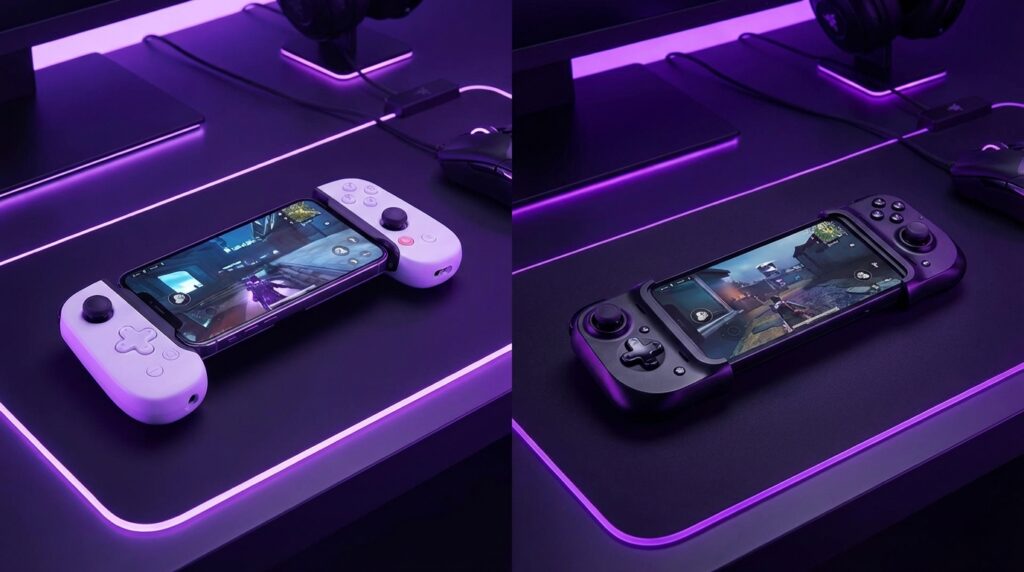
Backbone tends to lean into the “turn your phone into a console” feeling. The plastic shell has a bit more contour to it, especially on the PlayStation-style versions with white plastic and black accents. The grips are not as chunky as a home console pad, but they flare just enough at the back to give your ring finger and pinky extra support.
The face buttons on Backbone are tight and clicky, closer to what you might expect from an Xbox or PlayStation pad, but shrunk for mobile. The analog sticks sit low, with a shorter throw, which helps in portability and quick directional shifts but may feel a bit cramped if you have large hands. Shoulder buttons and triggers are surprisingly tactile for this size class, with defined separation between bumper and trigger.
When you slide a phone into a Backbone, you feel that satisfying little tension as the controller stretches and then clamps back. The center bridge has a bit of flex, but not the cheap creak of old clip-on shells. It feels like a unified piece once the phone is in.
Backbone also went heavy on a “home hub” style button layout. There is a dedicated Backbone button on the controller that launches their app, plus options for capturing screenshots and clips. It feels built for recording and sharing moments just as much as playing.
Razer Kishi: The “portable rig” feeling
Razer’s Kishi design has gone through iterations, but the core idea stays the same. It folds into a compact form when not in use, then expands with a central flexible band to fit around your phone.
The grips on the Kishi are usually slimmer, with less of a back bulge compared to Backbone. This keeps it very compact in bags, but can feel flatter in a long session. Razer leans hard into its gaming identity: matte black finish, green accents depending on the model, and a button feel that channels the Razer controller line.
The Kishi’s analog sticks can sit a bit higher and their resistance sometimes feels closer to a console pad. Face buttons are snappy, although spacing varies by revision. On some models, the D-pad has a slightly softer feel, more like a single disc under separate buttons.
The sliding and clipping action on Kishi has a more mechanical feel. You pull the controller apart, set the phone on one side, then guide it into the other port. There can be a bit of flex in the band, which some users like because it accommodates cases more easily, while others prefer the more rigid Backbone framing.
“User Review from 2005 (reimagined): ‘If this phone had buttons on both sides like a Game Boy, I would never need a console.’ The Kishi is basically that comment turned into a product.
Connection and latency: why the port matters
Both Backbone and Kishi avoid Bluetooth for the main connection in their flagship versions. They plug directly into the phone’s port: Lightning for compatible iPhones in older Backbone models and certain Kishi versions, and USB-C for many Androids and newer iPhones.
This direct connection gives lower latency than typical Bluetooth controllers. The input goes straight over the data line instead of passing through a radio stack. When you are playing shooters or rhythm games, those small differences matter. It feels closer to that instant click-to-action loop you once had with the old D-pad games, just multiplied across more axes and buttons.
One difference that often shows up in real-world use is how each brand handles pass-through charging and, occasionally, audio.
– Backbone models often support pass-through charging so you can plug power into the controller and charge the phone while gaming.
– Kishi also supports pass-through on many versions, but behavior can change depending on the exact revision and phone model.
Audio through the port can be more hit-or-miss on both, depending on system-level support and updates. Many players sidestep that completely and use Bluetooth earbuds or wired headphones through the phone if it still has a jack.
Software, apps, and ecosystem focus
This is where the two brands start to diverge in daily feel, even if the plastic and electronics look similar on paper.
Backbone: The “console-like dashboard” for your phone
Backbone pitch sounds simple: one controller, one app, one unified experience. When you press the Backbone button, it pulls up the Backbone app, which looks a bit like a console home screen layered onto mobile. Game tiles, streaming services, and shortcuts to installed titles show up in a curated list.
Backbone wants your phone to feel like a dedicated handheld when the controller is on. You can organize cloud services like Xbox Cloud Gaming, PS Remote Play, Steam Link, and mobile games in one place. There is also built-in support for screenshots and clips, which the app helps you edit and share.
For some players, this is the main draw. It feels structured, like turning on a PlayStation or Xbox, even though under the hood it is still your phone. For others, it can feel like an extra layer they ignore while bouncing between apps the old-fashioned way.
Razer Kishi: Lighter wrapper around existing services
Razer has its own app layer, but its presence feels lighter in daily use. The Kishi is more of a hardware-first product with software to help you discover compatible games and manage settings, rather than a full dashboard that tries to reframe the phone experience.
You still can gather links to cloud services and supported games, but many Kishi users simply click on Xbox Cloud Gaming, GeForce Now, or their game of choice and let the OS handle launching. There is less of a “console shell” vibe and more of a “this is a controller, use it with whatever” feeling.
If you like the idea of a curated hub and recording integration, Backbone has an edge. If you just want a strong-feeling controller and do not care about one more launcher, Kishi lines up well.
Platform support: iOS, Android, and future proofing
The platform choice matters more now than ever, especially as USB-C becomes common across both ecosystems.
Backbone platform story
– Historically, Backbone got a lot of buzz around its iOS model, which plugged into Lightning and had very tight integration with iPhones.
– Newer revisions support USB-C, opening the door for Android devices and newer USB-C iPhones.
– Backbone often promotes specific compatibility lists. They like to call out which phone sizes fit best and what OS features are supported for things like screen recording.
If you are deeply tied to iOS and want a very “console-like” wrapper, Backbone usually feels dialed in. For Android, support is broad but always check device lists and port location. Thick cases or centered vs offset ports can change fit.
Razer Kishi platform story
Razer, coming from a PC and Android-heavy audience, put strong focus on Android USB-C models early on. Over time, they also shipped iOS-compatible variants and have refreshed designs to handle more devices and curved edges.
The Kishi often wins fans among those who flip between Android phones from different brands, since Razer tunes for broad compatibility. Again, case thickness, camera bumps, and port locations can still play a role.
If you swap phones often or use non-mainstream Android devices, Kishi can sometimes be more forgiving physically, especially on recent revisions designed with floating or adjustable phone cradles.
Button feel, layout, and long sessions
Some gamers care about travel distance and actuation force almost as much as frame rate. If you are one of those people, here is where the preferences usually split.
Backbone feel
– Buttons: Short travel, crisp click. Good for quick inputs and tap-heavy games.
– Sticks: Slightly shorter height, which can lower fatigue but sometimes feels a bit less precise for fine aiming compared to a full-size pad.
– Triggers: Defined pull, but shorter range than console counterparts. Well suited to racing games and shooters on mobile where full analog trigger finesse is used less often.
Many users say Backbone feels like a premium compact pad that takes cues from console controllers, but miniaturized. It is good for long sessions, especially if your hands are medium-sized. Larger hands might wish for deeper grips.
Razer Kishi feel
– Buttons: Snappy, slightly “clickier” on some versions, with a gaming mouse kind of profile in some models.
– Sticks: Sometimes slightly taller with a firmer resistance, which can help with precise aiming but may tire thumbs faster if you press hard in long sessions.
– D-pad: Varies by revision. Some units feel closer to a connected disc, which is nice for fighting games and 2D platformers; others feel more segmented.
Over long sessions, Kishi’s flatter grip profile might leave your fingers reaching a bit more if you are used to big console handles. On the flip side, that compactness is great for quick throws into a bag and casual short bursts.
Cloud gaming and remote play: where both shine
This is the area that really lights up the Backbone vs Kishi debate. Local mobile titles support controllers more often now, but both brands gain a lot of value when you point them at cloud or remote services.
Picture your old Snake phone trying to render a modern open-world game; the idea would have seemed like science fiction. Now, your phone decodes a 1080p or 4K video stream while the controller sends inputs with minimal lag over USB-C. You might be running Halo or Elden Ring on a server miles away and still playing in bed like it is native.
Both Backbone and Kishi work well with:
– Xbox Cloud Gaming (through Game Pass)
– PS Remote Play
– Steam Link / Moonlight / similar apps
– GeForce Now
If you grew up on wired controllers plugged into massive CRTs, there is something surreal about lying on a couch with just a phone and a clamp-on controller, playing titles that used to require a full box under the TV and game discs stacked on a shelf.
“Retro Specs: PlayStation 2, 128-bit ‘Emotion Engine’, dual analog controller, plugged into a 480i CRT. Now that same style of game is streamed to a 6.7 inch OLED with a USB-C controller.”
Latency in cloud gaming is still mostly shaped by your network and the remote server, not so much by the controller in this case. Since both Backbone and Kishi use direct connections, they avoid adding extra hops.
Build quality, durability, and small annoyances
Neither device has the tank-like solidity of an original Nokia brick, but they are sturdier than older clip-on toy-like shells.
Backbone gear usually feels like a slightly more solid shell once the phone is in place. The central bridge has controlled flex, and many users mention that it survives regular bag throws and desk drops without issue. Still, you are dealing with rail and port connectors, so gentle use during insertion and removal is smart.
Kishi’s foldable design gives it an edge in compactness but brings more moving parts. The elastic or rail-based connector system can loosen over long periods if handled roughly. Some users report that earlier versions felt a bit “stretchy” over time, especially with heavier and larger phones.
Both can collect dust and pocket lint in crevices, especially around the port and expandable bands. A quick brush clean now and then keeps things smooth.
One annoyance that affects both: phone cases. Thick or rugged cases can make your phone too wide or thick for a snug fit. Sometimes you need to pop the case off, which takes away from the grab-and-play fantasy. Newer revisions across both brands try to handle slightly bigger phones, but case compatibility still is something to check before buying.
Backbone vs Razer Kishi: Where each one fits best
Thinking about this like the early days of mobile helps. Back then, your choice was often “Nokia, Sony Ericsson, or something else?” Each had its own flavor: ringtones, screens, battery life. For controllers today, Backbone and Kishi fill similar roles with their own lean.
When Backbone tends to be the better fit
– You want a console-style dashboard on your phone, with a dedicated button to pull up a central app.
– You care about built-in support for capturing clips and sharing content from one place.
– You like a slightly more contoured grip with clicky, short-travel buttons.
– You are on a compatible iPhone model or mainstream Android phone and do not swap devices constantly.
Backbone is almost like buying a mini console interface wrapped around a controller. The software is a big part of the story, not just the plastic.
When Razer Kishi tends to be the better fit
– You prefer a hardware-focused controller with a lighter software layer.
– You swap Android phones often or use models that sit outside the typical “flagship” cluster, and you want broad support.
– You prefer sticks that feel a bit closer to a console pad in tension.
– You care about compactness when packed away. A folded Kishi can slip into small pockets and cases very easily.
Kishi feels closer to carrying “a real controller that happens to clamp around your phone,” with less emphasis on turning your OS into a console home screen.
Then vs Now: Controls, heft, and feel in play
To tie it back one more time, think about how your thumbs used to move on those tiny T9 keys. Up for north, 8 for down, 4 and 6 for left and right, with maybe 5 as an action button. There was no question of analog input. It was digital clicks all the way.
Now we have:
| Aspect | Early Mobile Gaming | Backbone / Razer Kishi Era |
|---|---|---|
| Input Type | Single D-pad, few keys | Dual analog sticks, 4 face buttons, D-pad, 4 shoulders, function keys |
| Physical Feedback | Hard plastic keys, deep click | Short-throw buttons, analog stick resistance, trigger pull |
| Grip Style | One-handed or cramped two-handed vertical grip | Console-like horizontal grip across both hands |
| Typical Session Length | A few minutes at a time | Extended sessions, from commutes to evenings on the couch |
| Game Complexity | Simple mechanics, low input density | Complex controls mapped like console titles |
Maybe it is just nostalgia talking, but there is something charming about both eras. The old one gave you purity: one D-pad, one game, no controller choice. Today, the question has more nuance. Backbone or Razer Kishi? Cloud or local? Clip-on or Bluetooth?
What connects all of it is that moment when a physical click translates into something happening on screen. Whether that is a straight line snake turning at a pixel-perfect angle, or a precise flick in a battle royale, your fingers remember the feel.
“User Review from 2005: ‘I did not think playing on a phone could feel like a console. If only we had triggers and sticks.’ Twenty years later, we finally do.
