

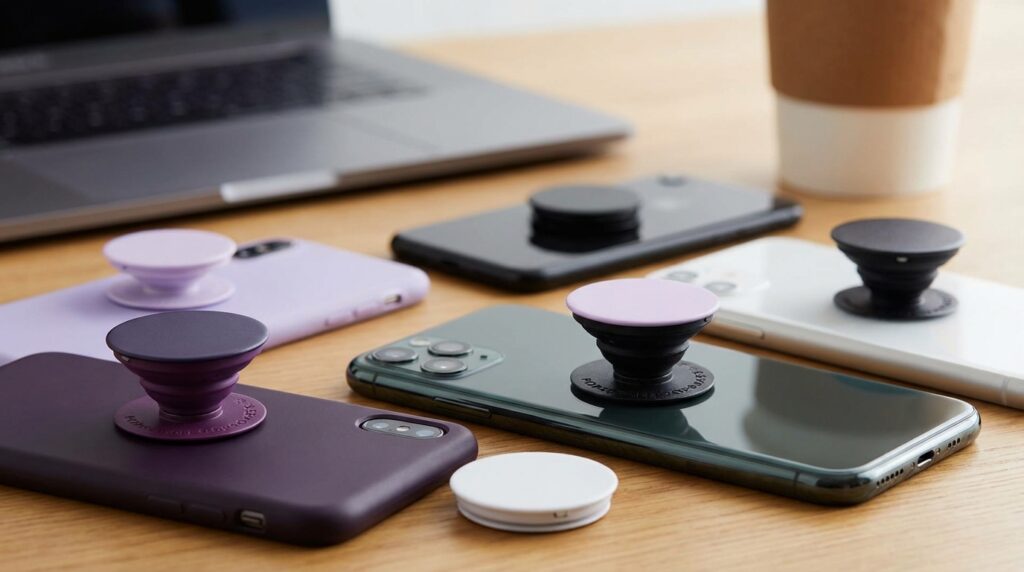
“The first time I stuck a PopSocket on my phone, I kept flipping it in and out just to hear that soft ‘pop’ and feel the little disc click into place.”
You remember that sound, right? That click became part of the smartphone experience for a while. A small plastic circle on the back of your phone, looking almost like a toy, somehow made a slippery glass slab feel easier, safer, more “yours.” Fast forward to now, where phones fold, cameras stick out like tiny skyscrapers, and MagSafe rings glow faintly through clear cases. The question hits a little different: are PopSockets and phone grips still useful in a world of giant screens, metal frames, and wireless charging pads?
Maybe it is just nostalgia talking, but when you pick up a big phone with no grip and feel that subtle panic in your fingers, your brain still remembers that small plastic disc that fixed the problem overnight. Back then, the biggest risk was your Nokia or Sony Ericsson sliding out of your hoodie pocket when you were running for the bus. Now it is your thousand-dollar face-unlock slab tilting off the edge of the couch in slow motion while you reach the remote.
For the first few years of smartphones, the “grip” was just the case. Rubberized backs, fake leather, chunky bumpers. Then screens stretched taller, bezels shrunk, and our palms did not magically grow larger to keep up. Around that time, PopSockets appeared: a simple telescoping stand and grip that stuck on with adhesive. No Bluetooth, no firmware, just a cheap, almost silly-looking thing that solved three problems in one move. Better grip. Easy stand. Fidget toy built right in.
The first PopSockets felt light but solid. The plastic had a slight grain to it, enough texture that your finger did not slide off. Collapsed, it sat almost flush, just a raised circle under your fingertips. Extended, those two stages of “pop” locked in with a kind of muted snap. If you ever tried to watch a YouTube video on a cramped flight with your phone propped up on a wallet, the moment you switched to a PopSocket stand felt like an upgrade.
You had this glossy glass rectangle, maybe with a 720p or 1080p screen, and behind it, this goofy little disc with a llama graphic or a galaxy print. That clash between serious hardware and playful accessory somehow made sense. Phones got more premium. Accessories stayed fun.
The rise of the grip: when phones outgrew our hands
There was a time when a 3.5-inch screen felt huge. If you pull out an iPhone 4 today, it almost feels like a toy. It slides into the palm, the edges bite a little into your skin, and one-handed typing suddenly seems easy again. Compare that to a modern giant with a 6.7-inch OLED panel. The weight difference is real. You feel the strain in your pinky after ten minutes of scrolling.
Phone grips like PopSockets did not hit big until screens crossed a certain size threshold. Once phones went past 5 inches, one-handed use started to feel awkward. The weight shifted up top, the bezels shrank, and the glass went edge to edge. You no longer had those chunky borders to hold. You were basically holding raw screen.
That is where grips entered the story. They did not add battery, storage, or a camera trick. They added control. A simple place for your fingers to hook around helped solve:
– The “pinky shelf” pain at the bottom of the phone.
– The nerve-wracking selfie at arm’s length over water.
– The bedtime scroll where the phone slides and smacks you in the face.
“Retro Specs: Early PopSockets were a plastic disc about 38 mm wide, around 6 mm thick when collapsed, and about 20 mm tall when fully extended, with a simple accordion stem and a TPU-like adhesive pad on the back.”
The accordion stem was important. It compressed with a bit of resistance, like a stiff spring with memory, and you could feel the stages as it clicked in and out. The disc on top? Printable, brandable, swappable. Suddenly your grip was not just a tool. It was a tiny billboard for your favorite show, band, meme, or just a color that matched your case.
What people loved about PopSockets in their prime
If you look back at what users were saying in the mid-2000s and early 2010s, you can see the pattern. Phones were getting sleeker and more slippery, cameras were getting better, and content was going vertical. Selfies, TikToks, Instagram Stories, video calls. Our hands were being asked to do more while holding something less grippy.
“User Review from 2005: ‘I know it looks dumb but I have not dropped my phone once since I put this thing on. I can reach the top of the screen now without feeling like it is going to fly across the room.'”
That was the core benefit. Not style. Not trend. Just less chance of watching your screen bounce on concrete.
Other common themes:
“User Review from 2005: ‘Does not seem like you need it until you try to go back to a phone without one. My fingers feel lost on a flat case now.'”
“User Review from 2005: ‘The stand is underrated. Working lunch, phone on the table, YouTube playing sideways. I do not carry a laptop anymore if I do not have to.'”
So yes, they looked a bit odd. A thick plastic wart on the back of your phone. But function beat aesthetics for a lot of people.
Then vs now: how a classic brick compares to a modern slab
To really see why grips even exist, it helps to compare an old legend to a modern flagship. Think Nokia 3310 versus a hypothetical iPhone 17. One felt like a dense piece of plastic engineering. The other is closer to a pocket TV screen with cameras attached.
| Feature | Nokia 3310 (Then) | iPhone 17 (Now) |
|---|---|---|
| Screen size | 1.5 inches, monochrome | 6.7 inches, OLED, high refresh rate |
| Weight | About 133 g | Around 200 g or more |
| Body shape | Thick, curved plastic shell | Flat glass and metal sandwich |
| Grip out of the box | Textured, chunky, easy to hold | Smooth, flat, can feel slippery |
| Use case | Calls, SMS, T9 games | Video, social, gaming, work, banking |
| Need for extra grip | Low | High for many users |
The 3310 almost clung to your palm by itself. The plastic back had a slight texture, the curved body filled your hand, and drops were more about scuffs than total screen failure.
Contrast that with a modern iPhone or flagship Android. Glass on both sides, polished aluminum or steel around the frame, camera bumps pushing the center of gravity higher. The device is heavy and top-loaded. Without a case or grip, it feels like a helpline call waiting to happen.
No surprise people started sticking grips on the back.
Wireless charging, MagSafe, and the grip problem
Then something shifted again. Wireless charging mats appeared. No more plugging and unplugging. You just dropped your phone on a pad and walked away. The problem: a big adhesive grip made that messy.
PopSockets, rings, straps, anything stuck to the center of the phone broke the clean contact point needed for wireless charging. The coil in the phone needs flat contact with the coil in the charger. A big plastic bump in the center breaks that alignment and reduces charging performance or stops it entirely.
Then came magnetic systems like MagSafe. Suddenly the back of the phone became a second interface. Not just for holding, but for power and accessories. Magnets, chargers, wallets, stands, batteries. The same space where PopSockets lived became valuable property.
So PopSockets and competitors got an update too. No more simple adhesive-only approach. You started seeing:
– Grips with magnetic backs that snap on and off.
– Thin grip plates that attach to MagSafe cases.
– Low-profile loops and straps that try not to interfere with charging.
This is where the “are they still useful” question gets interesting. The original design was simple: stick it on and forget it. The modern grip has to share space with magnetic chargers and other accessories.
Actual use cases today: where grips still quietly win
Walk through your day for a second and imagine every moment your phone leaves your pocket or bag. There are still many spots where a grip earns its keep.
One-handed texting on giant phones
If you use a large device, you know the thumb gymnastics. Reaching the top corner while holding your phone one-handed feels risky, even with reachability features or floating keyboards. A grip changes your leverage. It anchors the phone to your fingers so your thumb can stretch without your palm losing contact.
The weight of a modern flagship, often above 190 g, becomes more manageable when that weight is supported not just by skin friction but by an actual mechanical hook for your fingers.
Selfies and vertical video
The front camera arms race never really slowed down. High-res selfies, portrait modes, beauty filters, and now vertical video everywhere. The problem: you often hold the phone further from your face than normal, sometimes with your wrist rotated in awkward angles.
A grip gives you a safer way to hold the phone out. Instead of pinching the sides, you slip a couple of fingers around the grip and relax your other muscles. That reduces shakiness and the mental “careful, careful” voice when you are hanging the phone over a railing for that perfect angle.
Bedtime scrolling and couch viewing
You know that moment. Lying on your back, phone above your face, and your grip loosens. Gravity does its thing. Screen meets nose. It stings more than you expect.
A grip on the back gives you a lockpoint for your fingers and reduces those micro-slips where the phone starts to tilt. Even when you are half-asleep, muscle memory kicks in around the grip.
On a couch or desk, the stand function is still useful. You can prop your phone up to read recipes, watch streams, or keep an eye on notifications while working on a laptop. Foldable phones are starting to offer their own “stand” modes, but candy bar phones still profit from the angle a simple grip stand can provide.
Gaming sessions and extended use
Mobile gaming is not just Flappy Bird any more. Long sessions in landscape with shooters, racers, and complex RPGs can cramp your fingers. Holding a flat slab edge-on for an hour is not kind to joints.
A grip can double as a mini handle. With two grips, one on each side, it almost turns the phone into a tiny handheld console. Your fingers wrap around them while your thumbs stay on the screen. That spreads the weight and strain more evenly.
Accessibility and hand conditions
This part does not get talked about enough. For people with certain hand conditions, reduced grip strength, or joint issues, a flat, heavy phone can be hard to manage confidently. A grip gives an anchor point that requires less pressure from the rest of the hand.
PopSockets and similar grips can make one-handed operation easier for people who would otherwise need two hands for most tasks. The phone feels less like an object trying to escape your fingers and more like something you can hang from your hand with minimal effort.
The flip side: why some people moved on from grips
Grips help, but they are not perfect. There are reasons why many users tried them for a while and then retired them.
Bulk and pocket feel
Slide a phone with a grip into your jeans pocket, and you feel it. That little disc or ring catches on the edge of the fabric. The back of the phone is no longer flat against your leg. Some people get used to it, others do not.
The extra thickness can make the phone harder to slide into small pockets or bags. For users who prefer thinner cases or no case at all, a grip can feel like a step backwards.
Wireless charging conflicts
If you rely on wireless charging, especially on stands or multi-device chargers, a permanent adhesive grip is annoying. You get misalignment, slower charging, or no charging at all.
Magnetic grips help here since they can detach, but that adds another step to your routine. Attach the grip when you pick up the phone, detach it when you drop it on the charger. For some people, that friction is enough to say “no thanks” and skip the grip.
Case design and camera bumps
Modern camera modules take up more space on the back of the phone. Big square or rectangular bump, three or four lenses, LiDAR, flashes. Many cases already have ridges or raised edges to protect that bump.
Adding a grip means negotiating around this raised area. You have less flat space, so placement becomes tricky. Too high and the phone feels top-heavy. Too low and it loses stability as a stand.
MagSafe and magnet systems changing expectations
Magnetic accessories brought a new behavior: quick swap. Wallet on, wallet off. Power bank on, power bank off. That created a habit where the back of the phone is not permanent real estate any more.
Static grips that always stay there begin to feel old-fashioned to some users, especially those who like switching between battery packs, stands, and wallets during the day. A grip that needs to be peeled off, or that blocks magnets entirely, goes against that flow.
So, are PopSockets and grips still useful in 2026?
If we are being direct: yes, they are still useful. But the type of person who gets the most from them has shifted a bit, and the designs have had to adapt to the new hardware context.
Think about who actually benefits the most:
– People with large phones and smaller hands.
– Heavy content consumers who watch lots of video on the phone.
– Selfie and TikTok creators who record frequently.
– Gamers who play long sessions in landscape.
– Users with grip or joint issues who need extra assistance holding a heavy device.
For those groups, grips are not just cosmetic. They reduce hand strain, cut down on drops, and make the phone a little more ergonomic. Maybe it does not sound fancy, but comfort over hours of use adds up.
Where the question gets more nuanced is how you pair grips with your charging habits and accessories.
Modern grip options: beyond the classic PopSocket disc
The original PopSocket is now just one option among many. Each tries to tackle the same core need while working better with modern phones.
Magnetic grips
Magnetic PopSockets and similar grips clip onto MagSafe rings or magnetic cases. No adhesive, no residue. Snap on when needed, snap off for charging. The feel is a bit different since the grip can rotate or shift slightly if the magnet is weaker, but quality ones hold solidly.
This design respects the idea that your phone back is now a hub for more than one thing. You can stack a thin ring or grip on a MagSafe-compatible battery in some setups, though that depends on magnet strength and weight.
Low-profile loops and straps
Instead of a thick disc or ring, some grips use a flat strap that sits almost flush when not in use. Slide your fingers underneath when needed, then it lies flat again for pockets. These grips usually play better with wireless charging since they are thinner, especially when placed slightly offset from the exact coil center.
They lack the satisfying “pop” and the same stand stability, but they shine for people who want less bulk and a more minimal look.
Ring grips with rotation
Ring-style grips give you a metal loop that your finger can slide through. The ring usually rotates and doubles as a kickstand. These rose to popularity with larger Android phones where one-handed reach is a real challenge.
They can be surprisingly comfortable, but the metal ring has its own trade-offs: pressure on a single finger and more chance of snagging on clothing than a flat disc.
How grips intersect with modern phone trends
Modern phones are not just about size. They bring new design patterns that change how we think about grips.
Foldables
Foldable phones like book-style or flip-style devices already come with built-in grip quirks. A smaller outer screen and a larger inner tablet-like screen shift how you hold the device. The hinge, fold, and weight distribution can make external grips tricky.
Some brands offer custom cases with integrated grips or stands to address this. A PopSocket stuck to one side of a foldable will change how it lies flat and how it folds, so placement matters more than on a flat phone.
Camera-first designs
With cameras turning into the main selling point, the back of the phone is becoming more sculpted. Bigger bumps, works-of-art lens islands, and complex sensor layouts mean accessory designers need to be specific about fit and placement.
A grip too close to the camera can interfere with your fingers when framing a shot or cause shadows at certain angles. Some users now place grips lower to leave the camera zone clear, which can change stand behavior.
Integrated grips and textured cases
Phone makers and case brands have taken cues from grip accessories. You can now find:
– Cases with built-in pull-out stands.
– Rubberized or patterned sides that help with grip.
– Slight contours and ridges designed where fingers naturally rest.
These built-ins do not replace PopSockets entirely, but they reduce the need for an extra accessory for users who just want “a bit more grip” without the pop sound or extra height.
When a PopSocket still makes real sense today
So, in the middle of all these design shifts and magnetic systems, when would I still suggest a classic-style PopSocket or similar grip?
If your phone feels too big or heavy already
Try this experiment: hold your phone at the top corners with one hand and see if your thumb can reach the bottom safely. Then flip it and reach the top. If either motion feels awkward or risky, a grip can change the geometry enough to help.
For many people, especially with large-screen devices, the mechanical advantage a grip provides is real. Your fingers do not need to squeeze as hard, and your thumb does not have to push your luck.
If you watch video without a stand often
On a plane tray table, a desk, a kitchen counter near the stove, a grip that doubles as a stand pays off every week. You do not need to carry a separate kickstand or prop your phone up on random objects.
Horizontal stands are where PopSockets still do well. Collapse and extend, tilt your phone, and you have a stable little viewing angle that feels reliable.
If you care more about grip than wireless charging
Some users still prefer cables. Or they rarely use wireless charging, only when they remember or on a desk at work. If that is you, then a permanent adhesive grip will not really clash with your habits.
For this group, the main trade-off is pocket bulk and aesthetics. If you are ok with a thicker phone profile and like the feel of a physical anchor on the back, the grip earns its space.
If you share your phone with kids
Kids do not hold phones delicately. They twist, grab, and wave them around while playing games or watching shows. A grip gives them a safer way to hold a big device that was not sized for their hands in the first place.
A PopSocket on an older spare phone that you hand to kids can buy you a bit of peace of mind. Not perfect, but better than pure glass-on-fingers chaos.
Design, identity, and the “fun” side of grips
There is another layer to all of this: style. Even if magnets and built-in grips reduce the “need” for accessories, a lot of people still like having something personal on the back of their phone.
Those circular PopSocket tops have turned into tiny design canvases. Logos, anime characters, gradient colors, matching sets with cases and wallpaper. The grip becomes part of your phone’s identity, not just a tool.
This was always part of phone culture. Remember swapping Nokia faceplates with wild colors? Or clipping rhinestone charms to your flip phone hinge? Grips tap into that same instinct: tech can be practical and playful at the same time.
Maybe that is where some of the nostalgia comes from. Phones are strong, cold objects now. Metal edges, glass backs, sharp camera rings. A plastic grip with a soft, rounded top cuts that seriousness a bit. It adds a small, tactile object your hand can explore while your brain focuses on the screen.
If you are the type of person who likes to fidget during calls or long scroll sessions, that pop in and out motion becomes part of your rhythm. You sit in a meeting, phone on the table, thumb pressing the disc in and out, not even thinking about it. Little habits like that stick.
Looking forward: where grips might go from here
PopSockets and similar grips sit in an odd spot now. They have already done their job once by helping a whole generation manage larger phones. Now they are negotiating with magnets, foldables, camera bumps, and charging coils.
You can see some likely paths:
More modular, less permanent
Magnets encouraged people to think “temporary” instead of “forever” on the back of the phone. Expect more grips that clip, slide, or snap on without glue.
You pick the grip based on the day’s needs: a low-profile strap for work, a chunky PopSocket for Netflix on a flight, nothing at all when you want a slim pocket feel.
Better stacking with chargers and wallets
Accessory stacks are starting to happen: phone, MagSafe case, magnetic wallet, grip, maybe even a battery pack in the mix. The trick is making these pieces play nice together without feeling like a heavy brick.
We might see thinner, lighter grips that integrate with wallets or battery packs directly, making the grip a feature of another accessory instead of a separate object.
More focus on comfort science
As phone use time climbs, comfort becomes less of a side benefit and more of a core feature. Curved backs, rounded edges, subtle contours are already coming back on some models.
Grips have an opening here to lean into ergonomics. Better distribution of weight, softer materials where skin rests, thoughtful shapes designed for different hand sizes. Less novelty, more long-term comfort.
The original PopSocket nailed something simple: a little bit of plastic in the right place can change how a heavy piece of glass feels in your hand. That insight still holds, even if the exact shape and mounting method continue to evolve.
