

“The sharp chirp of a Nokia 3310 message tone, the green backlight glowing in a dark bedroom, and that tiny pixel snake zig-zagging across a 1.5 inch screen.”
You remember that sound, right? That little brick in your hand felt like your whole world. The screen was tiny, the plastic was thick, the antenna stubby. You did not worry about losing it. That thing felt like it could survive a fall from the second floor, a trip through the washing machine, and maybe a small meteor strike. Fast forward to now: you are walking around with a thousand-dollar slab of glass in your pocket, plus wireless earbuds, maybe a tablet, house keys with an RFID fob, and a backpack with gear that costs more than your first computer. Losing things suddenly hurts a lot more. That is where smart tags slip in. AirTag, Tile, Galaxy Tag. Tiny plastic pucks that live on your keys, in your luggage, inside your camera bag, or clipped to your dog’s collar. The question is not just which one is “better,” but which one fits your life the way that old Nokia fit your pocket.
Back then, “tracking” your stuff meant patting all your pockets and flipping cushions. GPS chips were big, hungry for power, and lived inside thick car sat-nav units with chunky suction mounts. Bluetooth was new and finicky. Now we have coin-sized disks that talk to millions of phones around you without you even knowing it. The same way ringtones turned into streaming apps, keychains are turning into tiny nodes on global finding networks.
In a way, these smart tags are the spiritual successors to your old ringtone packs and polyphonic downloads. Tiny digital accessories that do one simple job and do it well. Except now the stakes are higher. A missed ringtone meant a missed call. A missing AirTag or Tile could be a missing suitcase with your work laptop inside.
The weight in your pocket: from bricks to buttons
Think about the physical feel of your old phone for a second. The Nokia 3310 weighed around 133 g, solid, with a removable battery that clicked in with a satisfying snap. The plastic had a bit of grip, a matte texture that held onto your palm. The screen was 84 x 48 pixels, monochrome. No GPS. No Bluetooth. No Wi-Fi. You could throw it, drop it, share it. There was nothing fragile about it.
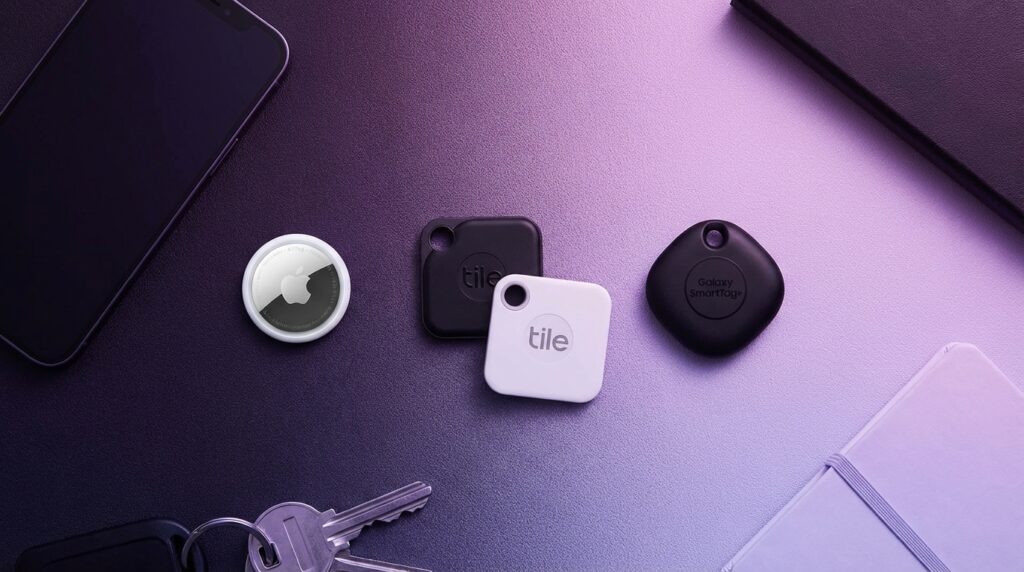
Now pick up an AirTag. It feels like a smooth coin, about 11 g, with a shiny white top and a metallic back that loves to collect micro-scratches. A Tile Pro feels a bit flatter and more plastic, with squared edges and a matte finish that reminds you of a key fob. A Galaxy SmartTag or SmartTag2 has that slightly thicker, almost pebble-like body, with a built-in keyring hole and a rougher plastic that does not slip easily in your fingers.
Those details matter. These tiny design choices are not just aesthetics. They decide whether your tag lives on a keyring, gets taped under a bike seat, or buried in a luggage liner.
“Retro Specs: Nokia 3310, 84 x 48 pixel screen, 2G GSM, about 133 g, 900 mAh battery, no Wi-Fi, no GPS, but legendary battery life and durability by 2000 standards.”
Back then, “finding your phone” meant calling it from the landline and listening for that monophonic ringtone. Now the whole logic is reversed. Your phone finds your stuff. The phone turned from the thing you look for, into the thing that searches.
Then vs now: finding your stuff in 2001 vs 2026
Before we jump into AirTag vs Tile vs Galaxy Tag, it helps to frame how far the tech has come. Here is a simple “Then vs Now” table to ground this.
| Feature | Nokia 3310 (circa 2000) | Modern Smart Tag Ecosystem (AirTag / Tile / Galaxy Tag) |
|---|---|---|
| Primary job | Calls, SMS, Snake | Locate objects (keys, bags, pets, gear) |
| Network used | GSM voice/SMS on cell towers | Bluetooth + crowdsourced location via nearby phones |
| Screen | Monochrome, 84 x 48 px | No screen on tags, visual interface on smartphone apps |
| Battery | Removable 900 mAh, days of use | Coin cell or small internal battery, months to years of use |
| Finding your stuff | Call your phone, check your bag by hand | Play sound on tag, view last location on map, Precision Finding (UWB) |
| Physical feel | Thick plastic brick, 133 g | Coins or small fobs, usually 8-14 g |
| Durability mindset | Phone can handle abuse, case optional | Phone is fragile, tags are disposable helpers |
We traded “one rugged device that does everything basic” for “a fragile hub plus a swarm of cheap sensors around it.” Smart tags are part of that swarm.
How smart tags actually work (without the buzzwords)
At a basic level, AirTag, Tile, and Galaxy Tag all follow the same recipe:
1. Small tracker with Bluetooth that can chirp and broadcast an ID.
2. Phone app or OS feature that listens for that ID.
3. A crowdsourced network of other devices that pick up that ID in the background and send the location to the cloud.
The magic is not the Bluetooth radio. That has been around since your early flip phone with a chunky Bluetooth headset. The magic is the scale of the network and the way it hides in daily life.
When your AirTag is sitting under a train seat, it is basically asleep, occasionally whispering a Bluetooth signal. Any nearby iPhone that runs a recent iOS version can quietly notice that signal, encrypt the location, and send a location report back to Apple. Your Find My app shows that your luggage made it to the airport carousel, even if nobody around you knows they helped.
Same story for Tile and Galaxy Tag, with different networks and different strengths.
“User Review from 2005: ‘I glued my old Nokia inside my backpack to track it if stolen. Problem is, the thief just takes the SIM out. So much for my genius plan.'”
Back then, “tracking” needed active power, SMS, and a SIM card that could be removed. These new tags live under that threshold. Tiny batteries, no screens, no SIM to pull. They are almost boring to look at, which is exactly the point.
AirTag vs Tile vs Galaxy Tag: the big picture
Let us frame the three in one shot before we go deeper.
| Tracker | Main ecosystem | Network strength | Battery & type | UWB (Precision Finding) | Best fit |
|---|---|---|---|---|---|
| Apple AirTag | Apple (iPhone, iPad, Mac) | Very strong in iOS-dense regions | Coin cell, user-replaceable | Yes (on supported iPhones) | iPhone owners who live in Apple land |
| Tile (Mate, Pro, Slim, Sticker) | Cross-platform (iOS, Android) | Moderate, varies by region & user base | Mix of replaceable and rechargeable/internal | No UWB on most classic Tiles | Mixed-device homes, people who want flexibility |
| Samsung Galaxy Tag / Tag2 | Samsung Galaxy phones | Strong where Galaxy Share is common | Coin cell, user-replaceable | Yes on Galaxy SmartTag+ and SmartTag2 with UWB | Samsung users who stay in the Galaxy universe |
Now let us walk through each one like a gadget geek checking a new phone on launch day, looking at feel, specs, quirks, and that weird in-between zone where nostalgia kicks in.
Apple AirTag: the polished coin in the Apple pocket
Physical feel and design
First impression: AirTag feels like a white skipping stone with a chrome back. About the size of a thick coin, 31.9 mm diameter, 8 mm thick, about 11 g. Smooth, rounded edges, no keyring hole by default. That last point matters. Out of the box, you cannot just slide it onto your keys. You need a holder, lanyard, or a third-party accessory. Classic Apple move.
The plastic front is glossy. The back is metal and scratches almost instantly. If you care about pristine gear, you are going to notice swirl marks within days. From a functional angle, it does not matter. From a “I used to polish my Nokia faceplate on my jeans” angle, you might feel a slight itch.
Inside, you get a replaceable CR2032 coin cell. The back twists off with a bit of force. That click when you close it feels reassuring, like snapping back a battery cover on an old feature phone.
How AirTag talks to your stuff
AirTag lives inside Apple’s Find My network. That network is huge. Every recent iPhone, iPad, and even some Macs act like silent scanners for your tag. The AirTag does a few key things:
– Broadcasts a secure Bluetooth identifier.
– If you have a UWB-compatible iPhone, you get Precision Finding, which puts a directional arrow, distance meter, and some haptic feedback on your screen.
– Ties to your Apple ID, which means if someone finds it, they can tap with NFC and see your custom message if you marked it as lost.
The smooth part: set up. You bring an AirTag near your iPhone. A little card pops up from the bottom of the screen, the same way AirPods do. You name it (“Keys,” “Camera bag,” “Car,” “Backpack”) and you are done. No QR codes, no separate accounts. The whole process feels lighter than setting up Bluetooth on early smartphones, where you had to punch in a PIN and hope the pairing did not fail.
Network reach and privacy quirks
In cities where iPhones are everywhere, AirTags feel almost magical. Leave your suitcase at the wrong gate in a busy airport, and your Find My app might refresh its location every few minutes as one iPhone after another passes by. In rural zones, it behaves like a classic Bluetooth tracker. Great when you are near it, quiet when you are not.
Privacy features cut both ways. Apple added anti-stalking protections, so if an AirTag that is not tied to your account moves around with you for a while, your iPhone warns you. Android users can install an app for similar alerts, and recent Android versions bake some detection in for unwanted trackers. There are also periodic chirps if the tag is traveling away from its owner for extended time.
If your mental image of a tracker is “stealth device hidden forever,” these alerts clash with that. If your mental image is “I want to tag my keys and my luggage and not accidentally stalk someone,” this feels more in line with what a modern tracker should do.
“User Review from 2005: ‘Bluetooth is neat but drains my battery and only works if I stand right next to my PC. I miss the simplicity of IR, just line it up and beam.'”
Back then, “wireless” often meant fragile and short-range, with weird trade-offs. AirTag turns that on its head with UWB and a global mesh of phones.
Strengths and limits of AirTag
Where AirTag shines:
– If your life is built around iPhone, iPad, Mac.
– If you want that near-field arrow and precise distance when you are in the same room.
– If you live in dense urban zones where a lot of Apple devices pass near your stuff.
Where AirTag feels cramped:
– If you use Android as your daily driver.
– If you want a built-in keyhole without buying accessories.
– If you want more creative shapes, like card-style trackers for wallets.
On the nostalgia scale, AirTag feels like one of those tiny phone charms from the mid-2000s, but smart. A little accessory that feeds into a much bigger, closed ecosystem.
Tile: the veteran that started with beeps in the couch
Tile’s physical family
Tile has been around since the days when your phone still had a headphone jack and a thick bezel. The lineup expanded into several shapes:
– Tile Mate: small square with a keyhole, plastic body.
– Tile Pro: slightly larger, more range, keyhole, more “premium” finish.
– Tile Slim: credit card style, thin, for wallets.
– Tile Sticker: small, round, adhesive back.
If you pick up a Tile Pro, the weight feels balanced for a keychain, around the feel of a car key fob. Matte plastic or soft-touch finishes give you grip. The edges are more squared than AirTag or Galaxy Tag, which some people like because it does not roll or slide easily on flat surfaces.
Some Tiles have replaceable batteries. Others have sealed batteries meant to last a set period before you replace the whole unit. That sealed style feels like the early days of non-removable phone batteries, where you go, “OK, when this dies, I toss it or send it in.”
Cross-platform reach
Tile runs on its own app, on both iOS and Android. No native OS panel like Find My or SmartThings, but a standalone piece of software that pulls all the strings. That cross-platform angle is Tile’s real edge.
If one person in your house uses an iPhone, another uses a Pixel, and someone else uses a midrange Android, Tile can sit in the middle. You all install the app, you all help the network, you all can ring each other’s Tiles.
Network size is the catch. Tile’s reach depends heavily on how many active Tile users exist near you. In some US cities, it feels solid. In smaller towns or regions where Tile never took off, it can feel quiet. You can pay for Tile Premium to get extra features like smart alerts when you leave something behind. That subscription softens some gaps but does not magically create more devices on the street.
Using Tile day to day
Open the app, tap your item, hit “Find” and the Tile rings. The ringtone is sharp and synthetic, not far from your old polyphonic phone tones. You can also press the Tile to make your phone ring, which feels like a nice callback to “call your phone to find it,” just inverted.
There is no UWB arrow with direction and distance like AirTag or Galaxy SmartTag+. Tile leans hard on sound and map location. In practice, inside a small apartment or office, the chirp is more useful than you might expect.
The setup experience is more traditional: open the Tile app, tap the plus icon, press the button on the Tile, pair, name it. It feels a bit like early Bluetooth pairing, just more polished and guided.
Strengths and limits of Tile
Where Tile wins:
– Mixed iOS + Android homes or teams.
– Wallets and flat items with Tile Slim.
– People who do not want to tie everything to Apple or Samsung accounts.
Where Tile struggles:
– In regions with fewer Tile users.
– If you want UWB direction guidance.
– If you want no-subscription basics that match what AirTag and Galaxy Tag give through their platforms.
Tile is the tracker equivalent of those third-party MP3 players that sat between iPod and Zune in the 2000s. More formats, more flexibility, less ecosystem muscle.
Galaxy SmartTag & SmartTag2: Samsung’s pocket beacons
Physical feel and variants
The original Galaxy SmartTag looks a bit like a smooth rounded square pebble with a hole punched near one corner. The plastic shell has enough texture to feel secure, less slippery than an AirTag. The weight hovers close to the other tags, light enough that your keys do not feel weighed down, but not so weightless that it feels cheap.
SmartTag+ and SmartTag2 add features and refine the ergonomics. SmartTag2 in particular leans into a more solid, somewhat taller design with a wide keyring hole that feels friendlier for bags, pet collars, and car keys.
Battery is replaceable coin cell on most models. Opening the shell feels more like prying apart a plastic remote control than twisting a watch back. It is workable, but not as refined as AirTag’s minimal twist-off mechanism.
SmartThings Find and UWB
Galaxy SmartTags plug into Samsung’s SmartThings Find network. If you are carrying a recent Galaxy phone, your device becomes part of a silent mesh that listens for nearby tags. The experience inside the Samsung world feels similar to Apple’s Find My, with one key addition on certain models: UWB.
With SmartTag+ and UWB-enabled phones, you get a directional interface sort of like AirTag’s Precision Finding. The phone screen shows an arrow, distance, and some visual cues that steer you toward your tag. Combine that with a distinct chime from the tag and it feels more like a radar game than a “walk around, hope you hear it” task.
The bigger story sits in SmartThings itself. If you already use Samsung devices for smart home stuff like plugs, lights, TVs, or appliances, SmartTag can act like a little remote. You can trigger routines based on button presses or presence. Your tag stops being just a passive tracker and starts acting like a tiny fob for automations.
Strengths and limits of Galaxy Tag
Where Galaxy Tag stands out:
– Households built around Galaxy phones and Samsung hardware.
– Users who want both tracking and some smart home triggers.
– People in regions where Galaxy users dominate.
Where it feels narrow:
– If you do not own a Samsung Galaxy phone.
– If you want full feature parity on other Android phones.
– If you are hoping for a neutral tracker that your iPhone friends can help with.
In the gadget timeline, Galaxy SmartTag is like a late-era Symbian smartphone that works brilliantly with its own suite of apps, but expects you to live inside that brand.
Head-to-head: AirTag vs Tile vs Galaxy Tag
Now let us compare these three through a few practical lenses.
1. Ecosystem lock-in
– AirTag: Locked to Apple IDs. You really need an iPhone or iPad for proper use. Macs help with location, but they are not your main interaction point.
– Tile: Works on both iOS and Android, plus some third-party integrations with headphones, laptops, and more from partner brands.
– Galaxy Tag: Tightly bound to Samsung Galaxy phones with SmartThings. Some cross-visibility, but real power sits in Samsung hardware.
If your first thought is “what about my family members,” Tile often wins that cross-device scenario. If everyone you know uses iPhone or Galaxy, AirTag and SmartTag get a lot more attractive.
2. Network density and real-world reach
This part feels less like a spec sheet and more like standing in a crowded mall with your old phone trying to send a text.
– AirTag benefits from the sheer number of iPhones worldwide. In crowded areas, your lost tag is likely passing near many Apple devices per hour.
– Tile needs other Tile users with the app installed and running. That is a much smaller pool, though you can influence it by getting your close circle to install the app.
– Galaxy Tag lives or dies based on Galaxy phone penetration in your region. In markets where Samsung dominates Android, the network can be strong.
Think of it like early Wi-Fi hotspots vs dial-up. The more access points, the smoother your experience. Here, those access points are other people’s phones.
3. Precision Finding vs “hot and cold” hunting
On AirTag and compatible Galaxy Tags, UWB does something that feels almost like magic if you grew up hunting for your phone by sound alone. You get a directional UI that says “2 meters ahead, slightly to the right” with haptic feedback. In a messy living room, that saves you from flipping every couch cushion like it is 2002.
Tile sticks with Bluetooth signal strength and an audible chirp. You move around, look at the “signal strength” bar, and listen for the tone. It works, but feels more analog.
For tight indoor searches, UWB wins. For outdoor or medium-range searches, all three lean on maps and crowd data more than on near-field tricks.
4. Battery life and maintenance
This is where those old removable phone batteries echo back. You know that comfort of popping in a new BL-5C and getting another week of life.
– AirTag: CR2032 battery, advertised around a year, easy twist-off replacement.
– Tile: Mixed approach. Some models have replaceable coin cells. Others are sealed and meant to last around 3 years, after which you replace the unit.
– Galaxy Tag: Replaceable coin cell, similar life to AirTag, depending on usage.
Replaceable coin cells feel closer to that old Nokia mindset: devices are meant to keep going. Sealed batteries feel like modern slim phones: use for a few years, then retire.
5. Form factors and mounting
– AirTag: circular disk with no hole. Needs accessories for keyrings, pet collars, or straps.
– Tile: several shapes. Tiles with built-in holes work great on keys. Slim slides into wallets. Sticker attaches to surfaces.
– Galaxy Tag: built-in hole on most units, chunky enough for keychains, compact enough for bags.
If you like everything to be clean and minimal, AirTag plus a nice leather holder has that Apple aesthetic. If you like utility and want a card in your wallet or sticker on your camera, Tile’s variety matters. Galaxy Tag sits in the middle with practical shapes and built-in holes.
Real-world scenarios: which tag where
Tagging your keys
Keys are brutal on gadgets. Metal edges, constant knocking into doors, and that same place in your pocket that used to scratch your early candybar phone screens.
– AirTag: Great if you do not mind buying a keyring holder. Precision Finding is helpful when you toss keys in weird corners.
– Tile Mate or Pro: Easy drop-in, built-in keyhole. Loud ring, no need for an extra accessory.
– Galaxy Tag: Good fit for Galaxy users, rugged enough shape, keyhole ready out of the box.
If your keys live in jeans pockets, the extra bulk of a holder for AirTag might bug you. Tile Pro or Galaxy Tag feels more “throw and go.”
Luggage and travel
This is where crowd networks really show their value.
– AirTag: Strong bet in most airports and cities. Your bag will likely ping as it moves through check-in and baggage handling, as staff and passengers carry iPhones nearby.
– Tile: Depends heavily on other Tile users. Sometimes surprisingly handy, sometimes quiet.
– Galaxy Tag: Good call in places with heavy Galaxy presence, and if you already travel with a Galaxy phone.
For travel, form factor matters less than network and battery. A coin-shaped tag inside an interior pocket works for all three. The question is who else is listening.
Pets and kids’ backpacks
Quick reality check: none of these are full GPS collars or safety devices. They are helpers, not guarantees.
– AirTag: Many people clip them to collars, sometimes inside special holders that protect from chewing and water spray. Anti-stalking alerts give some safety guardrails.
– Tile: Works if people around your kid or pet paths are Tile users or have the app. Less invisible background help.
– Galaxy Tag: Strong in Galaxy-heavy neighborhoods. SmartThings routines can alert you if a pet’s tag leaves a geofenced area, depending on your setup.
If you already spend late nights reading about GPS pet trackers and kid smartwatches, these Bluetooth tags feel like a lighter tool for items, not people. They help you find a lost backpack or wandering dog in your area, but they do not replace real GPS trackers.
Hiding tags in vehicles or bikes
This is where your inner hacker from the early 2000s might wake up, the same one who taped old phones under car seats.
Modern tags:
– Can help locate a stolen bike or car, if thieves are not alert and anti-stalking alerts do not trigger alarm first.
– Might chirp or raise alerts that warn whoever has the vehicle.
– Depend on how often other phones pass near the parked or moving object.
AirTags and Galaxy Tags have some edge in dense areas, Tiles can work if someone with the app walks by. None of them replace a dedicated anti-theft GPS tracker that wires into the vehicle’s power or hides deep inside the frame.
Retro comparison: 3310 vs iPhone vs smart tags
To keep our inner archivist happy, let us set classic gear against modern tags and phones on one simple table.
| Device | Year range | Primary role | Finding features | Battery behavior | Durability feel |
|---|---|---|---|---|---|
| Nokia 3310 | circa 2000 | Phone, SMS, games | Call it and listen for ring | Removable, lasts days | Feels almost indestructible |
| iPhone (modern) | 2020s | Hub for everything (apps, camera, payments) | Can ping other devices, runs Find My / tracking apps | Sealed, charged daily | Fragile, glass-heavy, needs case |
| AirTag / Tile / Galaxy Tag | 2020s | Locate objects | Sound, Bluetooth, UWB, crowdsourced maps | Coin cells, months to years | Small, basic plastic, “good enough” ruggedness |
We went from one rugged phone to a centrepiece phone supported by satellites of small helpers. Tags are like modern keychain charms, except now the charm pings a global mesh of radios and cloud servers.
“Retro Specs: Early Bluetooth 1.1, about 10 meters range, slow pairing, chunky dongles, and that blinking blue LED on your belt clip headset that made you feel like a space pilot.”
Bluetooth matured from that blinking annoyance into the quiet backbone behind modern trackers. The old pain points turned into habits. We expect instant pairing now. We expect background magic.
Subtle details that matter over months, not days
When you first buy a tag, you think about range and price. After six months, other things start to matter.
Scratches, scuffs, and pocket life
AirTags scratch. The shiny metal back picks up swirls from coins, keys, even dust in your pocket. Tile trackers tend to hide scratches better because of matte and textured plastics. Galaxy Tags sit somewhere in between, with their more understated shells.
Functionally, all three survive normal use. Psychologically, if you like your tech to age gracefully, matte finishes win. The old Nokia 3310 had swappable shells. Scratched your front? You bought a new one at a kiosk. With these tags, you learn to accept the scars.
Audible patterns and sound quality
When you trigger a ring, that sound matters. Tinny, high-pitched beeps cut through couches and backpacks better than soft, warm tones. AirTag, Tile, and Galaxy Tag each have their own ringtone style, and they can feel as personal as old SMS tones once did.
The difference: now it is less about personality and more about practicality. Can you hear it through a closed car trunk? Through a thick winter coat? In a noisy airport?
Software aging and app fatigue
Years ago, the biggest annoyance on your phone might have been clearing out old ringtones or freeing a few kilobytes of SMS storage. Today, app fatigue is real. Every tracker brand asks to live in the background, with location access, Bluetooth access, notifications.
– AirTag rides on native Find My, no extra app to manage.
– Tile needs its dedicated app.
– Galaxy Tag rides on SmartThings and Samsung services.
Over time, fewer apps feel better. This is where deep ecosystem tags feel lighter. The trade-off is you are tied deeper into one brand.
Where nostalgia meets practical choice
Maybe it is nostalgia talking, but this whole smart tag story feels like a mirror of old mobile habits. You had that one phone that did a few things really well, and a handful of small accessories that showed your personality. Stickers, charms, custom faceplates, weird belt clips. None of that made the hardware better on paper, but it made it yours.
Today, AirTag, Tile, and Galaxy Tag sit at that same intersection of function and quiet identity. The metal-and-white AirTag screams Apple the second you see it. Tile’s simple squares feel tool-like, no-nonsense. Galaxy Tag leans into Samsung’s SmartThings ambition, that sense that everything in your house might carry a small sensor one day.
In pure tech terms, you could map the choice like this:
– If you live on iPhone and want the strongest crowd network plus UWB, AirTag is hard to beat.
– If you juggle iOS and Android and want wallet cards, stickers, and cross-platform sharing, Tile still has a place.
– If your pocket, TV, and appliances all say Samsung on them, Galaxy Tag ties them together cleanly.
The funny part is that under all the modern polish, the actual moment of use is still as simple and physical as that old Nokia ring in the dark: a sound from somewhere in the room, a glow on a screen that points you closer, and that small hit of relief when your fingers finally close around the thing you thought you had lost.
