

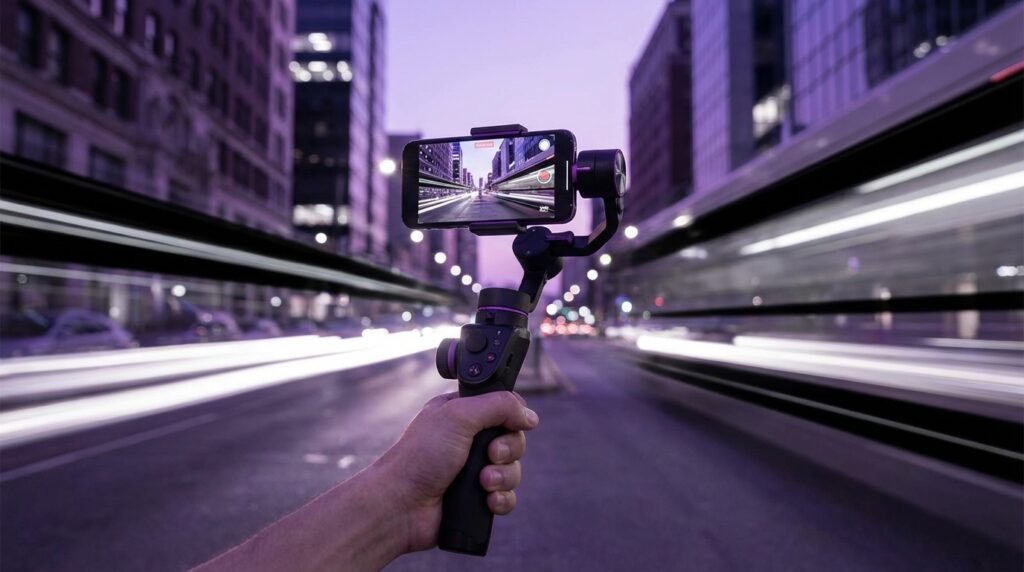
“The whir of a tiny motor fighting your shaky hands as you jog down the street, your old Samsung buzzing with 8-bit notification sounds in your pocket, while your friend yells, ‘Dude, it’s so blurry, hold it still!'”
You remember that feeling, right? Trying to record something that felt big to you on a tiny phone that just was not built for smooth video. You did your best: locked elbows, ninja walk, holding your breath like you were filming a nature documentary instead of your friend doing a skate trick in the parking lot.
Fast forward to now, and your phone has more camera tech than entire studios had when that clip went up on MySpace or early YouTube. You have 4K, 60 fps, stabilized lenses, HDR, all squeezed into a flat glass slab that feels like it should not even fit in a pocket. And suddenly, you are wondering: if phones already have all this built-in stabilization, do you really need a phone gimbal for mobile vlogging?
That question sits right at this weird overlap between nostalgia and progress. Back then, a “stabilizer” was you leaning against a wall. Today, a gimbal looks like sci-fi gear compared to those soft, grainy 240p clips.
“User Review from 2005: ‘I tried recording my band with my Nokia and the video looked like it was filmed during an earthquake. Audio was okay… for a phone.'”
Maybe you remember the weight of those early devices. Chunky plastic, tiny screens with blue backlights and pixel fonts that looked like they belonged on a calculator. You were not thinking about “content quality” then. You were just happy the video recorded at all.
Now, phones are different. Lighter but more fragile. Glass instead of thick plastic. Brighter, sharper screens where every shake is visible. When you open your camera app and hit record, your phone is already trying to correct for your steps using software stabilization and little lens shifts. Which brings us to the real question behind your question: is a gimbal actually going to make your vlogs better, or is it just another bit of gear brands want you to buy?
The Old Shaky Days vs. The Smooth-Obsessed Present
Back in the early 2000s, video on phones felt like a side quest. You had VGA or maybe 1.3 MP sensors cramped behind cheap plastic. Shutter lag. Rollover noise. You would pass the phone to your friend and say, “Try not to shake it,” even though there was no way that was going to happen. If you go back and watch those clips now, the shake almost feels baked into the memory, like it is part of the event itself.
“Retro Specs: Nokia 7610, 2004. 1 MP camera. 176×208 pixel screen. No stabilization. Your ‘cinema’ was a postage stamp that struggled under direct sunlight.”
Then YouTube blew up. Social platforms started favoring video. Phone manufacturers noticed. Sensors got larger, lenses sharper, software smarter. Suddenly your phone started smoothing out motion on its own. The first time you saw electronic image stabilization kick in on a jog, it felt like magic. Your screen still shook in your hand, but the recorded video looked flatter and calmer than it had any right to.
Now phones layer things on top:
– Optical stabilization in the lens or sensor
– Electronic stabilization that crops in slightly
– “Action mode” or “super steady” for more aggressive smoothing
So why does the gimbal still exist? Why do vloggers still hold that weird L-shaped handle with a floating phone on top, looking like they are controlling a tiny drone that forgot the propellers?
Because there is a limit to what in-camera and software stabilization can handle. And because vlogging is not just about removing shake. It is about how movement feels.
What a Gimbal Actually Does (And What It Cannot Fix)
A phone gimbal is basically a smart, motorized balancing system. Inside that handle are small motors and sensors that react to your hand movement in real time. Instead of your phone following every tiny twitch of your wrist, the gimbal absorbs it, keeping your phone level and steady.
You tilt down too fast. The gimbal eases into it.
You walk and bounce. The gimbal smooths that bounce into a gentle float.
You spin. The gimbal keeps the horizon straight.
Under the hood, it is tracking three axes of movement:
– Pan (left and right)
– Tilt (up and down)
– Roll (rotation like you are twisting a doorknob)
Your phone might correct some of that using software, but it is always starting with the actual shake of your hand, then trying to fix it after the fact. The gimbal tries to stop the shake before it hits the camera.
That said, a gimbal cannot fix:
– Bad audio
– Awkward framing
– Bad light
– Weak storytelling
It will not take a boring 2-minute shot of your feet and suddenly turn it into viral gold. It is not the magic cheat code for vlogging. It is more like a power-up for specific styles of shooting.
Then vs Now: Stabilization Showdown
Let us take something iconic from the past and stack it against a modern phone loaded into a gimbal. Think of this as a tiny time-travel chart.
| Feature | Then: Nokia 3310 (early 2000s era phone) | Now: Modern Flagship + Phone Gimbal |
|---|---|---|
| Video Resolution | None (or 144p/240p on later basic phones) | 4K or 8K video, 24-120 fps |
| Stabilization | Your two hands and patience | Optical + Electronic + 3-axis motorized stabilization |
| Screen | Monochrome or low-res color, tiny | 6+ inch OLED, high refresh rate, accurate preview |
| Weight in Hand | Thick plastic brick, but solid grip | Thin glass slab + gimbal handle with ergonomic grip |
| Vlogging Comfort | Video was barely a thought | Dedicated vlogging modes, face tracking, gestures |
| Share Speed | MMS, infrared, or cable transfer | Instant upload to social platforms |
The jump is not just in sharpness or resolution. The experience of filming has changed. Holding a phone with a gimbal feels more like operating a tiny camera rig, not just pointing a phone.
Where Phone Gimbals Actually Help Vloggers
So do you need a phone gimbal for mobile vlogging? The real answer lives in your use case. Some styles of vlogging benefit from a gimbal a lot more than others.
Scenario 1: Walk-and-Talks On The Move
If your idea of vlogging is you talking to the camera while walking through a city, a park, or a convention center, then a gimbal earns its keep quickly.
Without a gimbal:
– Your phone stabilization crops the image to smooth motion.
– Your steps show up as micro-bounces.
– Sudden turns create warping or “wobble” at the edges.
With a gimbal:
– Your steps become more floaty and less jarring.
– Pans feel like they glide.
– The horizon stays level when your hands get tired.
You know that look where vloggers move the camera from their face to a street sign or to their friends in one clean move that looks like it was rehearsed? That kind of motion feels easier and more natural with a gimbal, because its handle gives you leverage and control.
Scenario 2: Travel Vlogging, B-Roll, And City Shots
Think about capturing a city skyline while riding in a cab, or filming your partner walking through a night market. Those shots carry mood. Shake breaks that mood pretty fast.
Gimbals shine when:
– You are moving through crowds.
– You are filming out of vehicles.
– You want slow, controlled reveals and pans.
You could get some of that with careful handholding, but a gimbal lets you focus more on framing than micro-managing your grip.
Scenario 3: Action-Oriented Content
Skate parks, biking, running, rooftop adventures. If your vlogs involve chasing people, running with them, or filming from moving boards or scooters, then stabilization becomes non-negotiable.
Modern “action mode” software can do a lot but:
– It often crops heavily, so your field of view gets tighter.
– It can introduce weird warping in corners.
– It may struggle in low light because it is already fighting noise.
A gimbal spreads the work. It handles bigger movements. Your phone stabilization clears the leftovers. You get smoother footage without sacrificing as much quality.
Scenario 4: Static Talking-Head Vlogs
If your vlogs are 80% you sitting at a desk, framed mid-shot, talking into your phone on a tripod, then no, a gimbal is not a need. It becomes nice to have only if:
– You want to add quick, controlled push-ins or pull-outs for drama.
– You want to switch angles around your room without a cut.
– You sometimes get up and walk around while talking.
For purely static vlogging, a basic tripod or clamp gives you more value for less money and less gear to charge.
How Phone Gimbals Change The Way You Shoot
There is a subtle shift that happens when you start using a gimbal. It is not only about stability. It is about the kind of shots you start imagining.
You stop thinking, “I hope this is not too shaky,” and start thinking, “If I walk from that doorway to this window, I can reveal the whole scene in one smooth take.”
That mental shift matters for vlogging, because vlogging is not just you talking, it is how you bring people through a space.
“User Review from 2005: ‘Filmed my friend’s birthday on my Sony Ericsson. Everyone looks like a blur when they move. Might stick to photos next time.'”
Remember that? When motion was almost punished by the tech. Phones did not handle movement well, so you stayed more static. Now you are almost invited to move, pan, tilt, follow people, and show places.
A gimbal encourages that kind of movement:
– You do more “follow” shots.
– You use more continuous takes instead of constant jump cuts.
– You experiment with low angles and high angles because rotating the handle feels natural.
Maybe it is just nostalgia talking, but the first time you nail a long, stable one-take clip around a street corner or through a party, it feels a little like those old camcorder days when your uncle tried to emulate movie shots. Except this time, your pocket tech actually keeps up.
When The Gimbal Is Overkill
There is a flip side. Not every vlogger benefits from adding a gimbal to their kit. Sometimes it is a distraction.
Signs you do not really need one:
– Your videos are mostly short clips, heavily edited, with lots of cuts. A tiny bit of shake between cuts is not a deal-breaker.
– You shoot mostly indoors, in small spaces, with controlled movement.
– You are just starting vlogging and still figuring out what you want to talk about.
If your storytelling, presence, or audio is not there yet, a gimbal will not change that. It might even slow you down because you will spend more time:
– Balancing your phone.
– Charging yet another device.
– Learning modes and button combinations.
Sometimes you get more progress by sticking to handheld shooting, letting yourself be a bit scrappy, and focusing on your flow on camera and your editing rhythm.
Gimbal vs Phone-Only Stabilization: Real-World Differences
Let us break down how these two approaches feel in practice in common vlogging situations.
Walking Indoors With Good Light
Phone-only:
– Video looks acceptable, minor bounce, slight warping during fast turns.
– Easy point-and-shoot.
Phone + gimbal:
– Footage looks more “floating.”
– Pans and moves feel more cinematic.
– Heavier setup but more control.
Here, you can get away without a gimbal if you keep your steps soft and do not swing the phone too quickly.
Walking Outdoors In Low Light
Phone-only:
– Stabilization has a harder time because the phone is already fighting noise and camera shake from longer exposure times.
– Footage can look mushy or smeared during movement.
Phone + gimbal:
– Physical stabilization reduces the amount of blur.
– Electronic stabilization has less extreme work to do.
– Footage tends to hold detail better.
If you film a lot at night, during city walks or events, the gimbal starts pulling ahead.
Fast Pans And Quick Reframes
Phone-only:
– Fast turns cause warping, bending straight lines.
– Preview might look jerky even if the final clip smooths out.
Phone + gimbal:
– Motors add a natural ease-out and ease-in to moves.
– Quick reframes feel more deliberate.
So if your style involves whipping the camera from you to a scene and back, the gimbal gives those whips more control and character.
Then vs Now: Vlogger’s Toolkit
Let us look at how a mobile creator kit has changed from those early years to now, especially around stability.
| Item | Then: Early 2000s Mobile Creator | Now: Mobile Vlogger With Gimbal |
|---|---|---|
| Main Device | Nokia / Sony Ericsson with basic camera | Modern smartphone with multiple cameras |
| Stabilization | Handheld, maybe leaning on walls | 3-axis gimbal + phone stabilization |
| Audio | Built-in mic, mono, loud background noise | Lavalier or shotgun mic mounted to gimbal or phone |
| Support Gear | Maybe a selfie stick, if that | Gimbal, mini tripod, cold shoe mounts |
| Editing | Transfer to PC, basic software | On-phone edits, overlays, music, color tweaks |
| Distribution | MMS to a few friends | Instant uploads to global audience |
Now the stabilizer has become a central part of the kit instead of an afterthought. The question is just whether that central part needs to be a dedicated gimbal in your case.
How To Decide If A Gimbal Fits Your Vlogging Style
Rather than asking “Do I need one?” in a vacuum, anchor it to how you actually shoot now and how you want to shoot next.
Ask yourself:
– Do I walk a lot while recording myself?
– Do I care about longer, unbroken takes with movement?
– Do I shoot in crowded or chaotic environments?
– Do I often wish my footage looked smoother, not just sharper?
If those ring true, then a gimbal is not just a toy. It is closer to that upgrade from “phone video” to “deliberate video,” even when the camera is still your phone.
On the other hand:
– If you film at arm’s length, mostly static.
– If your edits are fast, punchy, and full of cuts.
– If your main struggle is what to say and how to say it.
Then a gimbal will sit in your bag more than in your hand.
How Using A Gimbal Feels In The Hand
Let us get tactile for a second, because feel matters more than spec sheets here.
Holding only a phone:
– Weight is front-loaded at the top of your grip.
– Long vlogs at arm’s length strain your wrist.
– Vertical or horizontal switches sometimes feel awkward.
Holding a phone on a gimbal:
– Weight is more centered in your palm via the handle.
– Your other hand can support or adjust framing.
– You gain physical buttons for record, mode, zoom on many models.
The first time you shoot with a gimbal, it feels slightly bulky. The second or third time, you start noticing how much easier it is to hold a stable frame on your face or a friend without your forearms burning.
“Retro Specs: Early compact camcorders weighed more than your laptop. Now, a phone gimbal combo can weigh less than those old tapes alone, while doing slow motion at resolutions you could only dream about back then.”
There is something quietly satisfying about that. The thing in your hand that once felt like a toy is now sitting on gear that operates closer to proper camera tools.
Common Misconceptions About Phone Gimbals
“My phone already has stabilization, so a gimbal is useless”
Phone stabilization is real and strong now. But it is still a band-aid over motion your hand already created. It is digital cleanup. Good, often great, but locked inside the physics of a small, lightweight device.
A gimbal works earlier in the chain. It prevents severe motion before your phone has to correct it. When both work together, the result usually looks more natural, with fewer weird artifacts along the edges.
“Only pro vloggers need a gimbal”
In the early days of YouTube, only bigger channels used stabilizers or proper rigs. Budget gear was limited. Now you can get decent phone gimbals at prices that used to be what you paid for a random plastic accessory.
You do not need to be pro to enjoy stable footage. You just need to care about how your videos feel. If smooth movement makes your content feel more watchable to you, that is enough reason to consider one, regardless of your subscriber count.
“A gimbal will automatically make my videos better”
This might be the biggest trap. Stable video is nicer to watch, but content is still king. If your story drifts, your audio is muddy, or your personality never comes across, stability will not fix it.
Think of a gimbal like a better pen. It can make your handwriting look cleaner, but it cannot write the novel for you.
Practical Trade-Offs: What You Give Up For That Smoothness
Nothing is free in video gear. A gimbal gives you smoother footage, but it also introduces friction in other ways.
You now need to:
– Keep the gimbal charged.
– Balance your phone, especially if you use lenses or cases.
– Carry more bulk when you go out to vlog.
– Learn how to operate modes without fumbling.
There is also the “attention” factor. Walking through a quiet café with a phone in your hand feels low-key. Walking in with a phone on a gimbal, suddenly you feel like a camera crew of one. Some people love that. Others find it awkward.
On the flip side, the physical presence of the gear can sometimes help you commit. When you took your first shaky clips on that early phone, nobody cared. Now, holding a gimbal, you might feel just a little more serious about what you are recording.
Remembering Where We Started
Think back to those early mobile clips. Grain everywhere. Audio clipping. Your friends waving at the camera like they were on TV, even though three people might see the video. No one asked about stabilization then.
You just wanted capture.
Today, capture is easy. Your phone is always ready. Cameras open in under a second. Resolution is more than enough. That baseline lets you be a bit more picky about how the footage looks.
Maybe it is just nostalgia talking, but the charm of those shaky 240p party videos came from the fact that everyone knew the tech was struggling. It kind of matched the chaos. Now, viewers are used to better. Even casual scrolls through Shorts or Reels carry an expectation: content can be raw, but the video still should not make them nauseous.
“User Review from 2005: ‘Video on phones is neat, but I don’t think anyone will use it for serious stuff. It’s too shaky and grainy for that.'”
You can almost hear that person loading a modern vlog on their old device and just staring at the smooth, detailed playback, wondering what happened in the last two decades.
What happened is that the line between “phone” and “camera” blurred almost completely. A gimbal does not change that line. It just nudges your setup a little closer to what dedicated cameras have had for a while: stable, controlled motion that lets the story breathe while everything stays watchable.
